Advertisement · In partnership with AWS
Lightsail: Run a Public Container on AWS for $7 a Month

This article is sponsored by AWS. Everything in it comes from building and running things on Lightsail ourselves, and the opinions are our own.
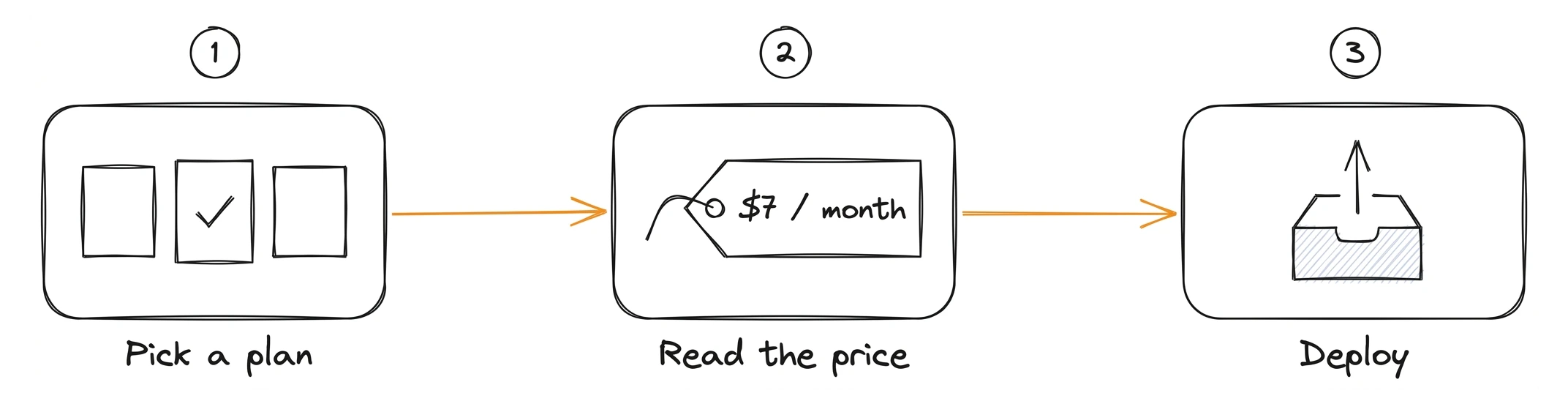
Lightsail is the part of AWS where you pick a plan, read the monthly price, and deploy. Virtual servers, managed databases, load balancers with free certificates, object storage, CDN distributions, DNS, and container services. All of it runs on AWS infrastructure, and none of it needs a pricing calculator.
For years, a lot of developers filed Lightsail under "the cheap VPS you try once". That picture is out of date. Today it covers most of what a product needs, from a side project to a business with real customers, and the container service is the part that changed our mind the most.
To see how far it goes, we gave it a real job. We built the AWS Event Inspector, a free public tool that shows you the exact payloads SNS and EventBridge send. It has to stay online around the clock and takes traffic from whoever shows up, and it runs on a single Lightsail container service.
Lightsail in a nutshell
Lightsail is AWS with a price tag on every resource. You pick a plan, and the plan is the bill:
- Instances, which are virtual servers with a built-in firewall and optional automatic daily snapshots, from $5 per month with a public IPv4 address or $3.50 for IPv6-only.
- Container services, which run Docker images behind an HTTPS endpoint, from $7 per month.
- Managed MySQL and PostgreSQL databases, from $15 per month.
- Load balancers, object storage and CDN distributions built on CloudFront.
You know what next month costs before you deploy, and you do not have to know VPCs or IAM policies to get something running.
The cheapest way to run a box
The $5 instance plan gives you 512 MB of memory, 2 vCPUs, 20 GB of SSD, 1 TB of transfer and a public IPv4 address. A few regions, like Mumbai and Sydney, include half that transfer allowance.
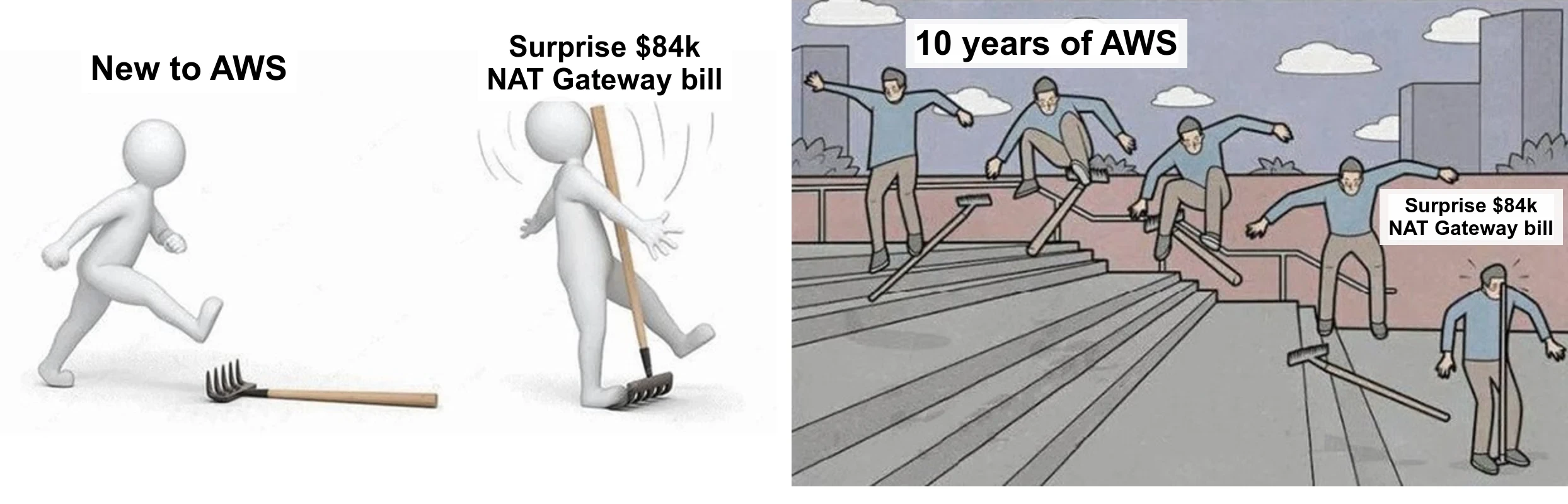
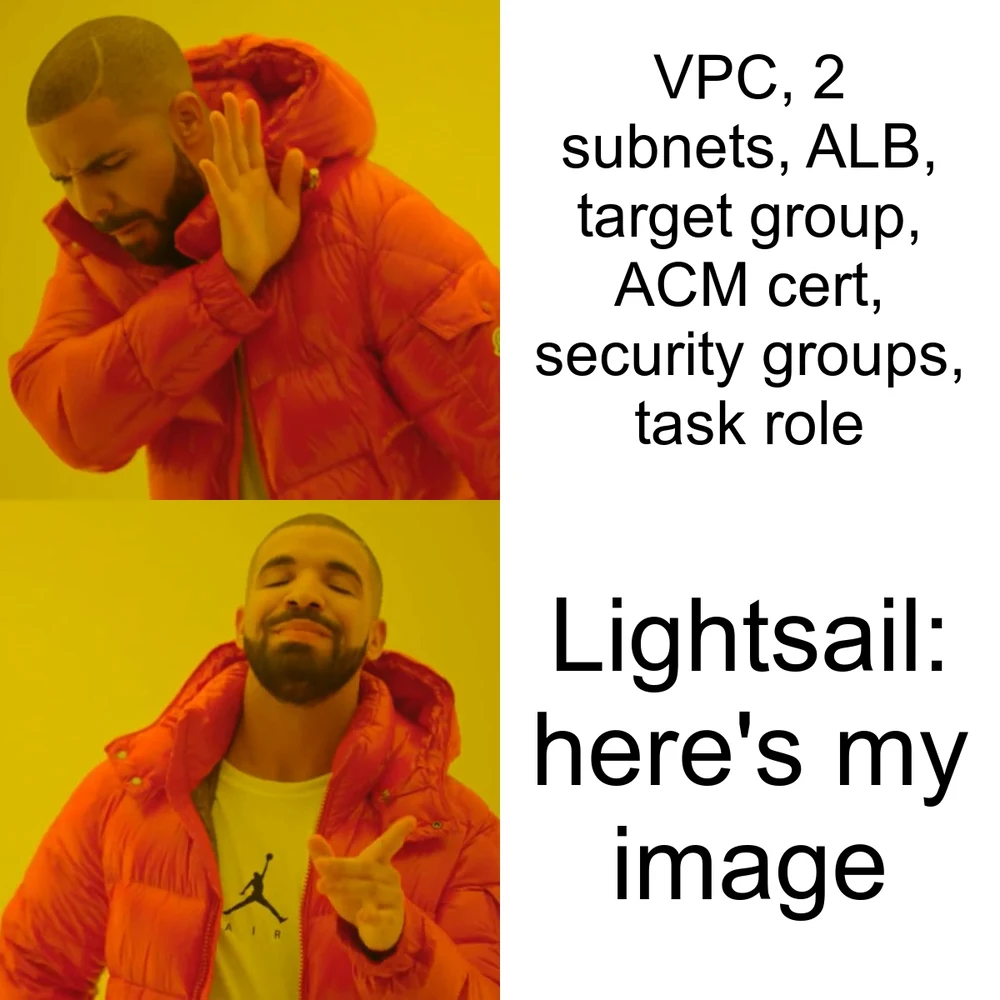
Probably the most common AWS joke on the internet.
That bill does not happen on Lightsail. There is no NAT Gateway to forget about, and the plan price covers the network up to the transfer allowance, so you know what you will spend before you deploy.
Compare that with any other VPS provider, including EC2. On EC2, the instance is only part of the bill. A t4g.nano in us-east-1 costs about $3 a month on demand, as of October 2026. Add a root volume and a public IPv4 address, which AWS bills by the hour, and you are past $7 before any data transfer. The Lightsail plan includes the disk and 1 TB of transfer on top.
Blueprints: a whole stack in one click
A blueprint is a ready-to-run image for an instance, more or less what an AMI is on EC2. Some are just an operating system, others come with an application like WordPress, GitLab CE or OpenClaw already installed.
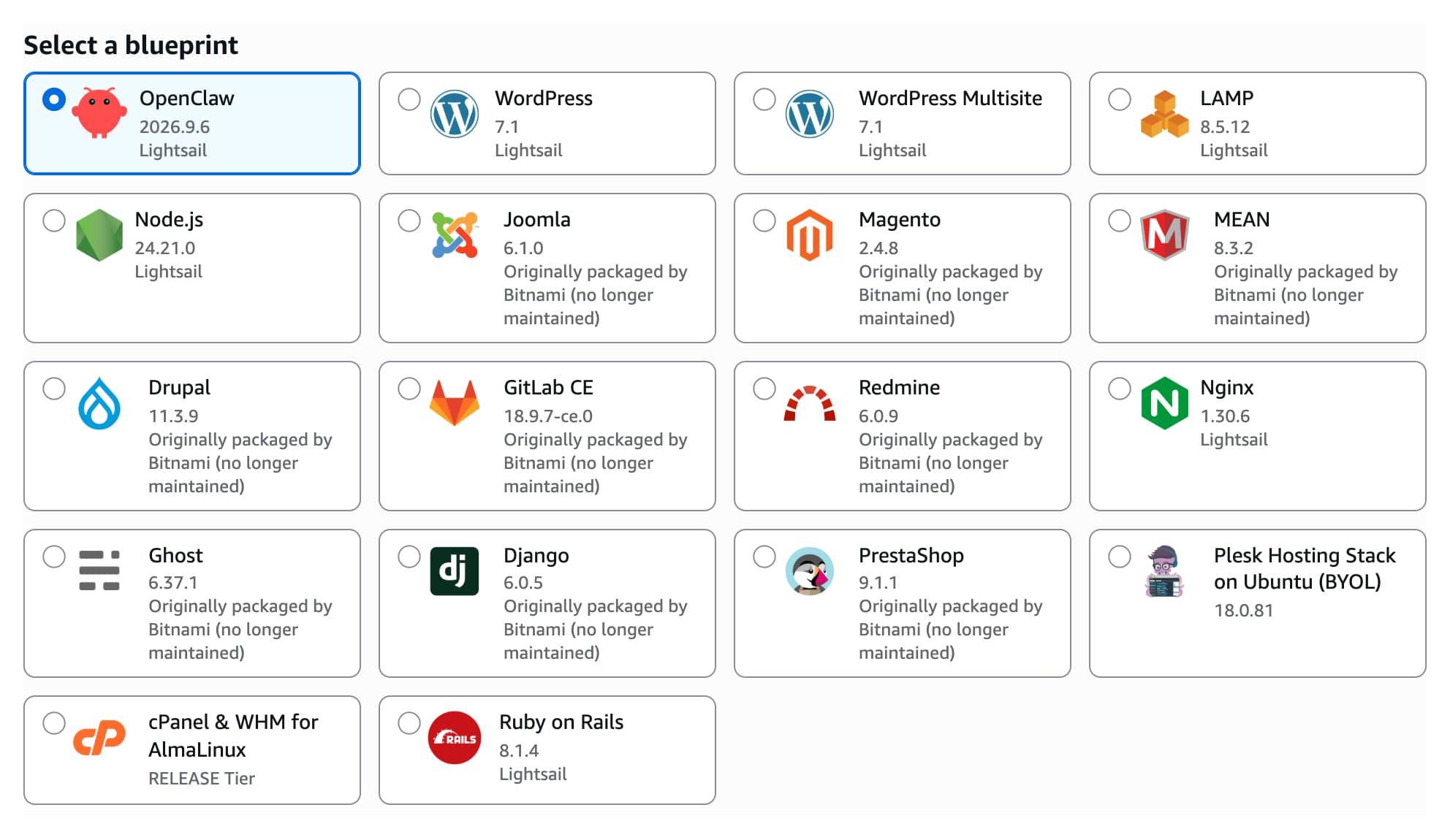
We ran OpenClaw on a Lightsail instance earlier this year, back when we still had to install it ourselves, and wrote about it in The $7 AWS Setup That Replaced My Local OpenClaw. The blueprint now does that install for you.
Container services
When you build your own software, you usually end up with a Docker image, and that is where container services come in.
A container service runs your images on a fixed number of nodes. You choose the power of each node, from Nano with 0.25 vCPU and 512 MB up to XLarge with 4 vCPUs and 8 GB, and the scale, from 1 to 20 nodes. A built-in load balancer spreads traffic across them.
A deployment describes what runs:
- Up to 10 containers, each with its image, command, environment variables and open ports.
- One of them is the public endpoint, reachable over HTTPS on a default domain.
- Health checks on a path you define.
- The last 50 deployment versions are kept, so a rollback is picking an older version.
Images come from a public registry like the Amazon ECR Public Gallery, from your machine via the lightsailctl plugin, or from a private Amazon ECR repository.
What you skip compared to ECS
ECS has made this setup easier. Express Mode and the new ECS Gateway create the load balancer, target groups, security groups and certificates for you, so you no longer write it all by hand. But that infrastructure does not go away. It runs in a VPC in your account, it shows up on your bill line by line, and it is yours to look after.
For a small public container on ECS with Fargate, you still:
- Choose a VPC and subnets in at least two Availability Zones for the load balancer and tasks.
- Pay for an Application Load Balancer by the hour and by usage, plus its public IPv4 addresses, on top of the task itself.
- Own the security groups, listener rules and target groups that ECS created. If someone changes them by hand, ECS does not put them back.
- Write a task definition and create a task execution role, plus an infrastructure role for Express Mode.
- Run a cluster and a service, and with ECS Gateway, a gateway associated with that cluster.
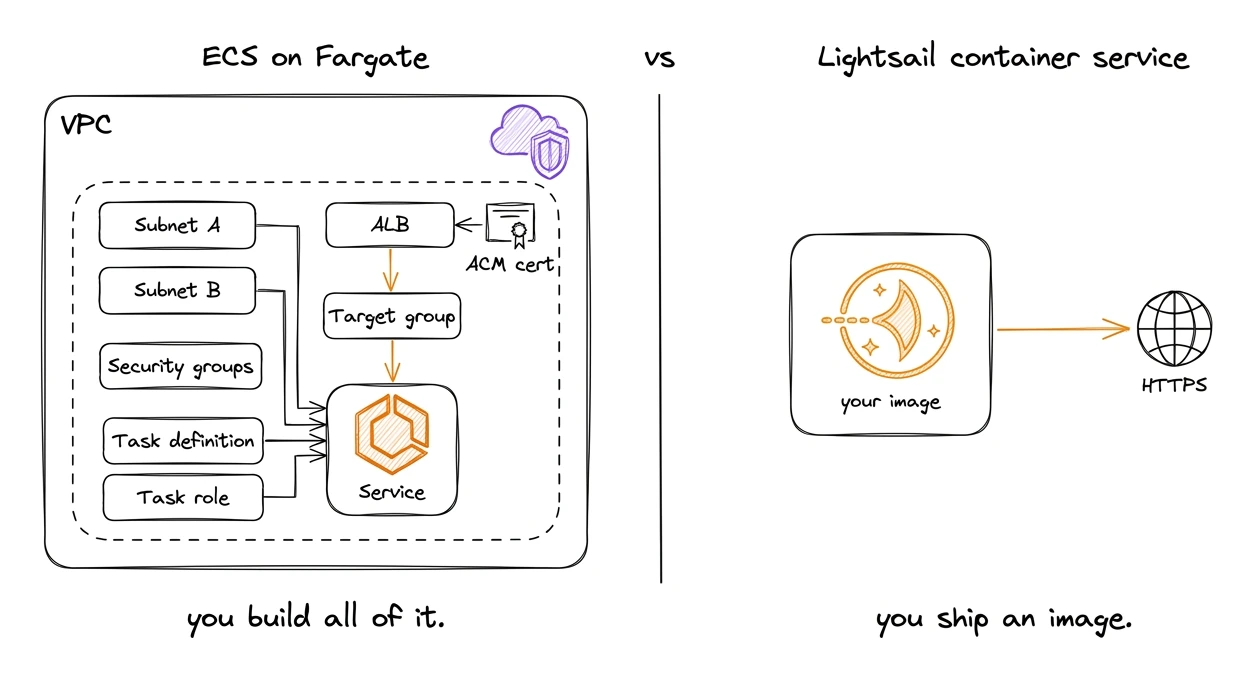
On Lightsail, none of this ends up in your account. You create a container service, pick a size, and deploy an image. The load balancer, certificate and network belong to Lightsail and are covered by the plan price.
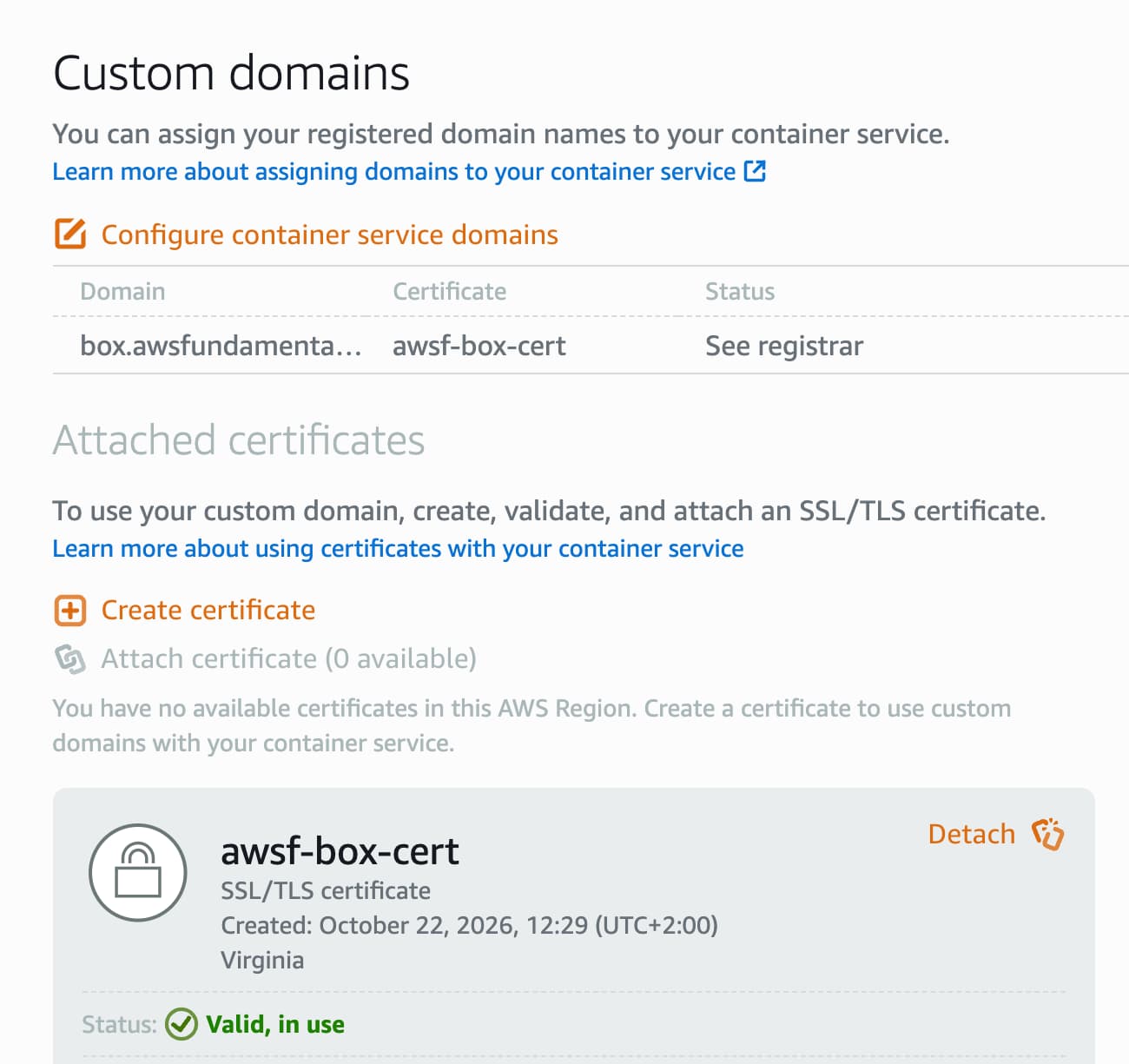
You get an HTTPS endpoint on a default domain like awsf-box.c1h3rrq2vchy8.us-east-1.cs.amazonlightsail.com, with the load balancer and certificate already in place.
For your own domain, you request a free Lightsail certificate, add a CNAME record per domain to validate it, and attach it. It has to be a Lightsail certificate, an existing ACM certificate does not work here.
Where Lightsail sits next to Lambda, Fargate and EKS
They differ in how much infrastructure you own and how you pay for it.
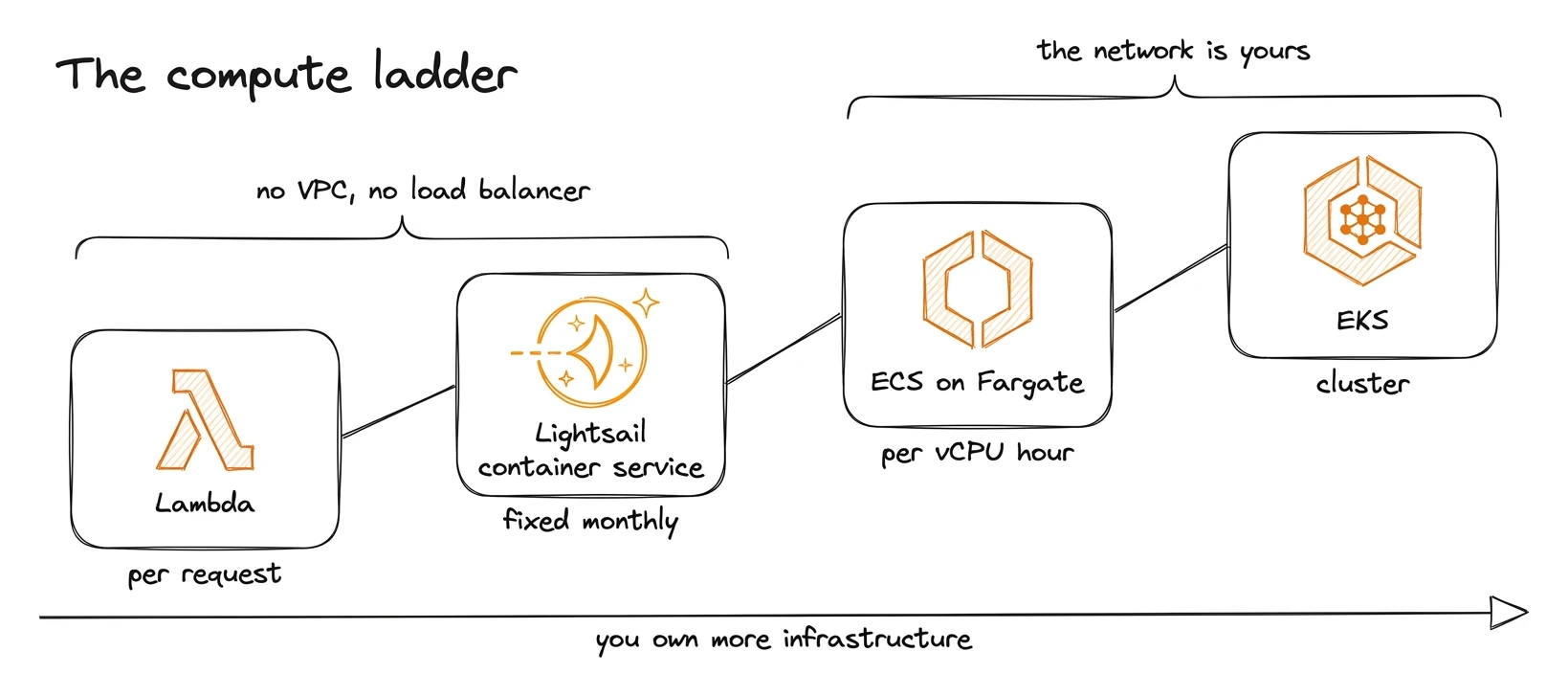
Each step up gives you more control and more infrastructure to own. Lightsail sits on the second step: always on, a fixed monthly price, and nothing to wire up around the container. The table compares the four as of October 2026.
 Lambda |  Lightsail |  Fargate |  EKS | |
|---|---|---|---|---|
| Shape | Per request | Always-on | Always-on | Always-on |
| Networking | None | None | VPC, ALB | VPC, ingress |
| Billing | Requests, duration | Fixed per node | vCPU, GB, ALB | Cluster, nodes |
| Scaling | Automatic | 1–20 nodes | Policies | Policies |
| AWS access | Execution role | Assumed role | Task role | Pod identity |
The Lightsail container service is a complete answer for small, always-on workloads. Plenty of services never need more than a few containers behind one HTTPS endpoint.
AWS ended support for the Copilot CLI and Proton in 2026, and App Runner no longer takes new customers. We wrote about why those layers on top of ECS came and went. Lightsail is a different story: it has been around since 2016 with its own console and API, and as of October 2026 its container services are not on the AWS lifecycle changes list.
Our test case: the AWS Event Inspector
The job we gave the container service comes from a function every AWS developer has written. It takes an event, logs it, and does nothing else.
export const handler = async (event: unknown) => {
    console.log(JSON.stringify(event, null, 2));
};
You deploy it because you need to know what an event looks like. What does S3 send to EventBridge when an object lands in a bucket? What does a CloudWatch alarm put into an SNS message? So you wire up the function, trigger the event, open CloudWatch Logs, copy the JSON out, and forget to delete the function.
The AWS Event Inspector replaces that loop. It gives you a unique HTTPS URL, you point SNS, an EventBridge API destination or a plain HTTP client at it, and every event shows up live in your browser with the full payload.
It confirms SNS subscriptions for you, unwraps the SNS Message string, and shows EventBridge envelopes next to their detail.
For every payload it generates a TypeScript type, an EventBridge rule pattern and a Lambda test event, and each inbox has a JSON endpoint your coding agent can read while it writes the handler.
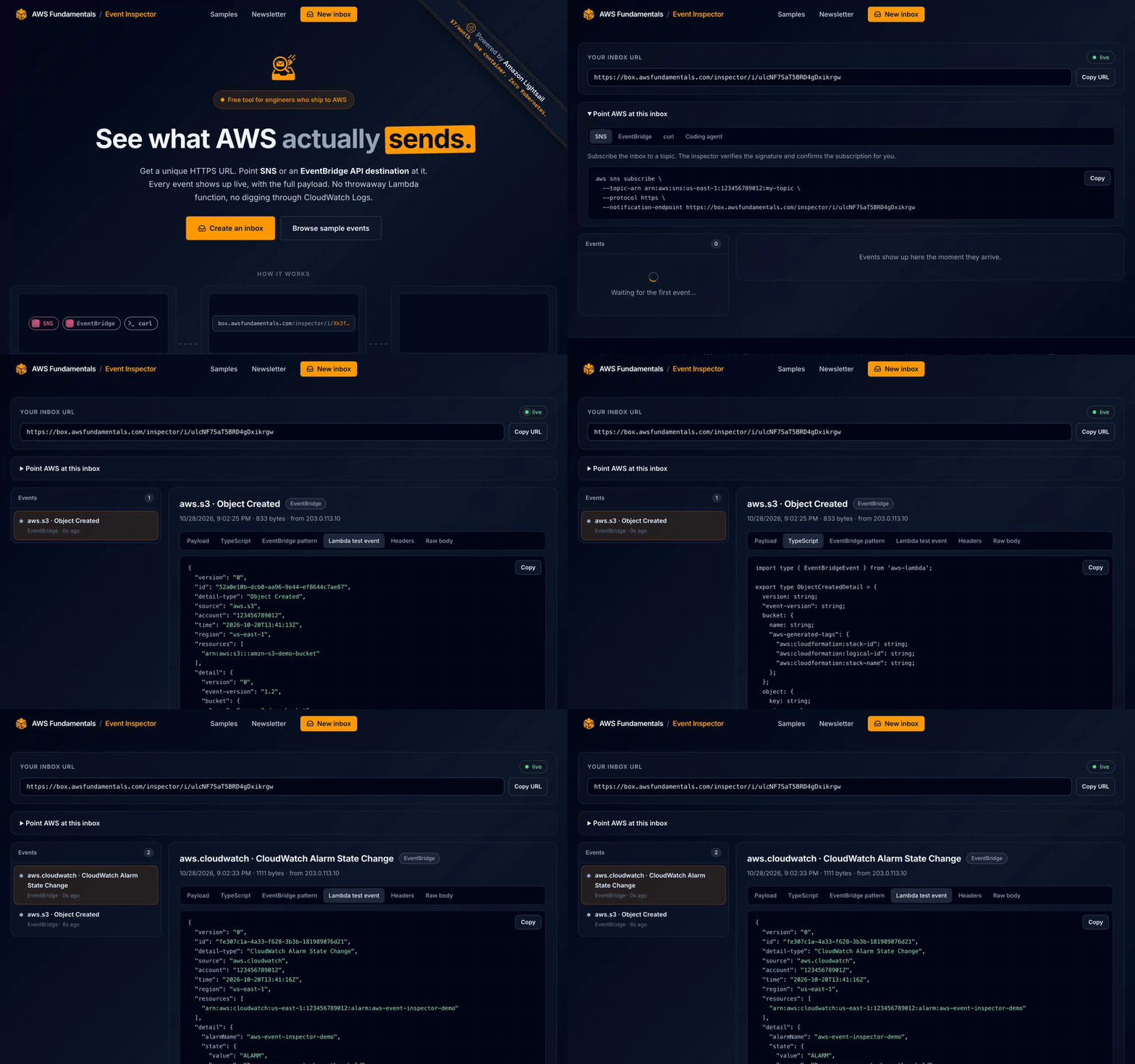
Inboxes live in memory and keep the last 100 events for 24 hours. Nothing touches a disk, which suits a tool that receives other people's events.
Why Lightsail fits
The inspector has to be online all the time, because SNS and EventBridge deliver whenever an event happens. It needs a public HTTPS endpoint with a valid certificate, because that is what they deliver to. A Lightsail container service comes with both, so the whole setup is one container behind the service's HTTPS endpoint.
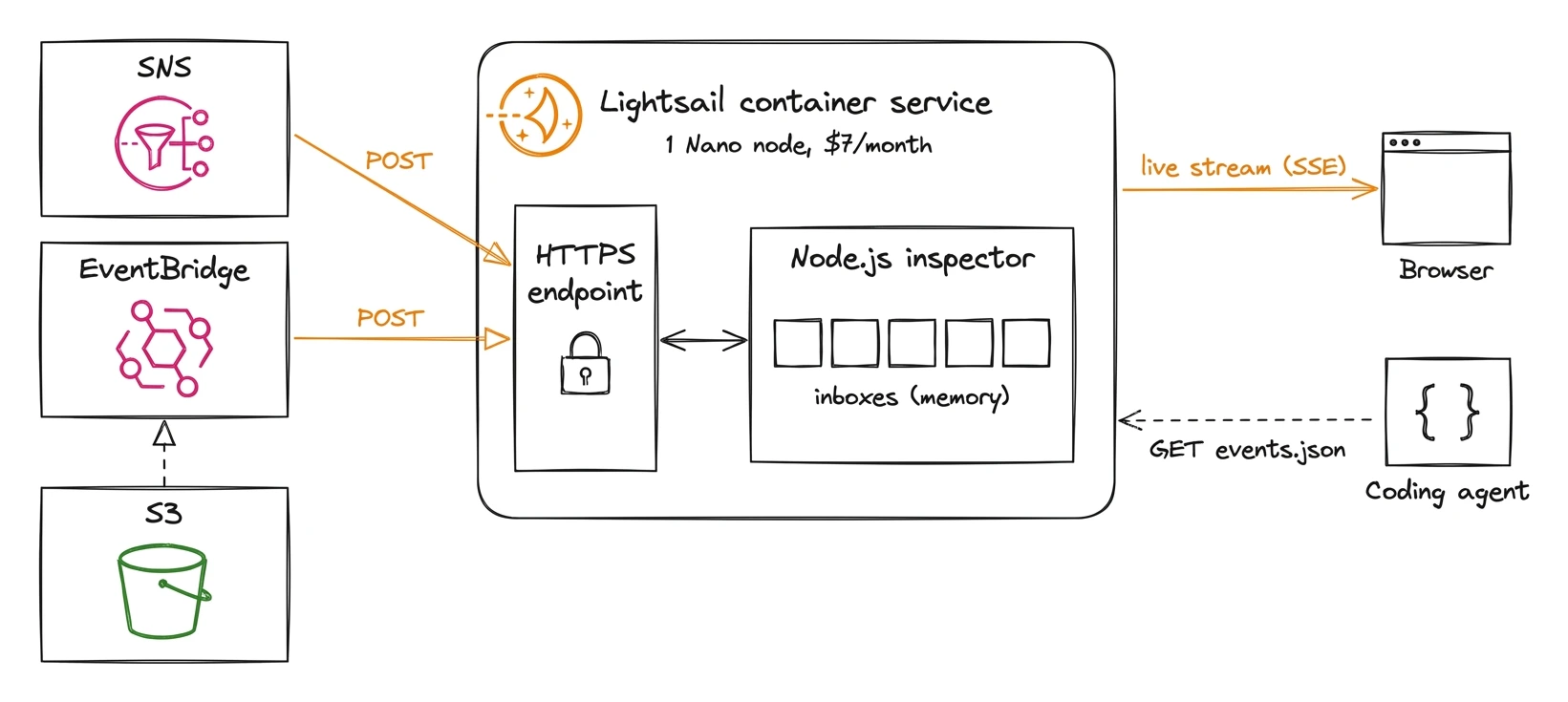
The receiving part would run on Lambda too, but three things made the container service the better fit.
- The receiver and the viewer share memory. An event arrives on one HTTP request and has to reach a browser that holds a Server-Sent Events stream open on another. In one long-running process, that is a function call. On Lambda, it is API Gateway WebSockets, a DynamoDB table for open connections, and fan-out code.
- The bill is fixed. Anyone on the internet can POST to the inspector. If a post about it does well, or someone decides to flood it, the Nano node costs the same at the end of the month.
- The same container runs locally and in production.
docker runon a laptop behaves like the container service, including the live stream. You ship the image you tested, and when something breaks you look at one process and one log stream.
How the inspector is built
The inspector is a single Node.js process written in TypeScript, with no runtime dependencies.
It uses the built-in node:http module for the server, and Node.js 22 runs the .ts files directly by stripping the types, so there is no build step inside the image.
The Dockerfile starts from node:22-alpine, copies src, runs as the node user and starts node src/server.ts, and the image lives in a private Amazon ECR repository.
Every inbox is a URL like /inspector/i/<id>.
SNS and EventBridge deliver to it asynchronously, as plain HTTPS POST requests to the public endpoint of the container service:
- SNS uses an HTTPS subscription. The first request is a
SubscriptionConfirmation. The inspector verifies the SNS message signature against the signing certificate and then calls theSubscribeURL, which confirms the subscription. Every notification after that is verified the same way. - EventBridge uses an API destination. A rule matches the events, and the API destination posts each one to the inbox URL.
The handler reads the body (up to 1 MB, the maximum size of an EventBridge event; SNS delivers at most 256 KB to an HTTPS endpoint), parses it and stores it in the inbox.
Every browser tab that shows the inbox holds a Server-Sent Events stream open, and the new event is written to those streams right away.
A /healthz route answers the health check of the container service.
Hands-on: deploying from a private ECR repository
We let Claude Code write the server, the Dockerfile, the deployment JSON and the policies. In our own setup, SST deploys all of it. The AWS CLI steps below do the same, and they show what each step does.
- Create the service. One Nano node is enough for the inspector.
aws lightsail create-container-service \
    --service-name inspector \
    --power nano \
    --scale 1
- Allow pulls from private ECR. This activates the image puller role.
aws lightsail update-container-service \
    --service-name inspector \
    --private-registry-access 'ecrImagePullerRole={isActive=true}'
- Read the image puller role ARN. It takes about 45 seconds to show up after step 2.
aws lightsail get-container-services \
    --service-name inspector \
    --query 'containerServices[0].privateRegistryAccess.ecrImagePullerRole.principalArn' \
    --output text
- Allow the role to pull from the repository. The console adds this policy for you, the CLI does not. The Lightsail guide for private ECR repositories covers both paths.
{
    "Version": "2012-10-17",
    "Statement": [
        {
            "Sid": "LightsailImagePull",
            "Effect": "Allow",
            "Principal": { "AWS": "<principalArn from step 3>" },
            "Action": ["ecr:BatchGetImage", "ecr:GetDownloadUrlForLayer"]
        }
    ]
}
aws ecr set-repository-policy \
    --repository-name inspector \
    --policy-text file://repository-policy.json
- Build and push the image. Container service nodes run on x86, so build for
linux/amd64, which matters on an Apple silicon laptop.
aws ecr get-login-password | docker login \
    --username AWS --password-stdin \
    123456789012.dkr.ecr.us-east-1.amazonaws.com
docker buildx build --platform linux/amd64 --push \
    -t 123456789012.dkr.ecr.us-east-1.amazonaws.com/inspector:v1 .
- Deploy.
containers.jsonnames the image, the port and the environment variables:
{
    "box": {
        "image": "123456789012.dkr.ecr.us-east-1.amazonaws.com/inspector:v1",
        "ports": { "8080": "HTTP" },
        "environment": { "PORT": "8080" }
    }
}
public-endpoint.json points the HTTPS endpoint at that container, with a health check on /healthz:
{
    "containerName": "box",
    "containerPort": 8080,
    "healthCheck": { "path": "/healthz", "successCodes": "200" }
}
aws lightsail create-container-service-deployment \
    --service-name inspector \
    --containers file://containers.json \
    --public-endpoint file://public-endpoint.json
What cost us time on the CLI path:
- The image puller role only pulls images, and only from repositories whose policy names its
principalArn. Access to other AWS services from inside the container works differently, see the next section. - Names are unique across resource types. A certificate named like the container service fails with
Resource with name awsf-box already exists. - Add an ECR lifecycle policy. Every deploy pushes an image, so expire untagged images after a day and keep only the newest tagged one.
The deployment was active about three minutes later.
An SNS subscription to an inbox confirmed itself, and an S3 upload reached the inbox through an EventBridge API destination within seconds.
Each inbox also has an events.json endpoint, so the agent can read the real payload and write a typed handler against it.
Calling other AWS services from the container
The inspector does not need any other AWS service, but most apps do.
There is no role you attach to a container service, like a Lambda execution role or an ECS task role.
Every container service still runs with its own role, managed by Lightsail, and its ARN is the principalArn of the service.
This is not the image puller role from above.
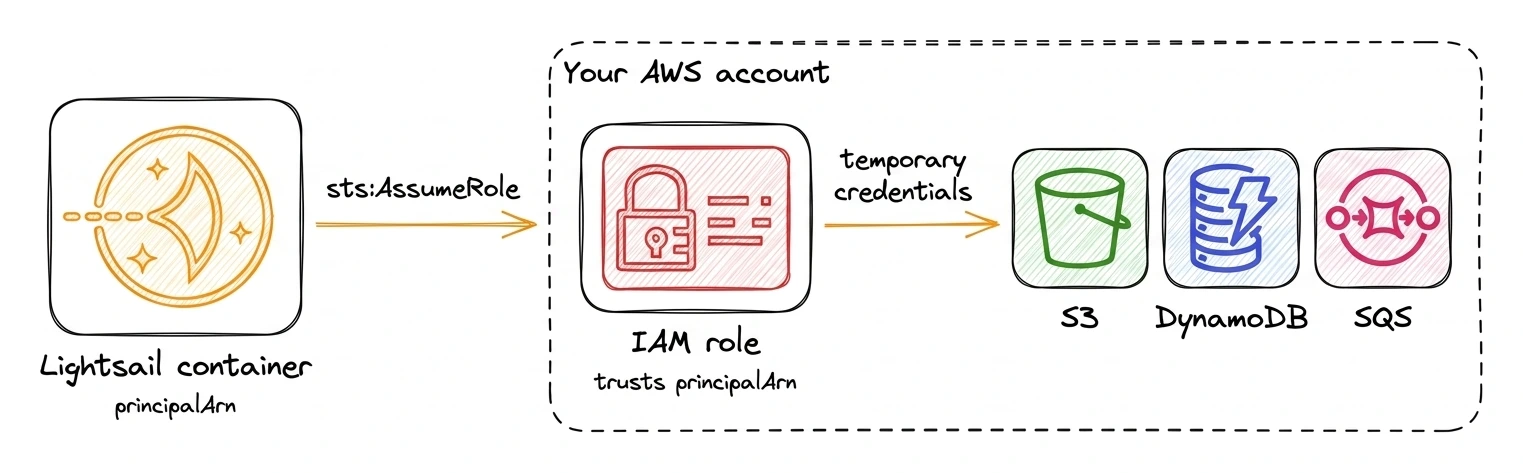
Your app uses that role to assume an IAM role in your own account and gets short-lived credentials back, so there are no access keys in the container.
- Get the
principalArn. It exists as soon as the service is created, no deployment needed.
aws lightsail get-container-services \
    --service-name inspector \
    --query 'containerServices[0].principalArn' \
    --output text
- Create a role that trusts it.
Copy the full ARN including the
/amazon/lightsail/...path, the trust policy has to match it exactly. If you delete and recreate the container service, the ARN changes and you have to update the trust policy.
{
    "Version": "2012-10-17",
    "Statement": [
        {
            "Effect": "Allow",
            "Principal": { "AWS": "<principalArn from step 1>" },
            "Action": "sts:AssumeRole"
        }
    ]
}
- Give the role the permissions your app needs, for example reading one bucket.
s3:ListBucketgoes on the bucket ARN,s3:GetObjecton the objects below it.
{
    "Version": "2012-10-17",
    "Statement": [
        {
            "Effect": "Allow",
            "Action": "s3:ListBucket",
            "Resource": "arn:aws:s3:::my-bucket"
        },
        {
            "Effect": "Allow",
            "Action": "s3:GetObject",
            "Resource": "arn:aws:s3:::my-bucket/*"
        }
    ]
}
aws iam create-role --role-name InspectorAppRole \
    --assume-role-policy-document file://trust-policy.json
aws iam put-role-policy --role-name InspectorAppRole \
    --policy-name S3Read --policy-document file://s3-read-policy.json
- Pass the role ARN and the region to the container in the
environmentofcontainers.json:
"environment": {
    "PORT": "8080",
    "AWS_REGION": "us-east-1",
    "ROLE_ARN": "arn:aws:iam::123456789012:role/InspectorAppRole"
}
- Assume the role in the app.
fromTemporaryCredentialsuses the container's own credentials to callsts:AssumeRole, caches the result and refreshes it before it expires.
import { S3Client } from '@aws-sdk/client-s3';
import { fromTemporaryCredentials } from '@aws-sdk/credential-providers';

const region = process.env.AWS_REGION;

const credentials = fromTemporaryCredentials({
    params: {
        RoleArn: process.env.ROLE_ARN,
        RoleSessionName: 'lightsail-container',
    },
    clientConfig: { region },
});

export const s3 = new S3Client({ region, credentials });
Assuming a role from another role is role chaining, so each session lasts at most one hour.
The SDK renews it on its own.
We ran this setup in a Nano container service against a bucket in our account, and it listed the objects on the first try.
The same credentials work for DynamoDB, SQS or Bedrock once the role has the permissions.
What it costs
The container service bills by the hour, capped at the monthly price: the power price times the number of nodes. These are the prices as of October 2026.
Instances are cheaper for the same memory and come with an SSD you can keep data on. A container node gets its vCPU share and memory, but no persistent storage. The price pays for the parts around the container: the load balancer, HTTPS, deployments with health checks, and no operating system to patch.
Every container service includes 500 GB of outbound transfer per month, and requests and inbound traffic are free. The load balancer and the certificate for the default domain are managed by Lightsail and never show up on the bill.
The inspector runs on a single Nano node for $7. The smallest comparable setup on ECS with Fargate, a 0.25 vCPU task behind an Application Load Balancer with public IPv4 addresses, comes to $35 or more per month in us-east-1 as of October 2026.
Good to know
- One node for in-memory state. The load balancer spreads requests across all nodes, so apps with more than one node keep shared state in a database or Redis.
- Deployments start fresh. Memory is empty after every deploy. Persistent data goes to a Lightsail database, whose endpoint you pass in as an environment variable, or to S3 through the role from above.
- AWS access goes through a role you own, which the container service assumes as shown above, so no access keys end up in the container.
- Rate limits belong in the app. Shield Standard covers network-level floods. Without a distribution in front, the client IP is the last entry of
X-Forwarded-For. For more, put a Lightsail distribution in front of the service and attach AWS WAF to it, which needs one of the larger distribution plans. - Logs, metrics and scaling live in the Lightsail console. Changing the power or node count needs no downtime.
Try it
If you have something small and always-on, a Lightsail container service is a good place to start. Our first deploy of the inspector was live about three minutes after the last command, and the bill is a flat $7 a month.
New AWS accounts get up to $200 in Free Tier credits, and the account sign-up is shorter than it used to be. The credits apply to any new account, and Lightsail can be run from them. The Amazon Lightsail page has the details on the free trial.
And if you want to see what AWS sends to your next handler, the AWS Event Inspector is free to use. Point an SNS topic or an EventBridge rule at an inbox and watch the events arrive.