Advertisement · In partnership with AWS
We Cancelled Excalidraw+, and We Self-Host ExcaliDash on Lightsail for $8 a Month

This article is sponsored by AWS. Everything in it comes from building and running things on Lightsail ourselves, and the opinions are our own.
We draw everything in Excalidraw. AWS architectures, user flows, a quick mock of a settings page - if we have to explain something to each other, someone opens Excalidraw first. Every chapter of the AWS Fundamentals book and the CloudWatch Book has its own collection of diagrams, and so does every client project.
For years all of this lived in Excalidraw+. Then Pieter Levels posted this:
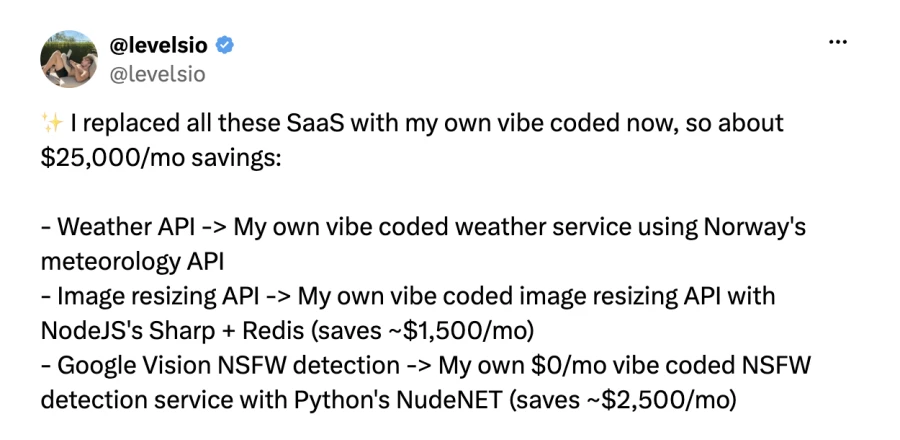
The first three of fourteen. Read the full list from @levelsio on X.
That matched what we had been feeling for a while. With AI coding agents, a lot of tools went from "we could never build that ourselves" to "done in an afternoon". So we went through our subscriptions line by line and cut everything we could run ourselves.
Unfortunately, Excalidraw+ was one of them. We love the product, and $6 per user per month (yearly billing) is a fair price. But every co-author on a book chapter and every client who wants to edit a diagram is another seat, and you can't self-host Excalidraw+. With an open-source alternative already out there, running our own was honestly too easy.
Now we run ExcaliDash on one Amazon Lightsail instance at draw.awsfundamentals.com. It costs us about $8 a month, no matter how many people we invite.
What ExcaliDash gives you
ExcaliDash is built by Zimeng Xiong and licensed under LGPL-3.0. It wraps the normal Excalidraw editor with the parts we used Excalidraw+ for:
- Folders and search across all drawings
- Live collaboration on the same canvas
- Version history per drawing
- User accounts with an admin panel
- Plain
.excalidrawfiles that you can export at any time
It ships as two Docker images (frontend and backend), and the backend keeps everything in SQLite - no database server to run.
Our fork
We run a small fork at awsfundamentals-hq/ExcaliDash with two changes: our branding ("AWS Fundamentals Draw") and library search. Our Excalidraw library is full of AWS icons, and scrolling through all of them to find EventBridge got old fast:
Other things we wanted were already upstream, like proper trackpad panning on a MacBook. You don't need the fork - the CDK stack runs the upstream images by default.
Why Lightsail and not EC2 or ECS
Now to the more technical part. Why did we use Lightsail and not EC2 or ECS? Mainly because of simplicity.
ExcaliDash needs one small server with Docker, a disk and a public HTTPS endpoint. On EC2 that means a VPC, public subnets, an internet gateway, route tables and a security group before the first container even starts. ECS adds a cluster, a task definition, a service, an Application Load Balancer, a target group and an ACM certificate on top of that - for a drawing app. On Lightsail I get one instance with a static IP and a firewall, and I never touch a VPC.
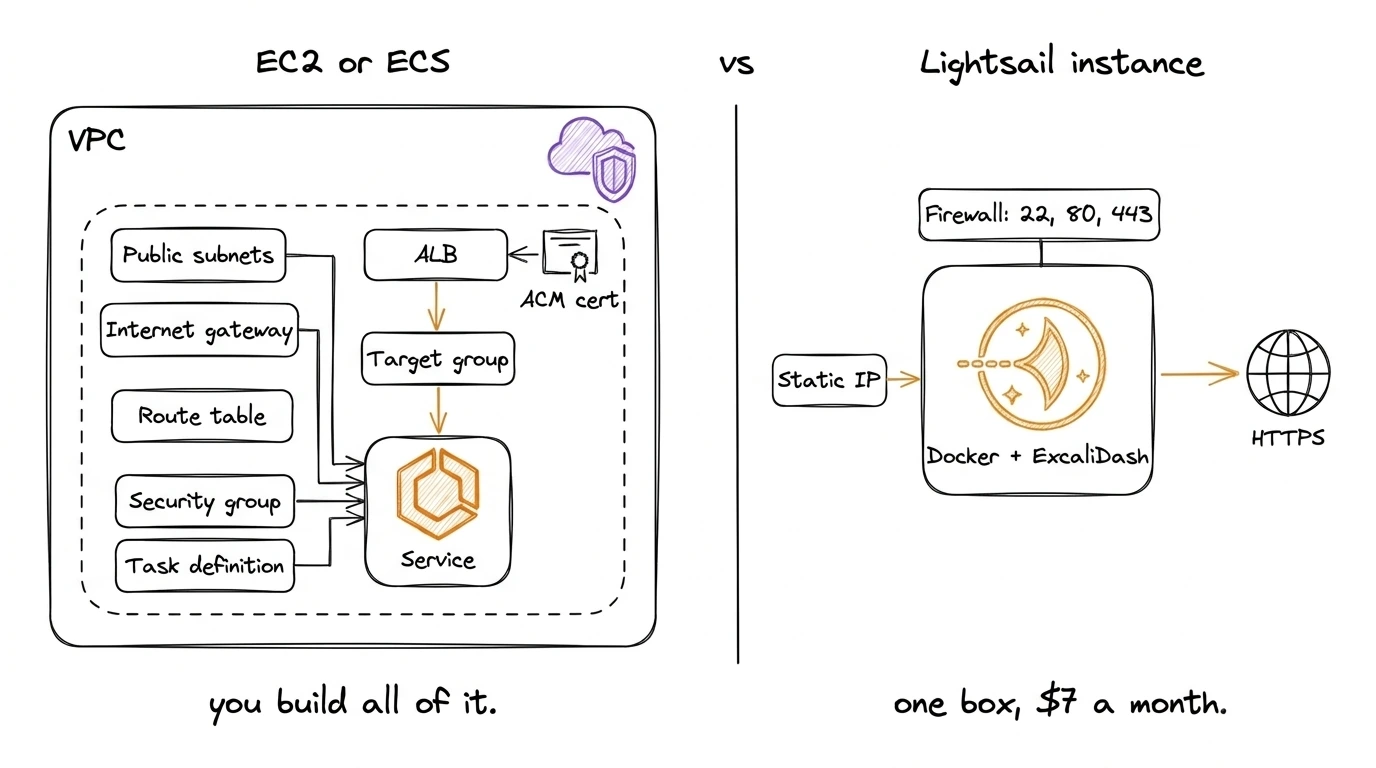
The price is fixed too: the micro_3_0 plan has 1 GB of memory, 2 vCPUs, 40 GB of SSD and 2 TB of transfer for $7 a month, public IPv4 included.
As long as we stay under those 2 TB, $7 is the whole bill for the instance.
If you read our first Lightsail post, you might ask why we did not use a Lightsail container service this time. The answer is the disk. Containers are typically stateless. But for ExcaliDash we run our database (SQLite) within our instance as well. You can connect a Lightsail database to a container service, but that adds at least $15 a month - twice the price of the whole instance.
And honestly, coding agents are super good at "put this Docker Compose file on a Linux box" - which is most of the work here.
How the stack looks
Everything runs on one Lightsail instance with Ubuntu 24.04 and Docker Compose:
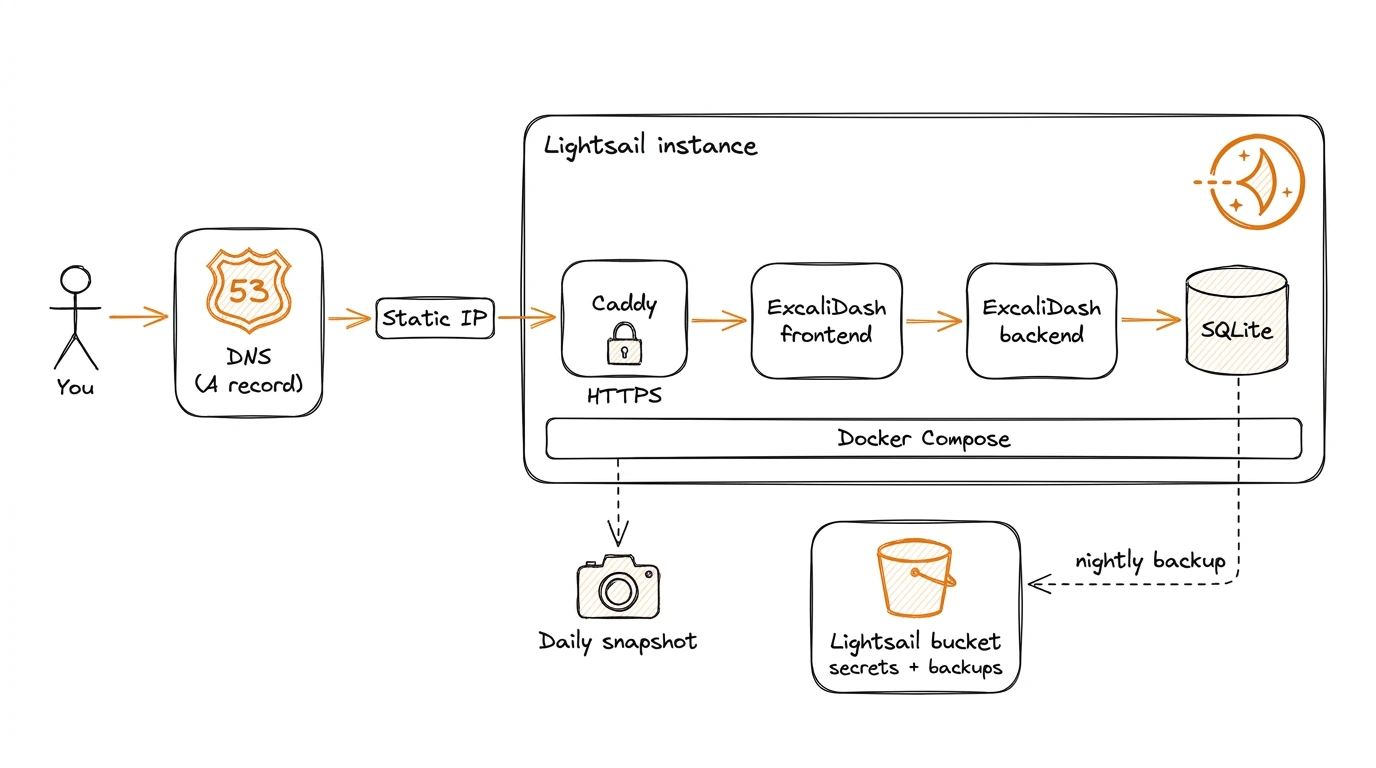
- Caddy terminates TLS with a free Let's Encrypt certificate and forwards traffic to the frontend.
- ExcaliDash frontend serves the editor and proxies API and WebSocket traffic to the backend.
- ExcaliDash backend stores users, folders, drawings and images in SQLite on the instance disk.
- A private Lightsail bucket holds the generated secrets and the nightly database backups.
- A static IP stays the same, even if you replace the instance.
The instance reaches the bucket through Lightsail's resource access, so there are no IAM access keys on the box. Backups run on two layers: Lightsail snapshots the whole disk every day at 03:00 UTC and keeps the latest seven, and ExcaliDash writes a SQLite copy at 04:00 UTC that a cron job syncs to the bucket at 04:30 UTC.
Deploy it with CDK
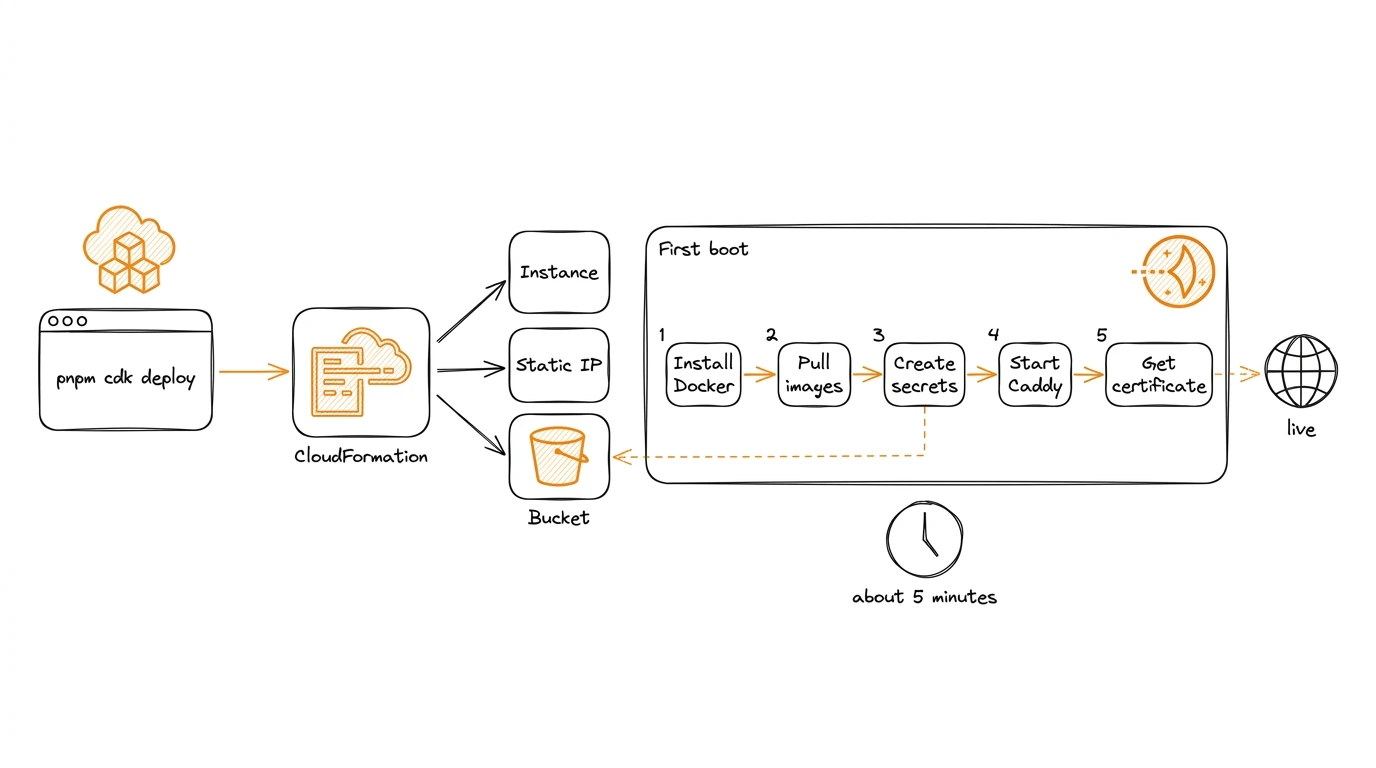
The whole setup is open source at awsfundamentals-hq/excalidash-lightsail. It's one CDK stack with three resources (instance, static IP, bucket) plus a first-boot script that installs Docker, writes the Compose file, creates the secrets and starts everything. Use the CDK path even for a small app like this - when you rebuild the instance in a year, you won't remember which buttons you clicked.
Prerequisites
- An AWS account
- Node.js 22 and pnpm
- AWS CLI v2 with a profile for that account
- A domain where you can create DNS records
The stack deploys to eu-central-1 (Frankfurt).
Change REGION in lib/config.ts if you want another region.
Step 1: Clone and install
git clone https://github.com/awsfundamentals-hq/excalidash-lightsail.git
cd excalidash-lightsail
pnpm install
pnpm test
The tests render the CloudFormation template and the first-boot script, so a broken config fails on your laptop and not in your account.
Step 2: Bootstrap CDK
CDK needs a small bootstrap stack in every account and region before the first deploy. You do this once.
pnpm cdk bootstrap aws://<account-id>/eu-central-1 --profile <your-profile>
Step 3: Deploy
Pass your own hostname as context:
pnpm cdk deploy --profile <your-profile> -c hostname=draw.example.com
After a couple of minutes the deploy prints these outputs:
ExcalidashLightsail.PublicIp = 3.120.xx.xx
ExcalidashLightsail.BucketName = excalidash-123456789012
ExcalidashLightsail.InstanceName = excalidash
ExcalidashLightsail.Hostname = draw.example.com
ExcalidashLightsail.SshCommand = ssh -i ~/.ssh/LightsailDefaultKey-eu-central-1.pem ubuntu@3.120.xx.xx
CloudFormation is done at this point, but the instance needs about five more minutes for its first boot.
You can follow it in /var/log/excalidash-bootstrap.log on the instance.
Every setting has a default in lib/config.ts, and you can override each one with -c key=value:
| Key | Default | What it does |
|---|---|---|
hostname | draw.awsfundamentals.com | Your public domain, without https:// |
bundleId | micro_3_0 | Instance size. Changing it replaces the instance |
excalidashVersion | 0.6.5 | ExcaliDash image tag for the first boot |
frontendImage | upstream frontend image | Use a patched frontend, like our library search one |
backupRetentionDays | 30 | Days to keep backups in the bucket |
bucketName | <instanceName>-<account id> | Lightsail bucket name, globally unique |
Step 4: Point your domain at the instance
Caddy only gets a certificate once your hostname resolves to the static IP, so you need one A record.
Your DNS is in Lightsail.
This is the simplest path, because the domain sits next to the instance.
Lightsail can register a new domain for you and creates the DNS zone for it.
For a domain you already own, create a Lightsail DNS zone and point the domain's name servers to it.
Then add an A record for draw.example.com in the zone and pick the static IP.
Your DNS is in Route 53.
Create an A record for draw.example.com with the PublicIp output as the value.
aws route53 change-resource-record-sets \
  --hosted-zone-id <zone-id> \
  --profile <your-profile> \
  --change-batch '{
    "Changes": [{
      "Action": "UPSERT",
      "ResourceRecordSet": {
        "Name": "draw.example.com",
        "Type": "A",
        "TTL": 300,
        "ResourceRecords": [{ "Value": "<PublicIp>" }]
      }
    }]
  }'
Your DNS is somewhere else.
Cloudflare, Namecheap, your registrar: create the same A record there.
That's what we did.
All of awsfundamentals.com already runs on Cloudflare, so draw is one more A record there, set to DNS only (grey cloud).
Keep the orange proxy cloud off, so Caddy gets the certificate requests directly on the instance.
Important: use an A record, not a CNAME. A CNAME has to point at another hostname, and a static IP is not a hostname.
Caddy keeps retrying until the record resolves, so give it a minute and check:
curl -sI https://draw.example.com
A 200 with a valid certificate means you are live.
Step 5: Create the first admin
Registration is closed by default, so nobody on the internet can create an account.
The first admin needs a one-time code from the backend log.
Download the default SSH key once from the Lightsail console (Account -> SSH keys -> eu-central-1), then run the SshCommand from the deploy output and read the code:
sudo docker compose -f /opt/excalidash/docker-compose.yml logs backend --tail=200 \
  | grep "BOOTSTRAP SETUP"
Open your hostname, register with that code within 15 minutes, and you are the admin. Invite everyone else from Admin, Access Control.
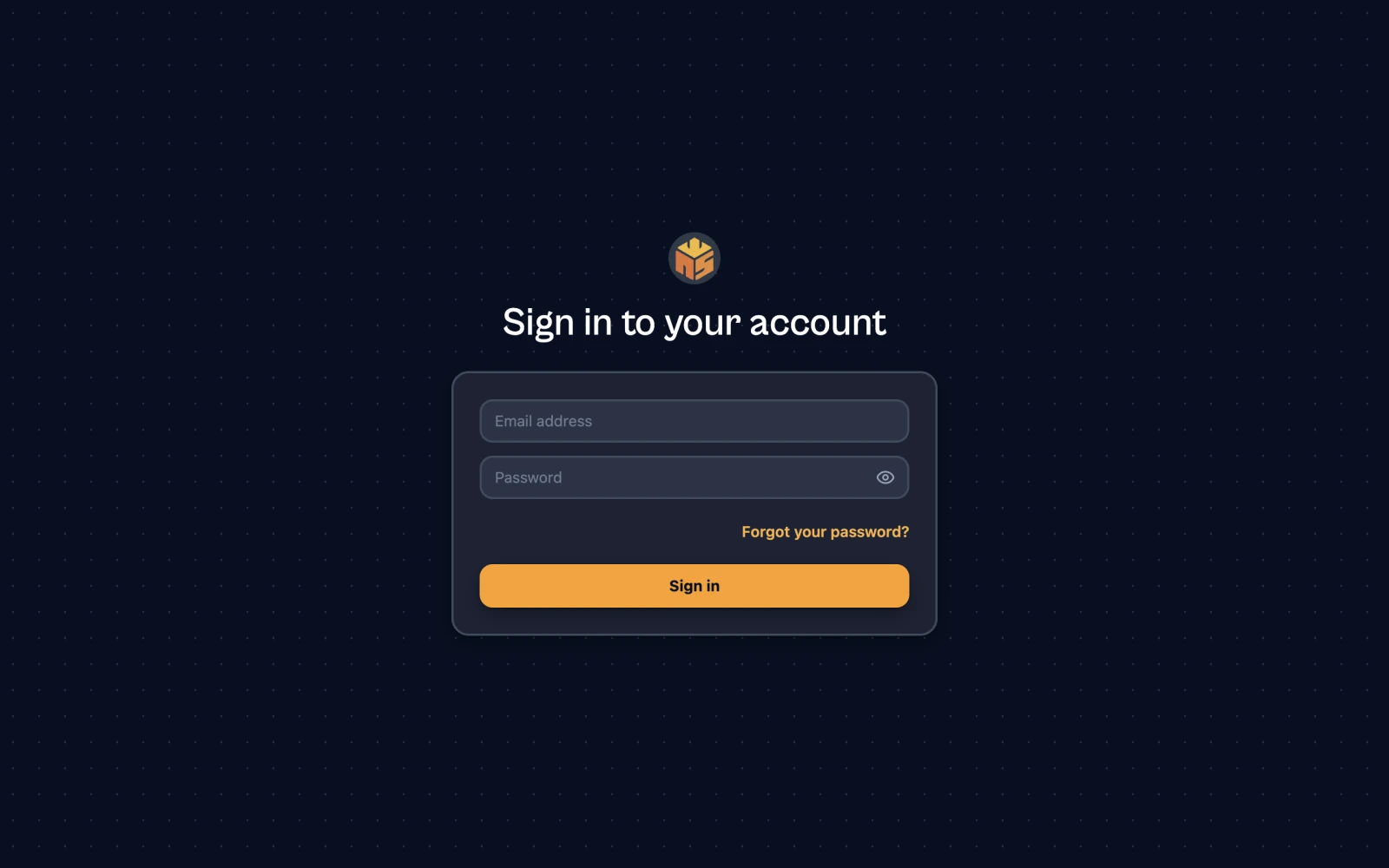
After the first admin exists, this is all a stranger sees.
From here, create a collection per project and share it - we have one per book and one per client.
What it costs
| Item | USD / month |
|---|---|
Instance micro_3_0 (1 GB) | 7 |
Bucket small_1_0 (5 GB) | 1 |
| Automatic snapshots (7 kept) | < 1 |
| Static IP while attached | 0 |
| Total | ~8 |
Snapshots cost $0.05 per GB-month. They are incremental, so seven daily snapshots don't cost seven full copies of the disk. With a few GB of data on the instance, that stays well under a dollar a month.
That's about $96 a year for the whole team, while Excalidraw+ costs $360 a year at five seats and $720 at ten:
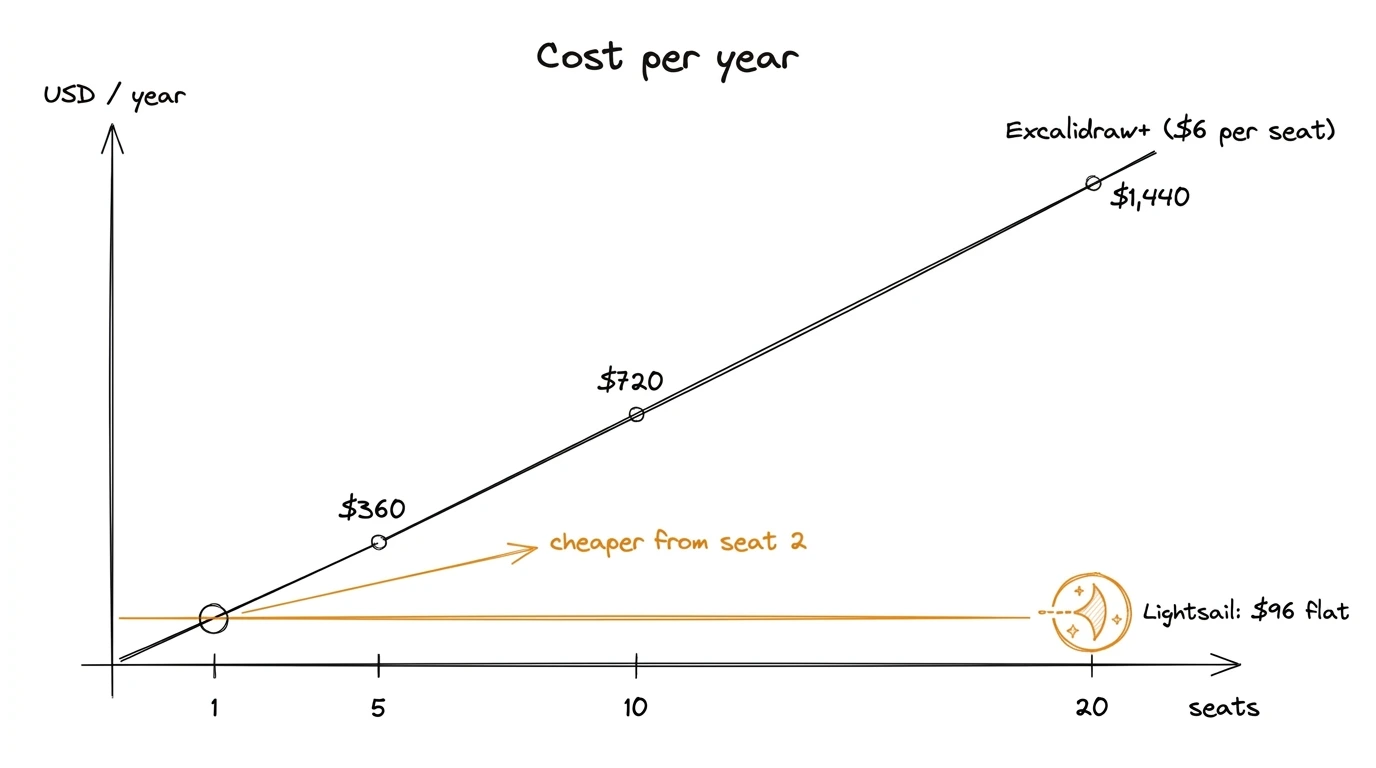
The 1 GB instance is enough for us.
If it ever gets tight, change bundleId to small_3_0 (2 GB, $12) and redeploy - that replaces the instance, so take a snapshot first.
Running it day to day
Updates
The repo installs an update script on the instance:
sudo /opt/excalidash/bin/update.sh 0.6.6
It backs up the database, syncs it to the bucket, pins the new image tag, pulls, restarts and waits for the health check.
Database migrations run when the backend starts.
Also pass the new version on your next deploy (-c excalidashVersion=0.6.6), otherwise a replaced instance boots an older version than your database.
Restore
For the whole instance, create a new instance from a snapshot in the Lightsail console and attach the same static IP to it - DNS keeps working because the IP stays the same.
For the database only, copy a backup from the bucket back into /opt/excalidash/data/prisma/dev.db and restart the backend (the README has the exact commands).
What you give up
Self-hosting is work, so here's what we traded:
- One instance, no high availability. ExcaliDash supports one backend. If the instance goes down, the app is down until you restore it.
- You patch it. Ubuntu security updates and new ExcaliDash versions are on you.
- SSH is open. On Ubuntu, Lightsail's default firewall opens port 22 to every IP, and using the browser-based SSH client doesn't change that. Restrict the SSH rule to your own IP in the Lightsail console and keep Lightsail browser SSH allowed, so the browser client still works.
- No hosted extras. Anything Excalidraw+ builds on top of the editor does not show up here.
For an internal tool that a handful of people use during work hours, we're fine with that. For something customers depend on, I would think twice.
Next step: no public ports
Right now anyone on the internet can reach the ExcaliDash login page, and the only thing in the way is ExcaliDash's own login. ExcaliDash is a young project, so the setup we want to move to puts the app behind a private access layer and closes ports 80 and 443:
- Cloudflare Tunnel with Cloudflare Access. A small
cloudflaredcontainer connects out to Cloudflare, so nothing has to listen on the internet. People log in with their email or SSO before a request ever reaches ExcaliDash. Nobody installs anything, and sharing a folder with a client still works: you add their email to the policy. - Tailscale. The app is only reachable inside your tailnet. Great if the whole team already runs Tailscale. Harder when you want to share a drawing with someone outside the company.
Pick one of the two - both close the inbound ports, so running both adds work without much extra safety. We haven't built this into the repo yet. It's next on our list.
Summary
We were paying per seat for a tool we use every day. Now ExcaliDash runs on one Lightsail instance for about $8 a month, and the drawings and backups are ours. Lightsail fit because this app needs a box with a disk and a fixed price, not a VPC with a load balancer - and since it's still AWS, CDK and the AWS CLI work like everywhere else.
Clone excalidash-lightsail, run cdk deploy, and tell us what you build on top of it 👀