
Table of Contents
Jump to a section
AWS Fundamentals has published more than 150 articles. That's great, but it creates a very practical problem:
Which three articles should somebody read after finishing the one they're currently on?
Last year, Sandro built the Related Posts section for AWS Fundamentals and wrote about using Amazon Bedrock Knowledge Bases and S3 Vectors.
The approach was simple: turn every article into an embedding, store those vectors, and use similarity search to find posts with a similar meaning.
We're aiming for the same user experience in our new demo: pick an article and show the three closest matches.

But AWS just made the architecture behind this feature even more interesting.
DynamoDB now has native vector search.
We can store an embedding directly next to our normal application data, create a vector index, and search it with the new SearchVectors API.
No separate vector database and, more importantly, no synchronization pipeline between our application database and vector store.
Let's rebuild the feature and see where that is useful.
First: What Are Vectors Again?
An embedding model turns text, an image, or audio into a list of numbers called a vector.
Content with a similar meaning produces vectors that are close to each other in this multidimensional space.
Vector search simply asks:
Which stored vectors are closest to this vector?
That's the foundation for semantic search, recommendations, RAG, related content, AI memory, and many other AI features.
That's all the theory we need for now. 🙂
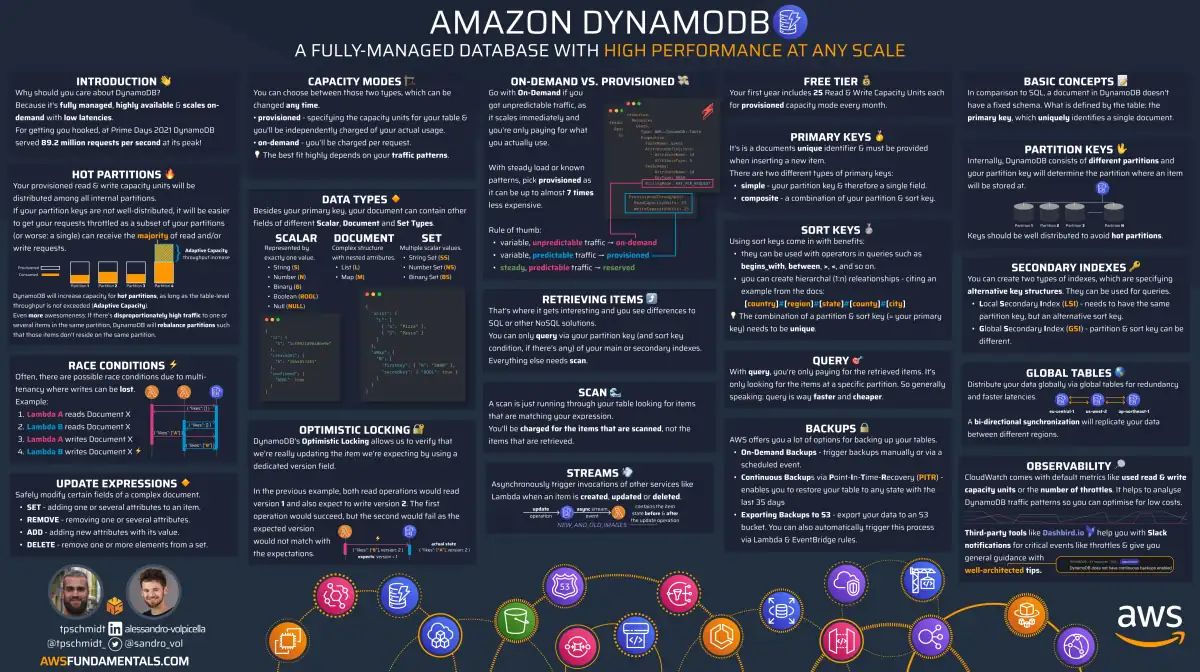
DynamoDB on One Page (No Fluff)
Master NoSQL on AWS. Our DynamoDB cheat sheet covers data modeling, partitioning, and access patterns - the practical knowledge you need.
HD quality, print-friendly. Stick it next to your desk.
Why Vector Search in DynamoDB Is Interesting
Until now, a common architecture looked roughly like this:

Our application data lived in DynamoDB, while our embeddings lived somewhere else.
That meant another service and, depending on the architecture, another synchronization mechanism.
DynamoDB vector search changes that:

The vector is simply another attribute of the DynamoDB item. DynamoDB maintains an index over that attribute and can search it by similarity.
This is especially useful when the things we want to search are already our operational application data: products, articles, users, conversations, listings, or agent memories.
Let's Build Related Posts Again
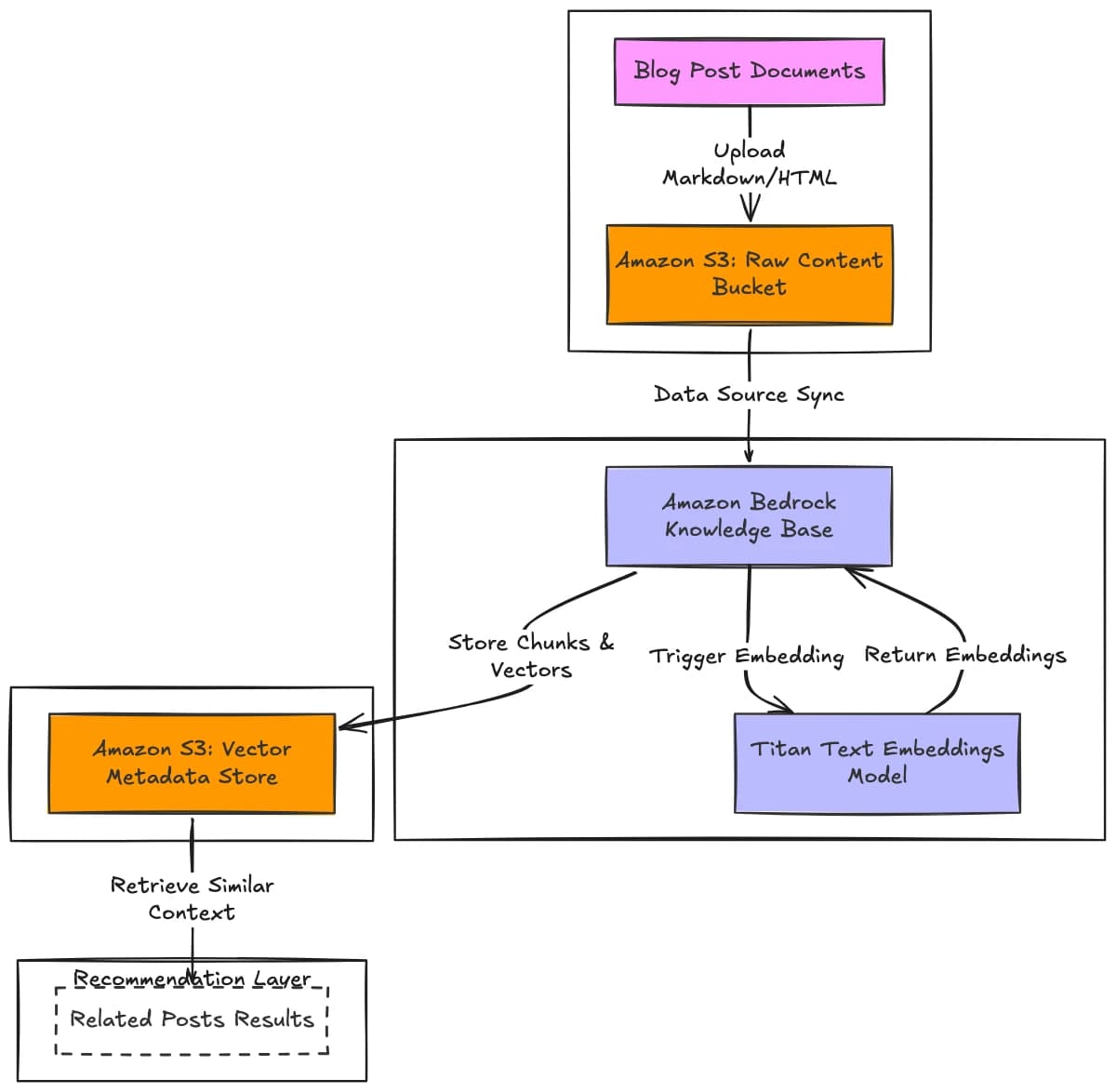
Sandro's original related-posts architecture used a Bedrock Knowledge Base and S3 Vectors. This time, we'll create the embeddings ourselves and store them with each post in DynamoDB.
Here is what the previous architecture looked like:
And here is the new one:
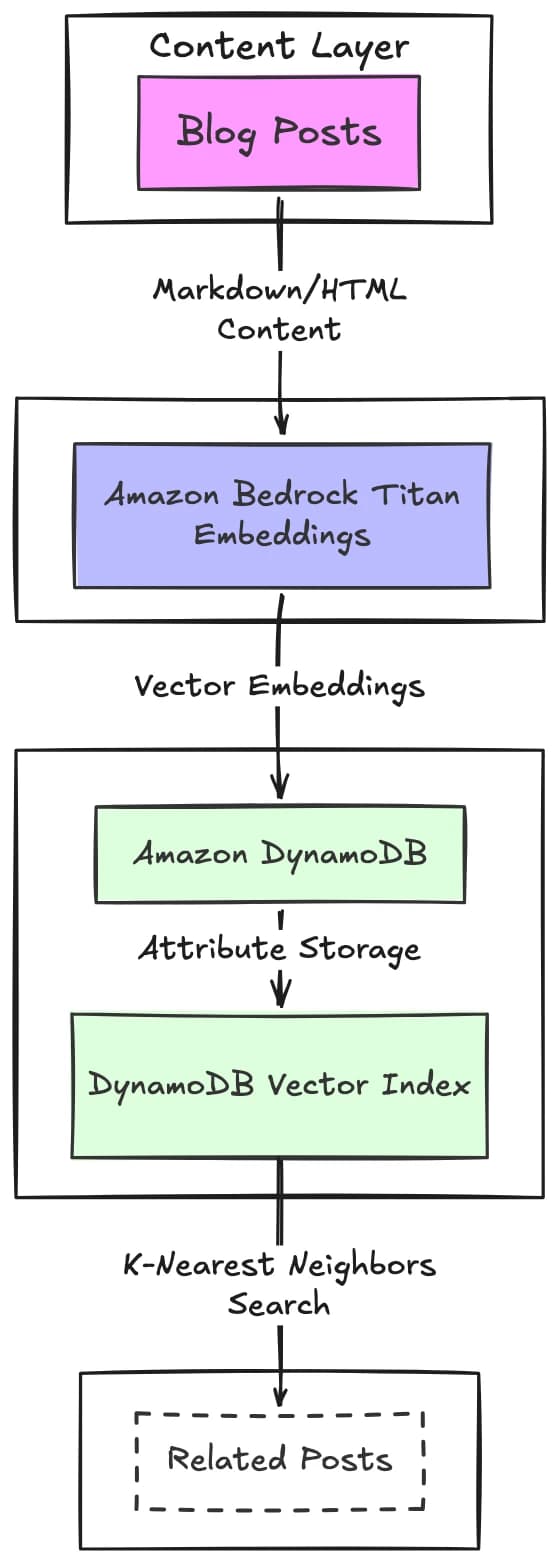
Much smaller.
There is one important difference though:
DynamoDB does not generate embeddings for us.
It stores and searches them. We still need an embedding model such as Amazon Titan Text Embeddings V2 to create the vectors.
For our related-posts use case, that's pretty straightforward.
Before We Build
There are a few details worth knowing before creating a vector index:
- Vector indexes require a DynamoDB table using on-demand capacity mode.
- The vector index must be
ACTIVE, and its initial backfill must be complete, beforeSearchVectorscan use it. SearchVectorscan return only attributes projected into the vector index.- The embedding dimensions in every item must match the dimensions configured on the index.
- Our application is responsible for creating and updating the embeddings.
The runnable demo uses the normal AWS SDK region chain. Set AWS_REGION to the region where the table, vector index, and enabled Bedrock model are available so every part of the example talks to the intended resources.
Step 1 — Generate an Embedding
For related posts, we could embed the whole article, but we don't necessarily need to.
The title and description already give us a useful semantic representation:
Understanding DynamoDB Streams

Learn how DynamoDB Streams capture item changes and how
you can use them to build event-driven applications on AWS.
We'll send that text to Titan Text Embeddings V2 through Bedrock:
import { BedrockRuntimeClient, InvokeModelCommand } from '@aws-sdk/client-bedrock-runtime';
import { DynamoDBClient, PutItemCommand } from '@aws-sdk/client-dynamodb';
import { marshall } from '@aws-sdk/util-dynamodb';

const bedrock = new BedrockRuntimeClient({});
const dynamodb = new DynamoDBClient({});

async function createEmbedding(text: string) {
    const response = await bedrock.send(
        new InvokeModelCommand({
            modelId: 'amazon.titan-embed-text-v2:0',
            contentType: 'application/json',
            accept: 'application/json',
            body: JSON.stringify({
                inputText: text,
                dimensions: 1024,
                normalize: true,
            }),
        }),
    );

    const body = JSON.parse(new TextDecoder().decode(response.body));

    return body.embedding as number[];
}
Titan V2 supports 256, 512, and 1,024 dimensions. We'll use 1,024 throughout this example.
Step 2 — Store the Embedding With the Post
Let's say one of our DynamoDB items looks like this:
{
    "pk": "POST#dynamodb-streams",
    "slug": "dynamodb-streams",
    "title": "Understanding DynamoDB Streams",
    "description": "Learn how DynamoDB Streams capture item changes...",
    "service": "dynamodb"
}
We create the embedding from its title and description and add one more attribute:
const embeddingText = `${post.title}\n\n${post.description}`;
const embedding = await createEmbedding(embeddingText);

await dynamodb.send(
    new PutItemCommand({
        TableName: 'BlogPosts',
        Item: marshall({
            pk: `POST#${post.slug}`,
            slug: post.slug,
            title: post.title,
            description: post.description,
            service: post.service,
            embedding,
        }),
    }),
);
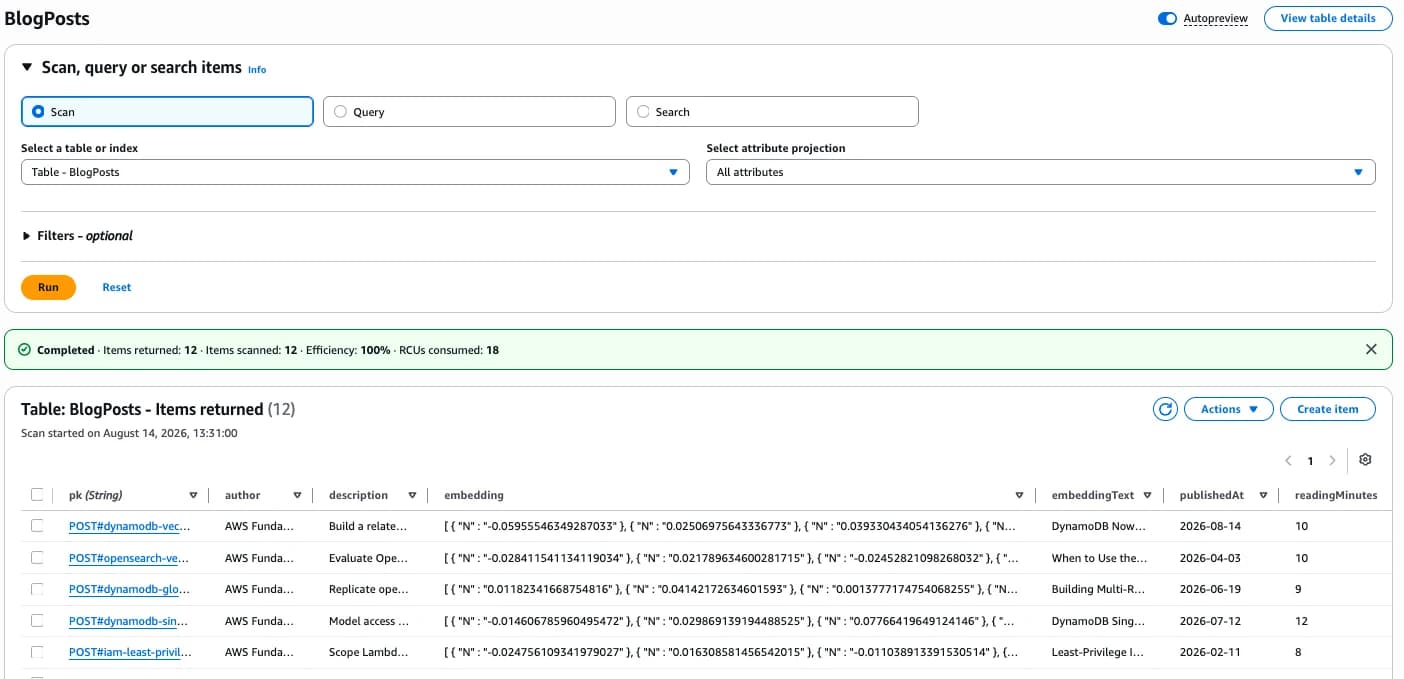
The resulting item now looks like this:
{
    "pk": "POST#dynamodb-streams",
    "slug": "dynamodb-streams",
    "title": "Understanding DynamoDB Streams",
    "description": "Learn how DynamoDB Streams capture item changes...",
    "service": "dynamodb",
    "embedding": [0.0234, -0.1827, 0.0731, "... 1,021 more numeric values"]
}
From DynamoDB's perspective, this is still a normal write. The embedding lives directly beside the rest of our application data.
Step 3 — Create a Vector Index
Now comes the new part.
Open the DynamoDB table and create a vector index.
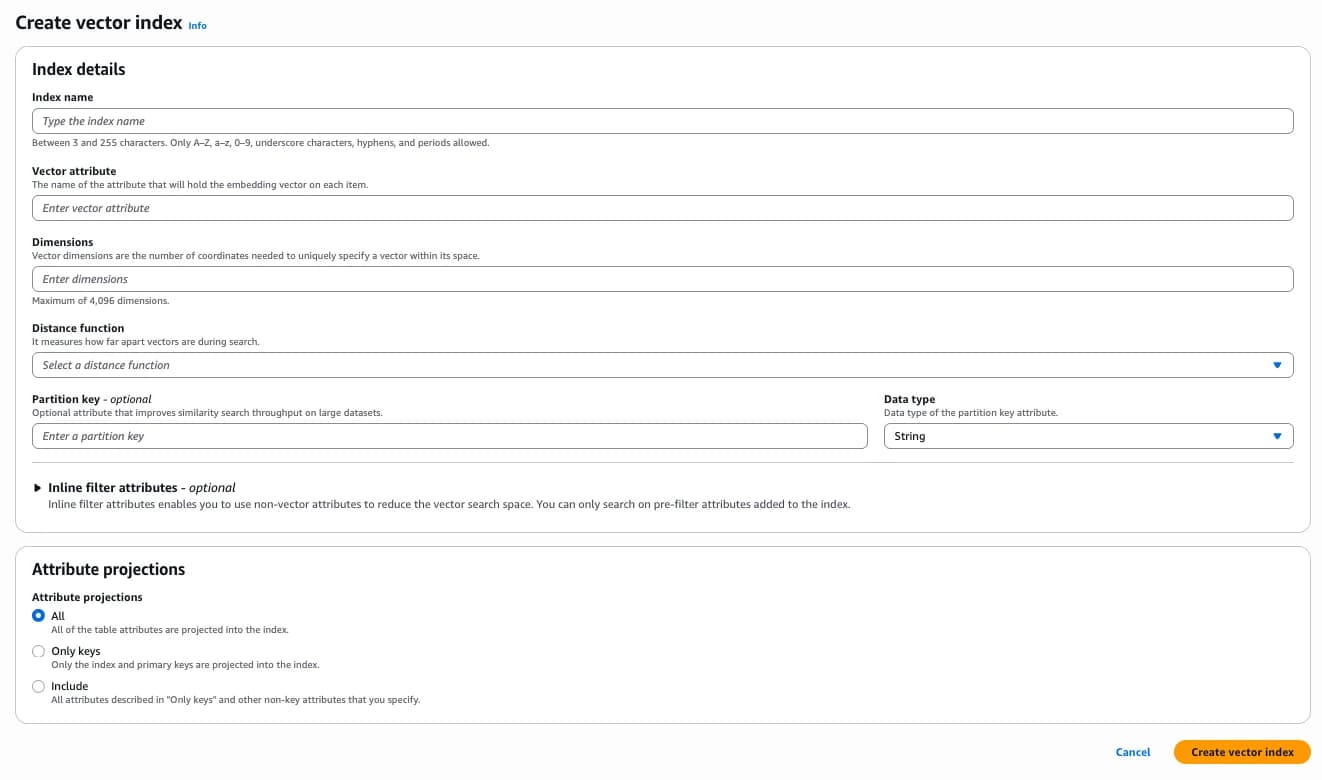
For our related-posts example, we'll use:
Index name:        RelatedPostsIndex
Vector attribute:  embedding
Dimensions:        1024
Distance function: COSINE
Projection:        slug, title, description, service
Vector Attribute
This is the DynamoDB attribute containing the vector:
embedding
Every item we want DynamoDB to index needs a valid vector in that attribute.
Dimensions
The dimensions must match the output of our embedding model.
Titan Text Embeddings V2 produces 1,024 dimensions with the settings above, so the DynamoDB index also needs exactly 1,024 dimensions.
DynamoDB supports vectors with up to 4,096 dimensions. Choose this value carefully because changing it means recreating the vector index.
Distance Function
DynamoDB supports three distance functions:
COSINE
EUCLIDEAN
DOT_PRODUCT
For normalized text embeddings, cosine is a good default. It compares the direction of two vectors, which works well for semantic similarity.
Projection
A vector search reads from the index, not from the complete table item. That means SearchVectors can return only attributes projected into the index.
Our result cards need the slug, title, description, and service, so we'll project those attributes. We deliberately don't project the large embedding because we don't need to return it with every result.
After creating the index, wait until its status is ACTIVE and backfilling is finished.

At the time of writing, CloudFormation doesn't expose vector indexes directly. The companion project therefore uses a small Lambda-backed custom resource to call UpdateTable and wait for the index to become ready.
What About the Vector Partition Key?
The index creation screen also offers a partition key.
This is not the normal DynamoDB table partition key. It partitions the vector index itself.
Imagine we had millions of posts belonging to different customers:
tenant-a
tenant-b
tenant-c
We could use tenantId as the vector index partition key. Every search would then be limited to one tenant instead of searching the entire index.
This is useful whenever there is a natural boundary around a vector search, such as a tenant, marketplace, or workspace.
For our small article catalog, we don't need it, so we'll leave it empty.
Step 4 — Search for Related Posts
Now somebody opens:
Understanding DynamoDB Streams
We already generated and stored its embedding. There is no reason to pay Bedrock to create the same vector again on every page view.
The complete read path is:
GetItem → read the current post's embedding → SearchVectors
Here is the relevant code:
import { GetItemCommand, SearchVectorsCommand } from '@aws-sdk/client-dynamodb';
import { unmarshall } from '@aws-sdk/util-dynamodb';

const currentResponse = await dynamodb.send(
    new GetItemCommand({
        TableName: 'BlogPosts',
        Key: {
            pk: { S: 'POST#dynamodb-streams' },
        },
    }),
);

if (!currentResponse.Item) {
    throw new Error('Post not found');
}

const currentPost = unmarshall(currentResponse.Item);
const embedding = currentPost.embedding as number[];

const result = await dynamodb.send(
    new SearchVectorsCommand({
        TableName: 'BlogPosts',
        IndexName: 'RelatedPostsIndex',
        SearchVector: embedding.map((value) => ({
            N: value.toString(),
        })),
        TopK: 4,
        ProjectionExpression: '#pk, #slug, #title, #description, #service',
        ExpressionAttributeNames: {
            '#pk': 'pk',
            '#slug': 'slug',
            '#title': 'title',
            '#description': 'description',
            '#service': 'service',
        },
    }),
);
DynamoDB now finds the vectors closest to the one we passed in.
Conceptually, the result looks like this:
[
    {
        "title": "DynamoDB Global Secondary Indexes",
        "score": 0.08
    },
    {
        "title": "Building Event-Driven Applications with DynamoDB",
        "score": 0.11
    },
    {
        "title": "DynamoDB Single Table Design",
        "score": 0.17
    }
]
The meaning of the score depends on the distance function. With COSINE, a lower score means the vectors are closer. Because we normalized the Titan embeddings, the UI can turn the distance into a familiar similarity value with:
const similarity = Math.max(0, Math.min(1, 1 - score));
There's one small problem.
The current post will probably be the best match for itself. 😄
That's why we request four results, remove the current post, and keep the first three.
And that's basically our Related Posts feature:
- one
GetItem - one
SearchVectors - no OpenSearch
- no dedicated vector database
- no data replication pipeline
Just DynamoDB.
Filtering Vector Searches
DynamoDB also lets us include attributes in the vector index search schema for filtering.
For example, if we configure service as an INLINE_FILTER attribute, we can ask:
Give me related posts, but only posts about DynamoDB.
SearchConditionExpression: '#service = :service',
ExpressionAttributeNames: {
  '#service': 'service',
},
ExpressionAttributeValues: {
  ':service': { S: 'dynamodb' },
},
This is useful for product categories, countries, tenants, content types, document statuses, and languages.
It lets us combine fuzzy semantic similarity with exact application-level boundaries.
One Thing DynamoDB Does Not Do
There is one thing that's easy to miss:
DynamoDB does not create or update embeddings for us.
Imagine we change our description from:
Learn how DynamoDB Streams work.
to:
Complete guide to DynamoDB Streams,
Lambda integrations and event filtering.
DynamoDB won't know that the embedding is now outdated. We have to call our embedding model again and update the embedding attribute ourselves.
Otherwise, the vector index keeps representing the old content.
This is one place where Bedrock Knowledge Bases with S3 Vectors still gives us a higher-level experience. We provide a data source, and the Knowledge Base handles much more of the ingestion and synchronization pipeline.
With DynamoDB, we're operating one level lower.
And sometimes that's exactly what we want.
When Should We Use Which Option?
DynamoDB vector search doesn't make S3 Vectors or OpenSearch obsolete. They solve different problems.
| Choose | When it fits |
|---|---|
| DynamoDB vector search | The searchable objects are already operational DynamoDB items and we want similarity search close to that data. |
| S3 Vectors with Bedrock Knowledge Bases | We're working with documents, PDFs, RAG datasets, large embedding collections, or want more of the ingestion pipeline managed for us. |
| OpenSearch | Search itself is a major part of the product and we need richer full-text search, hybrid keyword and vector retrieval, aggregations, or more advanced ranking. |
For our related-posts feature, DynamoDB is attractive because every article and its metadata already fit naturally into one item.
Another Use Case: A Product Marketplace
For 150 articles, both architectures are simple enough.
Now imagine a marketplace with 50 million products already stored in DynamoDB.
Previously, semantic product discovery usually meant introducing another database and keeping millions of records synchronized with it.
With a DynamoDB vector index, an item can contain both the operational product data and its semantic representation:
{
    "productId": "shoe-123",
    "name": "Trail Running Shoe",
    "price": 129,
    "inventory": 42,
    "category": "running",
    "embedding": [0.0234, -0.1827, 0.0731, "... 1,021 more numeric values"]
}
A customer could search for "waterproof shoes for rocky mountain trails" without those exact words appearing in the product name.
At that scale, partitioning, filtering, index projection, and cost still need careful design. We might partition searches by marketplace or tenant and filter by category or availability. But we no longer need to copy every product into another database just to compare embeddings.
That is where this feature gets interesting.
Try the Complete Demo
The companion project contains the DynamoDB table and vector-index infrastructure, the seed script that creates Titan embeddings, the GetItem and SearchVectors flow, and the small UI shown at the beginning.
You can find the project with the other AWS Fundamentals open-source examples.
Final Thoughts
Vector search is slowly becoming less of a specialized "AI database" feature and more of a normal database capability.
And I think that makes sense.
If our operational data is already in DynamoDB, copying it into another database just to answer:
Which items are similar to this one?
always felt like quite a lot of infrastructure for a relatively simple question.
With DynamoDB vector indexes, that question becomes a native DynamoDB operation.
For many serverless applications, that might be all the vector database we actually need. 🤝

