
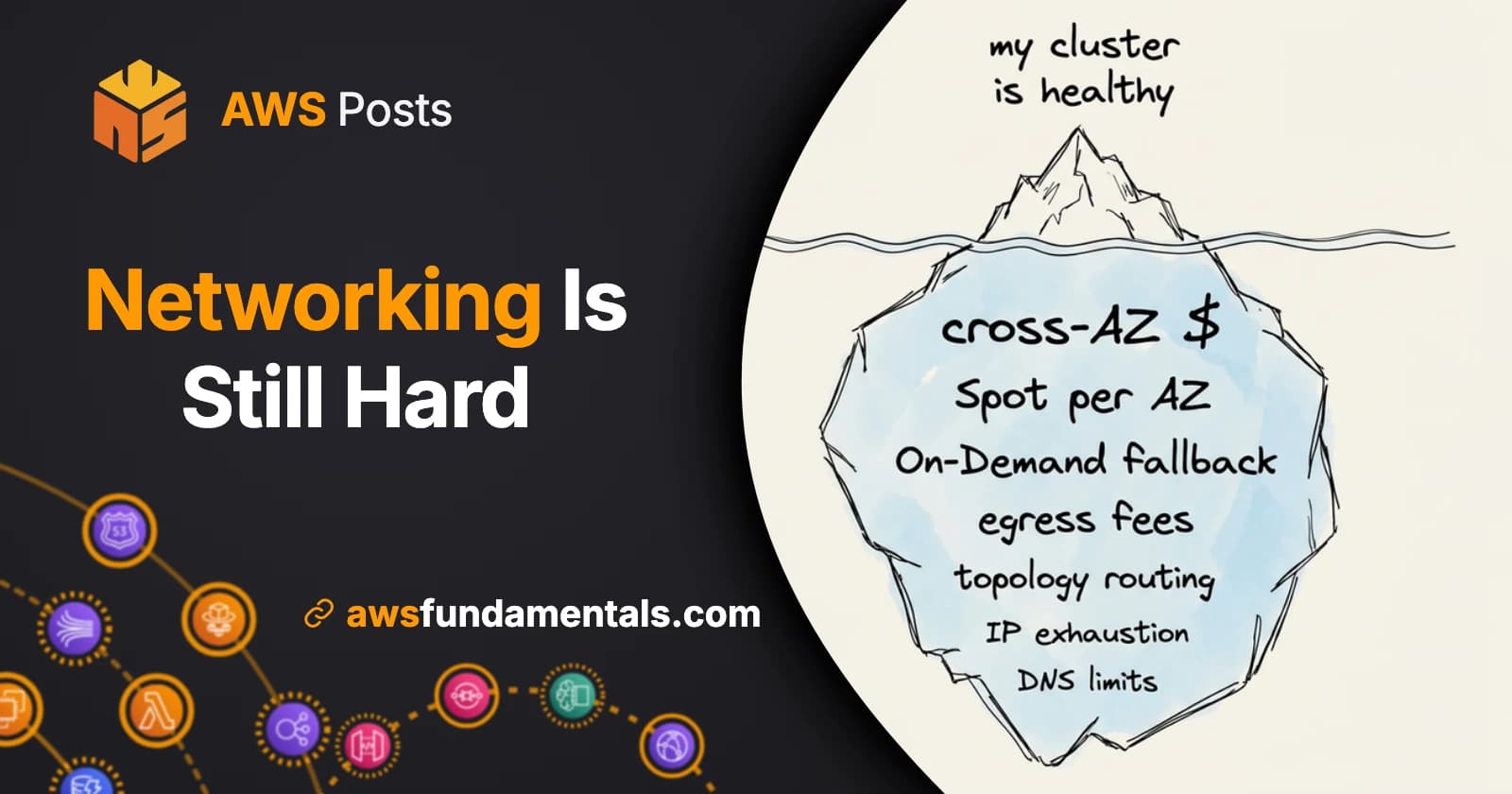
Table of Contents
Jump to a section
It's 2026, we have AI everywhere, and networking on AWS still feels like heavy engineering.
I posted that a few days ago and the replies were all variations of the same story. Something moved, nobody noticed, and the bill noticed.
It's worth walking through one of them properly, because the mechanics are always the same. A cluster that has been running fine for months gets noticeably more expensive over a couple of days. Nothing was deployed, traffic is flat, and every dashboard is green: pods Running, nodes Ready, no alerts. The only thing that changed is where the nodes are, and that turns out to be enough to really hurt.
A Quick Recap: EKS, Flux, and Karpenter
If you've read my EKS blueprint post, skip ahead. If not, and you want the full setup, that post has it.
In a nutshell: two controllers do the work in that setup.
- Flux reconciles configuration, so whatever is committed to Git is what runs in the cluster.
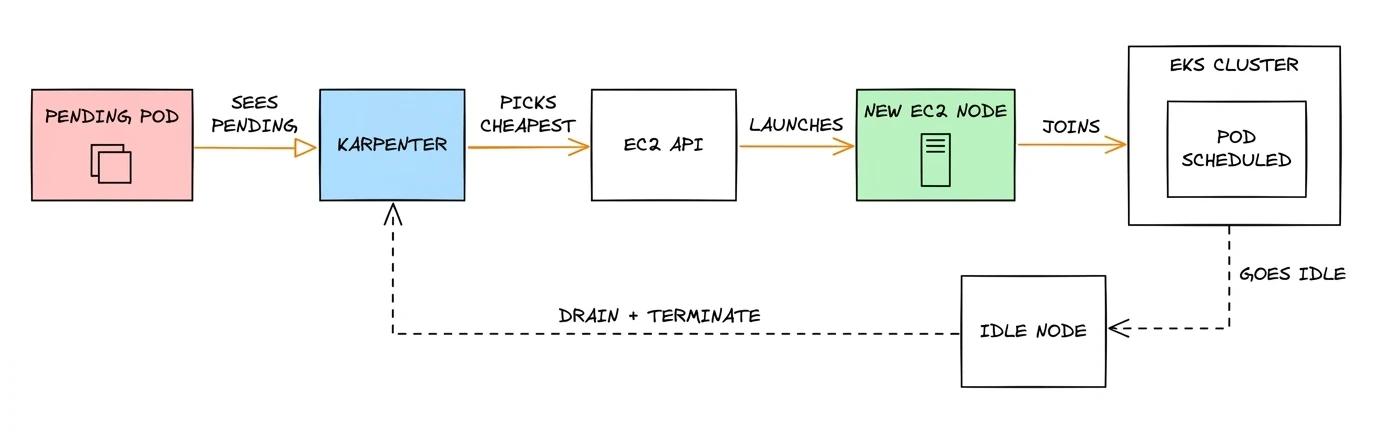
- Karpenter reconciles capacity, so whatever the pods ask for, it goes and finds EC2 instances to run them on.
Sounds pretty simple, but there's a lot that can go wrong quickly.
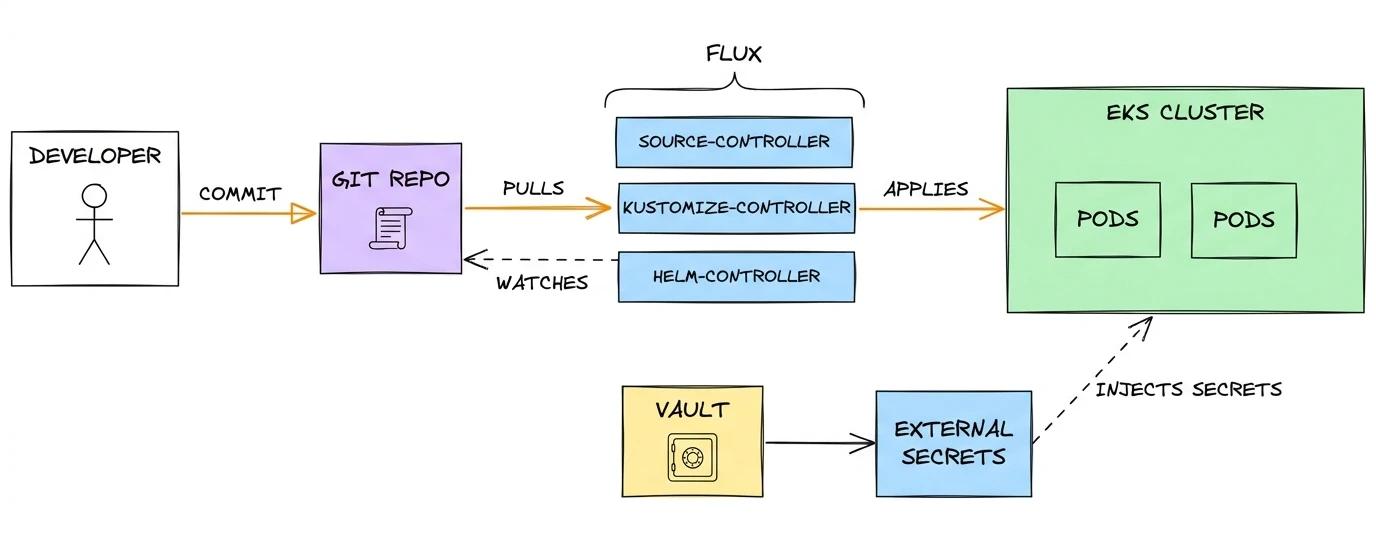
Nobody runs kubectl apply by hand.
You change a file, merge, and Flux rolls it out.
Karpenter does the same thing one layer down. It watches for pods that can't be scheduled, reads what they need, and launches instances that fit. When a node empties out, it drains and terminates it.
Sounds great, and most of the time it feels like magic.
What Karpenter is allowed to do lives in a NodePool:
- which instance types
- Spot or On-Demand
- which zones
- what limits
That file is small, it looks harmless, and it decides where in your region your traffic physically flows.
AWS Lambda on One Page (No Fluff)
Skip the 300-page docs. Our Lambda cheat sheet covers everything from cold starts to concurrency limits - the stuff we actually use daily.
HD quality, print-friendly. Stick it next to your desk.
Three Things That Set It Up
Two of these are deliberate decisions and both are defensible. The third is the one nobody makes on purpose.
- One instance family. It's been benchmarked, the price-performance is good, and standardizing makes node sizing predictable across teams.
- Spot preferred, On-Demand as fallback. That's the whole reason you run Karpenter: it picks the cheapest thing that satisfies the pods, so Spot wins whenever Spot exists.
- No zone-aware routing. Services talk to each other through plain
ClusterIPServices, which spread calls over every healthy endpoint regardless of where it sits.
Number three is the honest part of this story, and it's the one that's almost never clean.
Zone-local routing gets set on some Services and simply never on plenty of others, and nobody chases it, because it makes no measurable difference at the time.
That's the thing about the third one: while all the capacity happens to live in one zone, "route to any endpoint" and "route to a local endpoint" are the same instruction. Every call is local by accident, so the gap in the config is invisible and costs nothing. It only becomes a bill once the nodes move.
Read the first two together and you get something neither of them says alone. You haven't asked for cheap compute. You've asked for one specific kind of instance, on the spare-capacity market, and left the rest up to AWS.
Spot Capacity Is Smaller Than You Think
Spot isn't one big pool. A pool is one instance type in one availability zone, so the same size in a different zone is a different pool, and a different size in the same zone is another one again.
Your odds of getting Spot capacity come down to how many of those pools you're allowed to use.
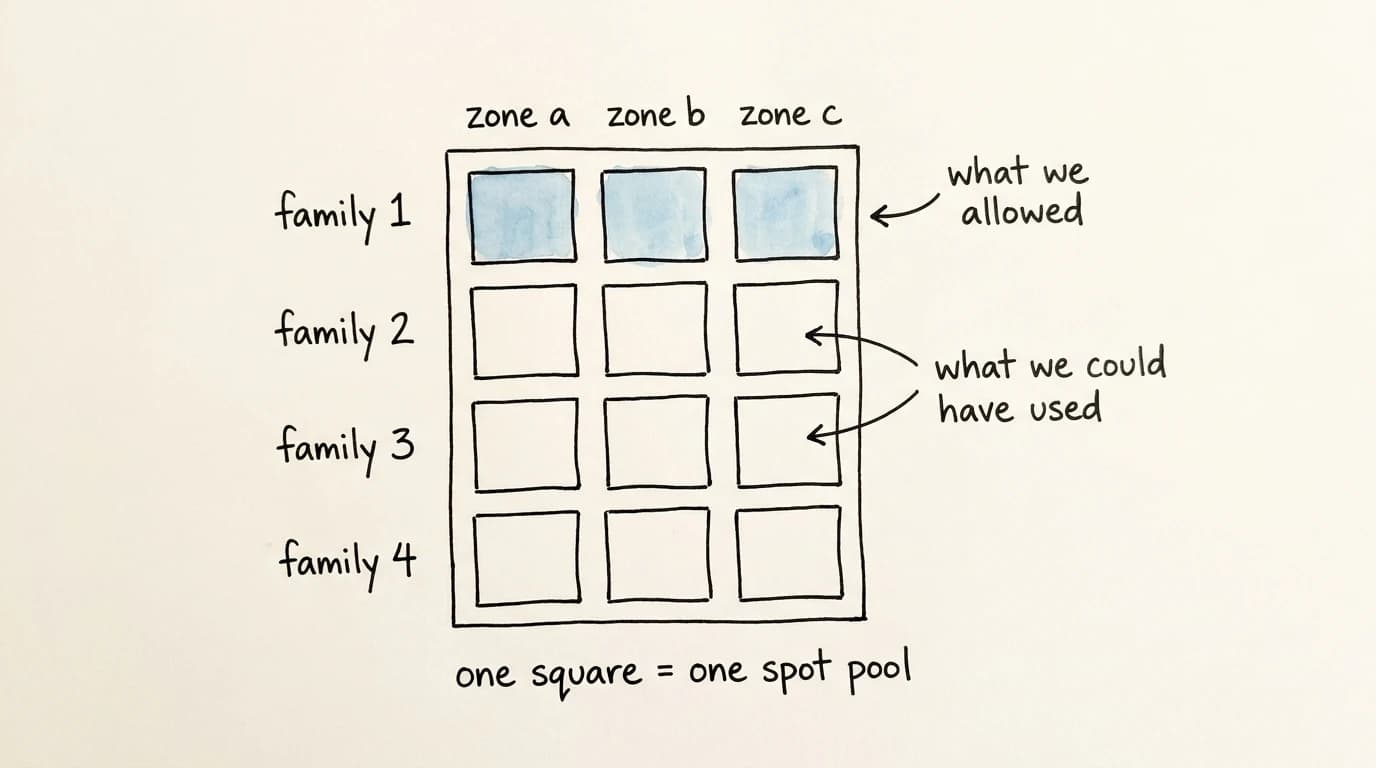
Pinning one family collapses that number. Allow a handful of families across two generations and you're choosing between dozens of pools. Allow one and you're down to a few, and they all run dry at the same time, because they're the same silicon in the same racks.
Picking the newest generation makes it worse, because there's simply less of it deployed and everyone who reads benchmarks wants it. That's the part that's easy to underestimate: you can optimize yourself into the thinnest part of the market without ever deciding to.
Day One: The Spot Fallback
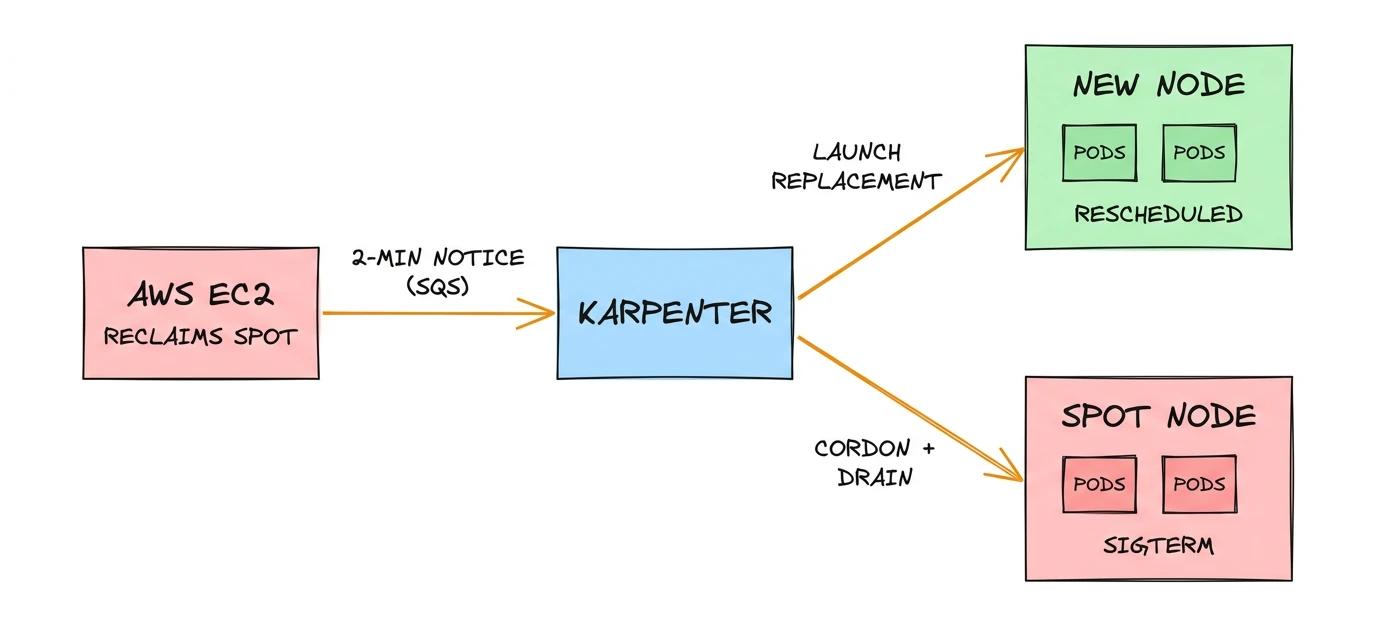
Spot capacity for that family runs out in the region, and Karpenter does exactly what it was told to do. It falls back to On-Demand.
That's correct behavior, and I want to be clear that I'd configure it the same way. The alternative is pending pods, and pending pods are an outage.
It's also a jump in unit cost with nothing attached to it. Kubernetes has no opinion about what a node costs. Pods are Running, nodes are Ready, every dashboard stays green, and the only place the change shows up is a bill you read weeks later.
A Spot-to-On-Demand fallback is a cost event, and cost events need alerts.
Karpenter labels every node with karpenter.sh/capacity-type, so the ratio of On-Demand to Spot nodes is one query away.
Day Two: The Cluster Moved
The second thing is the one almost nobody thinks about, and it costs more than the first.
The workloads have ended up concentrated in one availability zone. Not by design. That's just where capacity was available when things scaled up, and nothing ever moved them. Services talk to each other inside that zone, which is free, and nobody has ever needed to think about it.
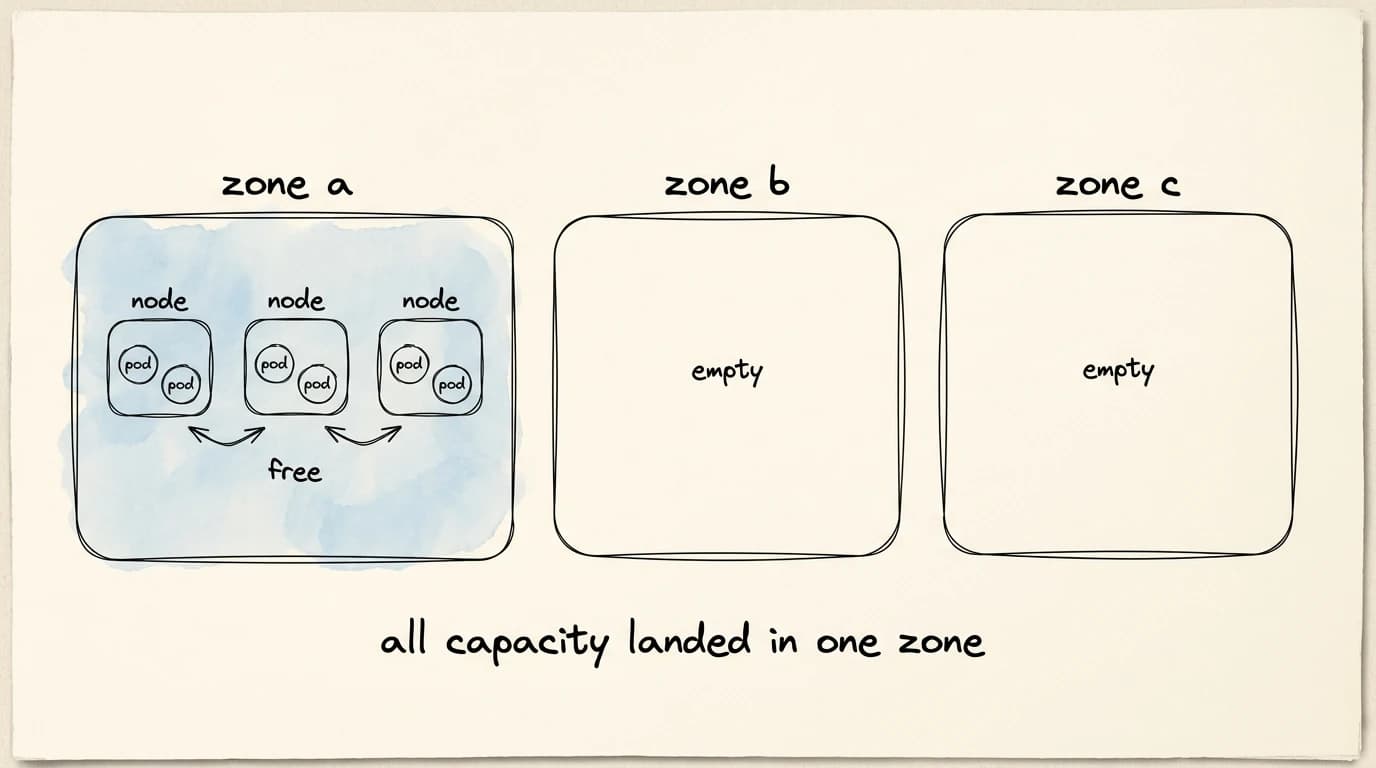
When the capacity crunch hits, it doesn't hit all zones equally. The busy zone goes first, so Karpenter places new nodes in the other two.
Worth knowing: zones in a NodePool are a filter, not a preference. If three subnets are allowed, all three are fair game, and Karpenter will put capacity wherever it can actually get instances. You can weight NodePools to lean towards one zone, but if that zone has no capacity, Karpenter still falls back to the others.
Within a day, a fleet that had effectively lived in one zone is spread across three. Nothing about that is wrong. Spreading across zones is what you're supposed to want.
Except the services still talk to each other constantly, and nothing in the config tells them to stay local. That third item from earlier stops being theoretical here.
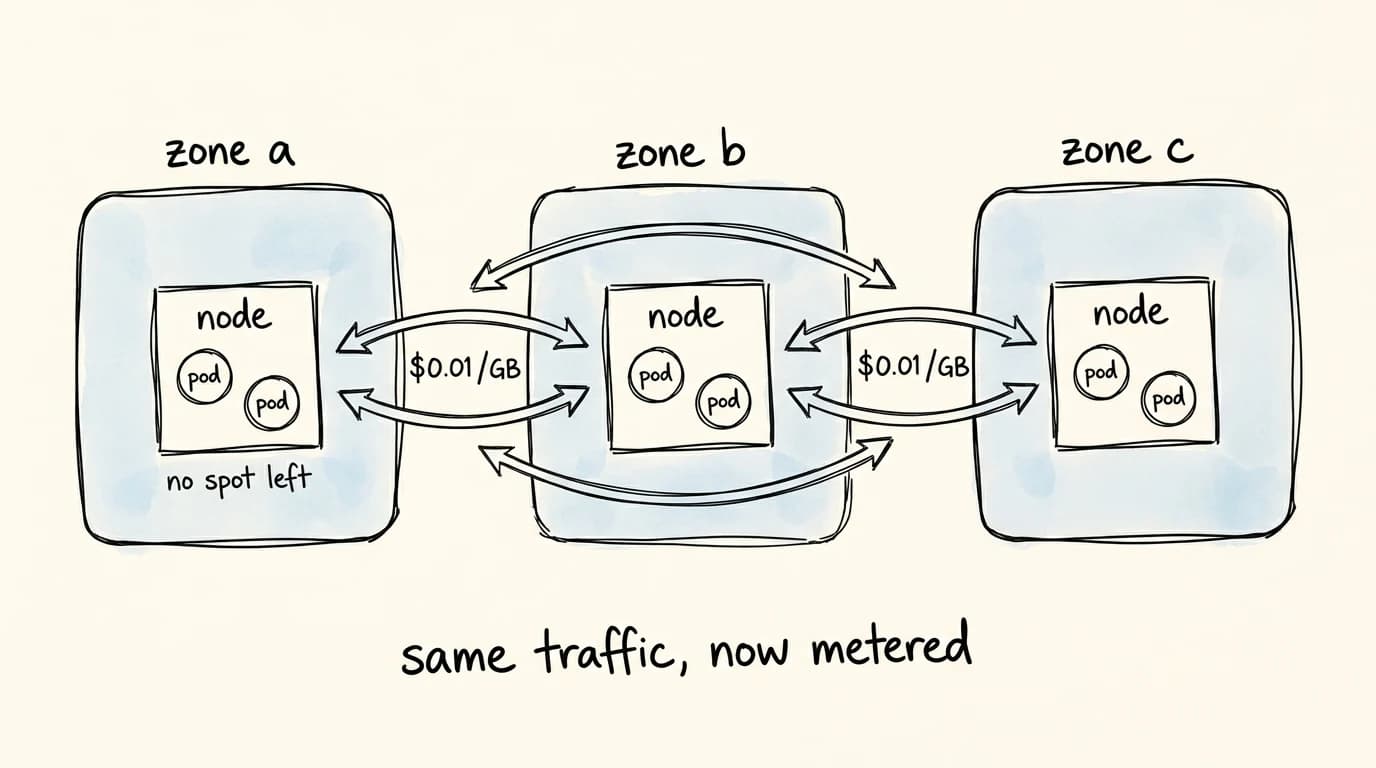
Every Service that never got zone-aware routing is now handing out endpoints in all three zones, so calls that had always happened to be local become calls across zone boundaries.
Why Spreading Out Costs Money
Two instances in the same zone talk over private IPs for free. Cross a zone boundary inside the same region and AWS charges $0.01 per GB in each direction, so a request answered from another zone costs two cents per gigabyte round trip.
Two cents sounds like nothing, and that's the trap.
A ClusterIP Service load balances across all healthy endpoints without caring where they are.
With pods spread over three zones, roughly two thirds of every internal call leaves the zone it started in.
Now remember that one user request isn't one internal call. It's a gateway calling a service, calling two more, each hitting a cache and a database, maybe a proxy on both ends. Ten internal hops can be normal, and every hop rolls that same two-thirds dice.
So you're not paying two cents per gigabyte of user traffic. You're paying it on your internal chatter, which is usually far bigger than anything that crosses your edge: cache fills, replication, health checks, metrics scrapes, all of it suddenly metered.
The traffic pattern never changed. Only the placement did.
Why You Don't See It Coming
Cross-AZ transfer is nasty for reasons that have nothing to do with the rate.
It doesn't show up as a service.
In Cost Explorer it lands under EC2-Other with the usage type DataTransfer-Regional-Bytes, sharing a bucket with EBS, NAT Gateway, and snapshots.
Plenty of teams have that bucket filed away as "storage and networking, roughly flat".
There's no Kubernetes signal either. No restarts, no failing probes, no CPU or memory anomaly, zero errors. The cluster is behaving perfectly, just in different physical places.
And it grows with the thing you're least likely to instrument: how far apart your pods happen to be today. That distance is decided by a controller optimizing for something else entirely, reacting to capacity you can't see.
There's a latency cost too, and depending on your workload it might bother you more than the money. Every cross-zone hop adds a little, the same multiplier applies, and it lands on your p99 rather than your median.
What To Change
None of this is exotic to fix. It's mostly about not leaving decisions to chance.
Give Karpenter Room To Choose
The single-family pin is the root cause, and widening it is a one-line change.
requirements:
    - key: karpenter.k8s.aws/instance-family
      operator: In
      values: ['c7a', 'c7i', 'c6a', 'm7a', 'm7i', 'm6a']
    - key: karpenter.k8s.aws/instance-cpu
      operator: In
      values: ['8', '16', '32']
    - key: karpenter.sh/capacity-type
      operator: In
      values: ['spot', 'on-demand']
More families and sizes means more Spot pools, which means the fallback fires far less often. It also means Karpenter has real options left inside your busy zone instead of being pushed out of it.
Standardizing on one instance family feels disciplined. For Spot it's the opposite of what you want, because flexibility is the availability strategy.
Keep Chatty Traffic In Its Own Zone
Kubernetes has a built-in answer here that most people never switch on.
Set trafficDistribution: PreferClose on a Service and traffic prefers endpoints in the caller's own zone, spilling over to other zones only when the local ones are unhealthy or gone.
apiVersion: v1
kind: Service
metadata:
    name: internal-api
spec:
    trafficDistribution: PreferClose
    selector:
        app: internal-api
    ports:
        - port: 8080
On older clusters this is the service.kubernetes.io/topology-mode: Auto annotation, the Topology Aware Hints version of the same idea.
Either way, the cross-zone hop becomes a fallback instead of the default.
One remark: it only works if every zone has enough replicas to serve its own traffic. Two replicas across three zones will pin load onto whichever pod is local, so pair this with a replica count that divides sensibly by your zone count.
Decide Your Spread Instead Of Inheriting It
If you're going to run in several zones, pick the shape yourself rather than letting capacity availability pick it for you.
topologySpreadConstraints:
    - maxSkew: 1
      topologyKey: topology.kubernetes.io/zone
      whenUnsatisfiable: ScheduleAnyway
      labelSelector:
          matchLabels:
              app: internal-api
Even spread plus zone-local routing is the combination that works. Even spread on its own just means you pay the cross-zone rate consistently.
ScheduleAnyway matters here.
A hard constraint plus a capacity shortage in one zone gives you pending pods, which is worse than a temporary cost bump.
Watch The Two Things That Actually Moved
The fix that keeps this from repeating isn't YAML at all.
- Alert on the On-Demand to Spot node ratio, straight from
karpenter.sh/capacity-type. - Alert on nodes per zone, from
topology.kubernetes.io/zone. A fleet migrating between zones is something you want to hear about the day it happens. - Put
DataTransfer-Regional-Byteson a dashboard as its own line instead of leaving it inside EC2-Other, with a budget alert on top.
Ten minutes of work each, and the whole class of problem turns into a Slack message instead of a month-end surprise.
The Mistake Wasn't Spot
It's worth being precise about where this actually goes wrong, because it isn't the Spot preference and it isn't the fallback.
What goes wrong: treating the NodePool as a performance decision. That file gets reviewed as "which instances do our workloads run best on", and the answer is usually fine. What nobody asks is where those instances land when AWS can't hand over the ones you wanted, and what your services cost to talk to each other from there.
A NodePool isn't an instance-type preference. It's a placement policy, placement is network topology, and network topology is a metered line on your bill.
That's the part that keeps AWS networking harder than it should be in 2026. The controllers are smart, the defaults are sensible, and the thing that gets expensive is a physical detail two layers below where you were looking.
So go read your own NodePool with that in mind. If it names exactly one instance family, you already know what to do.

