
Table of Contents
Jump to a section
I've spent years telling people not to run Kubernetes.
Not because Kubernetes is bad. Because most teams who reach for it are signing up for a second full-time job they never budgeted for. Cluster upgrades. etcd backups. A networking plugin that breaks on a Tuesday for reasons nobody can explain. A pile of YAML that no single person fully understands six months later.
I'm a serverless person by default. Lambda first, a queue behind it, managed everything, scale to zero. So when I tell you EKS is the right call for a certain kind of team, it comes from someone who argued the opposite for years.
What changed my mind: it's right until it's not. This post is about the "until," and the blueprint you reach for once you cross it.
The Compute Ladder: Lambda, Then Fargate, Then Stop
I pick compute in a fixed order.
Start with Lambda. If the work fits in a function, event-driven, bursty, short-lived, Lambda wins on almost every axis. No servers to patch. It scales to zero and you pay for what you run.
When Lambda doesn't fit, drop to containers on Fargate. Long-running processes, heavy dependencies, a runtime Lambda doesn't support, an app that just wants to be a normal container. ECS on Fargate gives you that without a single EC2 instance to manage.
I have a soft spot for ECS, and I'm not quiet about it. A post where I called ECS "boring" as a compliment became one of my most-read ever, and the replies were full of people telling the same story: ECS quietly running their production for years without drama.
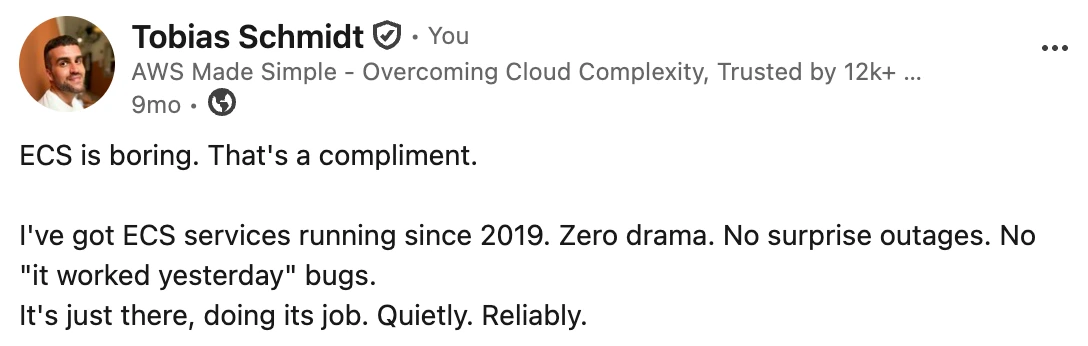
Pretty outstanding reach and most comments were positive!

Disclaimer: if I'm being honest, ECS is definitely not intuitive when you start. Tasks, task definitions, services, clusters, the mental model takes a while to click (at least it did for me!). Push through it anyway, you'll be glad you did! Alongside Lambda, IAM, S3, and SQS, it's one of the most battle-tested things AWS has ever shipped. I have containers running on it that I haven't really touched since 2019, no incidents and no downtime.
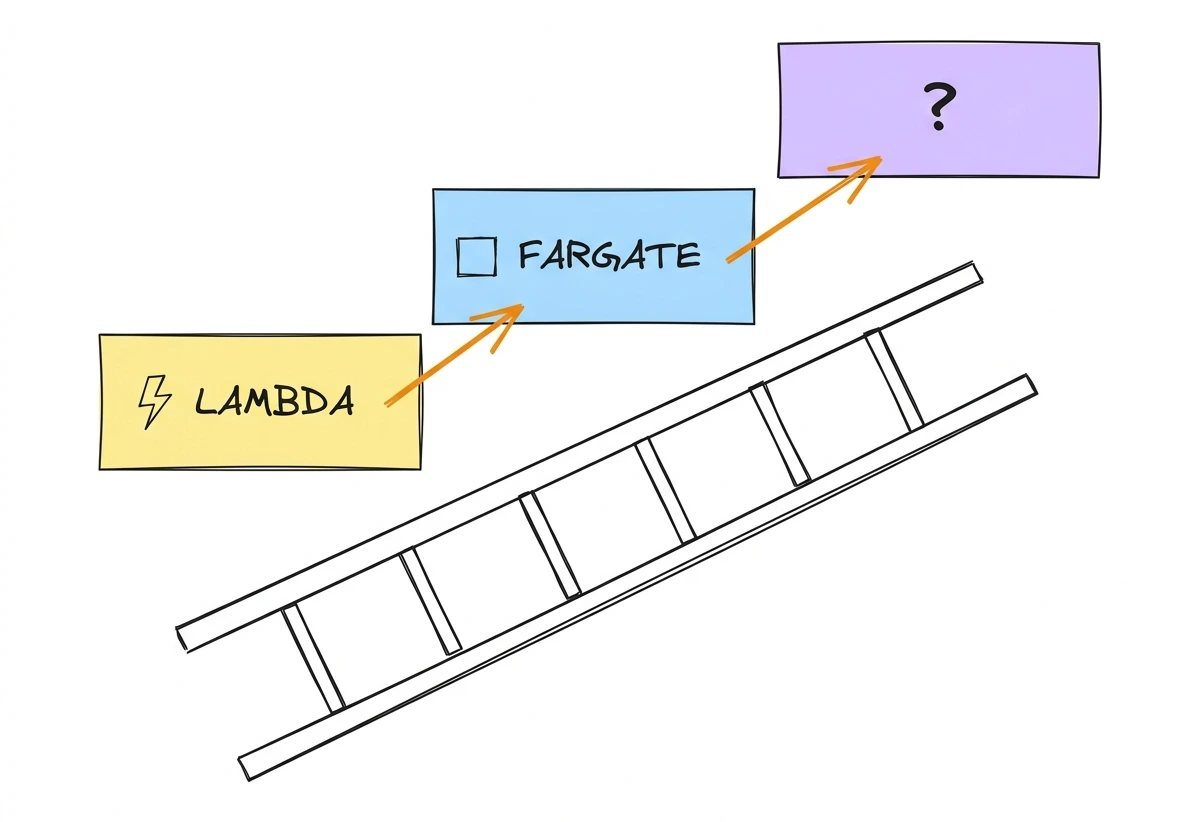
For years, that's where it ended for me. Two choices covered almost everything any team I worked with needed. The ops surface stayed tiny (mostly), and the bill followed real usage instead of a capacity guess (also mostly).
If you're a small team with a handful of services, that's still the advice. Stop here. What pushes you over the line is scale, not headcount, so a small team behind a large product, with a big user base and dozens of services, can still need everything below.
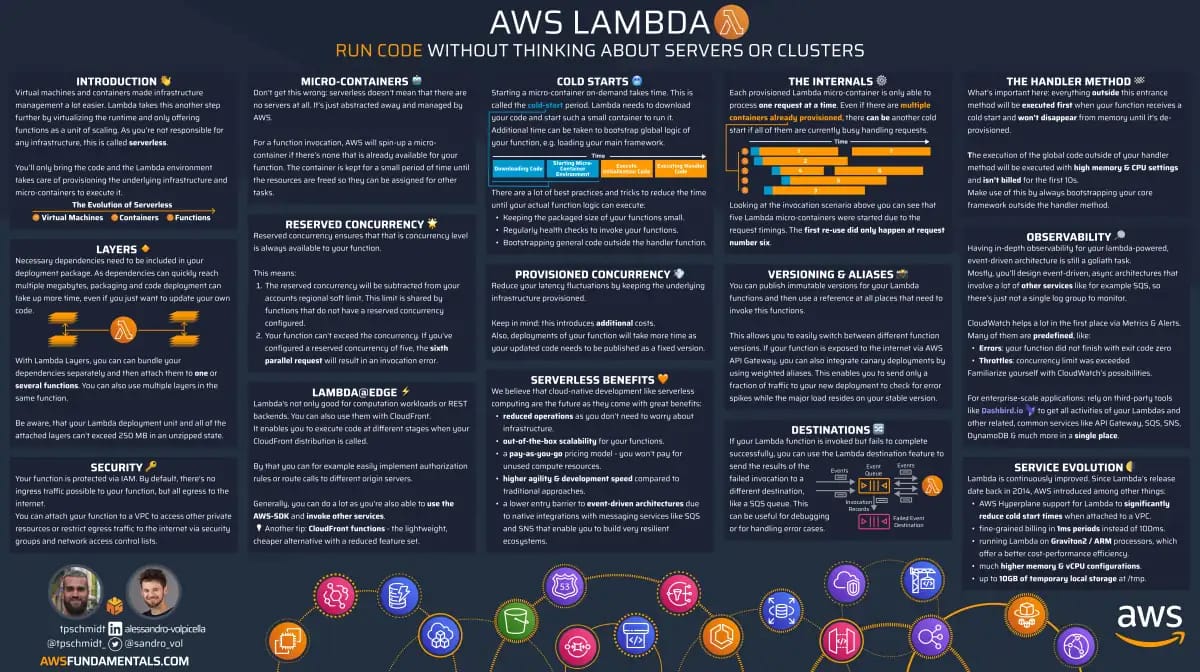
AWS Lambda on One Page (No Fluff)
Skip the 300-page docs. Our Lambda cheat sheet covers everything from cold starts to concurrency limits - the stuff we actually use daily.
HD quality, print-friendly. Stick it next to your desk.
Where the Ladder Breaks
The ladder assumes a handful of teams and workloads that fit neatly into functions or single containers. Scale either one up and it stops holding.
The workloads go first: a JVM service that needs 90 seconds to warm up, a batch job that pins a CPU for an hour, a vendor product that only ships as a Helm chart, a model server that needs a GPU. None of that fits a function or a one-off Fargate task. Add dozens of teams each wiring their own Lambda setup, IAM, pipeline, and logging, and you get a pile of slightly different architectures with nowhere to enforce a standard. One security fix becomes a pull request in every repo.
The economics flip too. Fargate's serverless convenience carries a per-vCPU premium over raw EC2: fine for bursty load, pure waste for hundreds of services running flat out, where you'd rather bin-pack onto EC2 and lean on Spot.
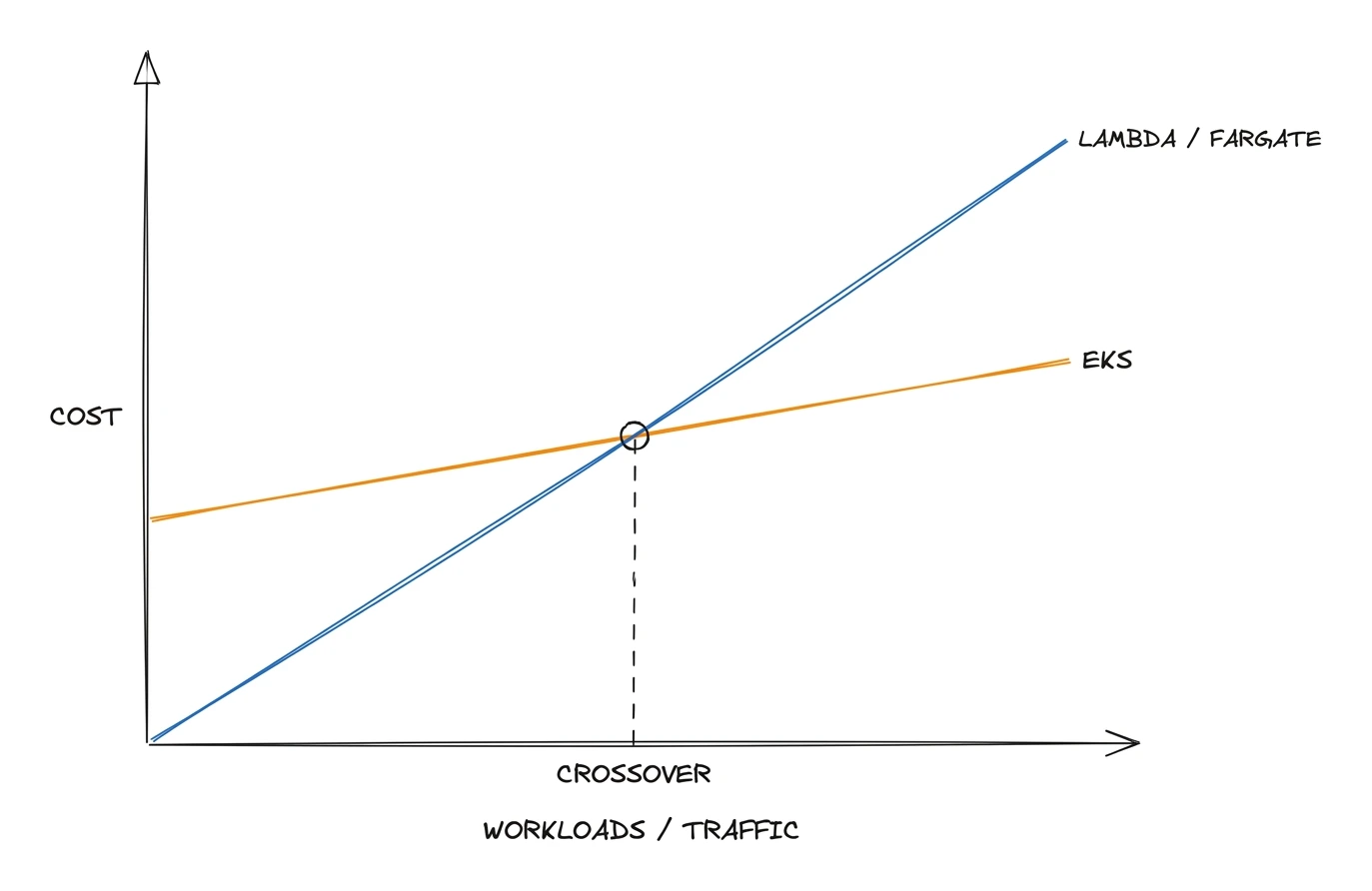
What you want at that scale is one substrate every team consumes the same way. A platform team owns a single paved road; everyone else self-serves through Git instead of filing tickets, and policy and cost stay in one place. That substrate is Kubernetes, because it's where all those pressures meet.
EKS Is Not Self-Managed Kubernetes
Go back to my list of horrors at the top. Cluster upgrades, etcd backups, a control plane you keep alive at 3am. Every one of those is about running Kubernetes yourself: kops or kubeadm on EC2 instances you own.
EKS takes that entire layer off your plate. AWS runs the control plane for you: the API server, etcd, the scheduler, the controller manager. They run it across multiple availability zones, patch it, back up etcd, and keep it available. There is no control plane node you can SSH into, because there isn't one that's yours to break.
Who runs what:
| Layer | Who runs it |
|---|---|
| API server, etcd, scheduler | AWS |
| Control plane availability and backups | AWS |
| Kubernetes version upgrades (control plane) | AWS performs, you trigger |
| Worker nodes | You, but Karpenter does the heavy lifting |
| Add-ons, networking, your workloads | You |
The part that used to need a dedicated team, keeping the brain of the cluster alive, is now a line item. The control plane costs $0.10 per hour, about $73 a month per cluster. For an org running hundreds of services across dozens of teams, that's a rounding error.
I won't pretend EKS is zero-ops. You still own node images, add-ons, the VPC CNI, and a version upgrade roughly three times a year, because that's Kubernetes' release cadence, not AWS's. You still need people who can read a failing pod and know what a taint is. But the specific nightmare that made me say no for years, babysitting etcd and a self-hosted control plane, is gone.
The Blueprint
The whole thing in one breath: an EKS cluster where Flux syncs everything from Git, Karpenter provisions the nodes, Helm and Kustomize template the workloads, External Secrets pulls credentials from Vault, and a thin slice of Fargate boots the controllers that run all of it.
Seven moving parts. Each has exactly one job.
- EKS gives you the managed control plane.
- Karpenter provisions EC2 nodes on demand and kills them when they go idle.
- Flux watches Git and makes the cluster match what's committed.
- Helm packages a workload as a chart: templated manifests plus values.
- Kustomize overlays per-environment values on top of a shared base.
- External Secrets Operator pulls secrets out of Vault and into the cluster at runtime.
- Fargate runs the system pods, the controllers above, so the cluster can boot itself.
Stacked top to bottom, it looks like this:
| Layer | What runs here | Hosted on |
|---|---|---|
| Control plane | API server, etcd, scheduler | AWS-managed |
| System pods | Karpenter, Flux, CoreDNS | Fargate |
| Worker nodes | EC2 instances | Provisioned by Karpenter |
| Application pods | Your workloads | Karpenter-provisioned EC2 |
| Desired state | HelmRelease, Kustomization, NodePool, EC2NodeClass | Git |
| Secrets | Credentials, tokens | Vault, via External Secrets |
The whole design rests on one idea: Git is the source of truth, and two controllers spend all day making reality match it.
- Flux reconciles configuration. Whatever's committed to Git is what runs in the cluster.
- Karpenter reconciles capacity. Whatever the pods need, it finds the cheapest (or whatever you specify) EC2 to run them on.
Nobody runs kubectl apply by hand.
You change a file, open a pull request, merge.
Flux notices and rolls it out.
If something drifts, the next reconcile pulls it back.
Same story for nodes: a pod goes pending, Karpenter adds capacity; a node goes idle, Karpenter removes it.
Self-healing on both axes, config and capacity.
But first, a chicken-and-egg problem you have to solve before any of this runs.
The Bootstrap Problem
Karpenter's whole job is to create EC2 nodes when pods need them. So where does Karpenter itself run?
Not on a Karpenter-managed node obviously! On a fresh cluster there are no nodes yet, and the thing that creates nodes isn't running, because it has no node to run on. Circular dependency! 🔥
The same circular dependency trap catches the other controllers. Flux is what pulls your config from Git and applies it. CoreDNS is what lets pods find each other. On an empty cluster, none of them have anywhere to be executed from.
Simple solution: Breaking the loop with Fargate! A Fargate profile selects pods by namespace and label, then runs each matching pod in its own AWS-managed micro-VM. No EC2 node required, no Karpenter required. You point a profile at the namespaces where Karpenter, Flux, and CoreDNS live, and AWS schedules them straight onto Fargate.
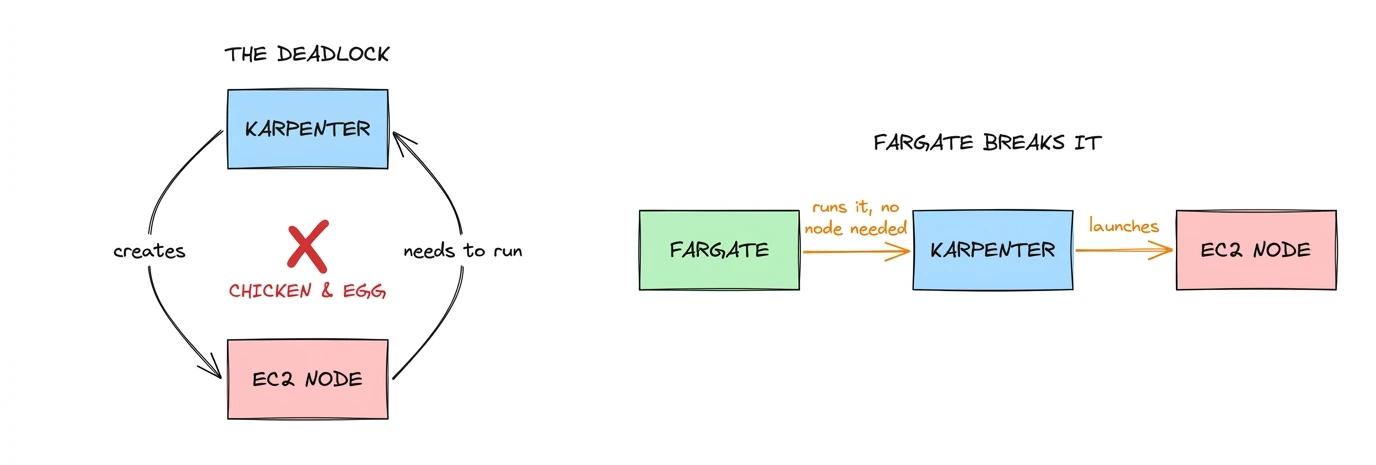
From there the cluster bootstraps itself.
- Fargate runs Karpenter.
- Karpenter brings up EC2 nodes.
- Every other workload, including your apps, lands on those nodes.
The system pods stay on Fargate, where they don't fight application load for capacity and don't depend on the very capacity they exist to create.
It's a small slice of Fargate, two or three namespaces, not your whole platform.
The Two Loops That Run the Cluster
Everything above exists to feed two control loops.
- One keeps your configuration in sync with Git.
- The other keeps your node capacity in sync with demand.
They run forever, independently, and they're what makes the cluster awesome!
The Flux Loop: Git to Cluster
You commit a change, e.g. a new HelmRelease or Kustomization. Flux does the rest as a background process.
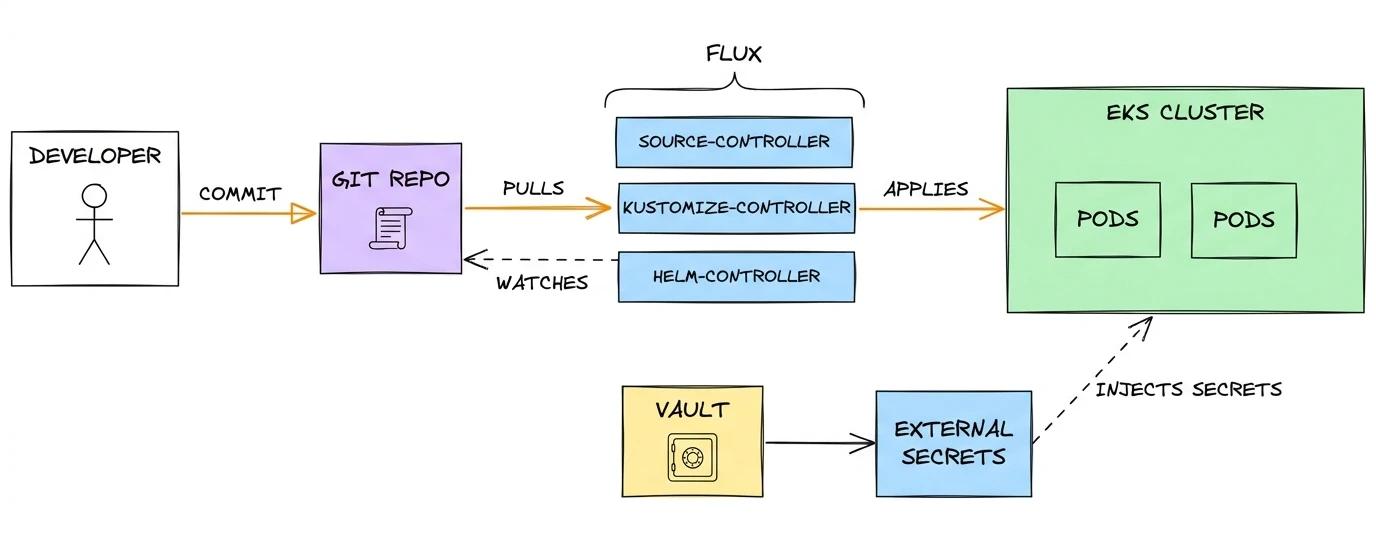
No human runs kubectl here, and no pipeline runs helm upgrade.
Flux watches Git and reconciles on an interval.
Change the values file for a service, merge, and the new version is live a minute later.
Delete a resource from Git and Flux removes it from the cluster.
Edit something by hand in the cluster and Flux puts it back on the next pass, because Git said otherwise.
Drift doesn't accumulate. The cluster is always converging on whatever is committed in Git.
The Karpenter Loop: Pods to Nodes
Karpenter watches for pods that can't be scheduled.
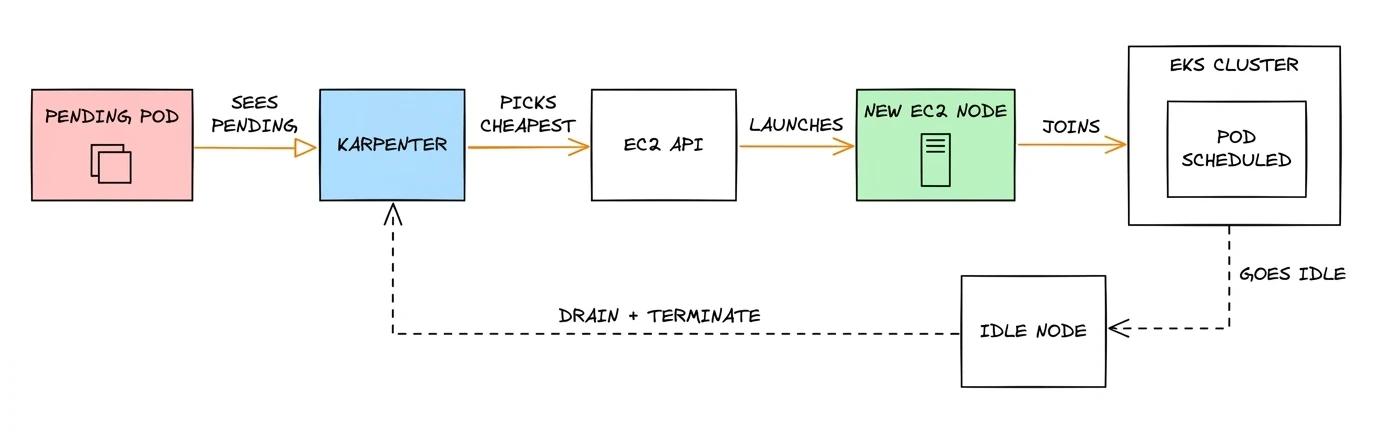
No node groups to size, no Cluster Autoscaler guessing in fixed steps. Karpenter looks at what the pending pods ask for, CPU, memory, architecture, Spot or on-demand, and picks instances to match. When load drops and a node empties out (= no pods are running on it), it drains and kills the node so you stop paying for it immediately.
Two resources in Git tell Karpenter what it's allowed to do:
- NodePool sets the rules: which instance families, architectures, Spot vs on-demand, limits, taints.
- EC2NodeClass holds the AWS specifics: subnets, security groups, AMI family, IAM role, user data.
Both live in Git, applied by Flux like everything else. Which means the way you scale the cluster is a pull request, reviewed and version-controlled, same as your app config.
Lean Hard on Spot
This is where the setup pays for itself big time! Because Karpenter picks instances on every scale-up, you can tell it to prefer Spot, the spare EC2 capacity AWS rents out cheap. The discount runs up to 90% off On-Demand on paper. In practice most fleets land somewhere between 60% and 80% off, depending on instance mix and how flexible you are about instance types and zones. At hundreds of nodes, that compounds into a compute bill cut in half or better.
The catch is that AWS can take a Spot node back, but it warns you first. You get at least two minutes' notice before the node goes away. Karpenter watches that notice on an SQS queue, cordons and drains the node, and starts a replacement before the old one is gone. Your pods get a SIGTERM and their full termination grace period to finish in-flight work and exit cleanly.
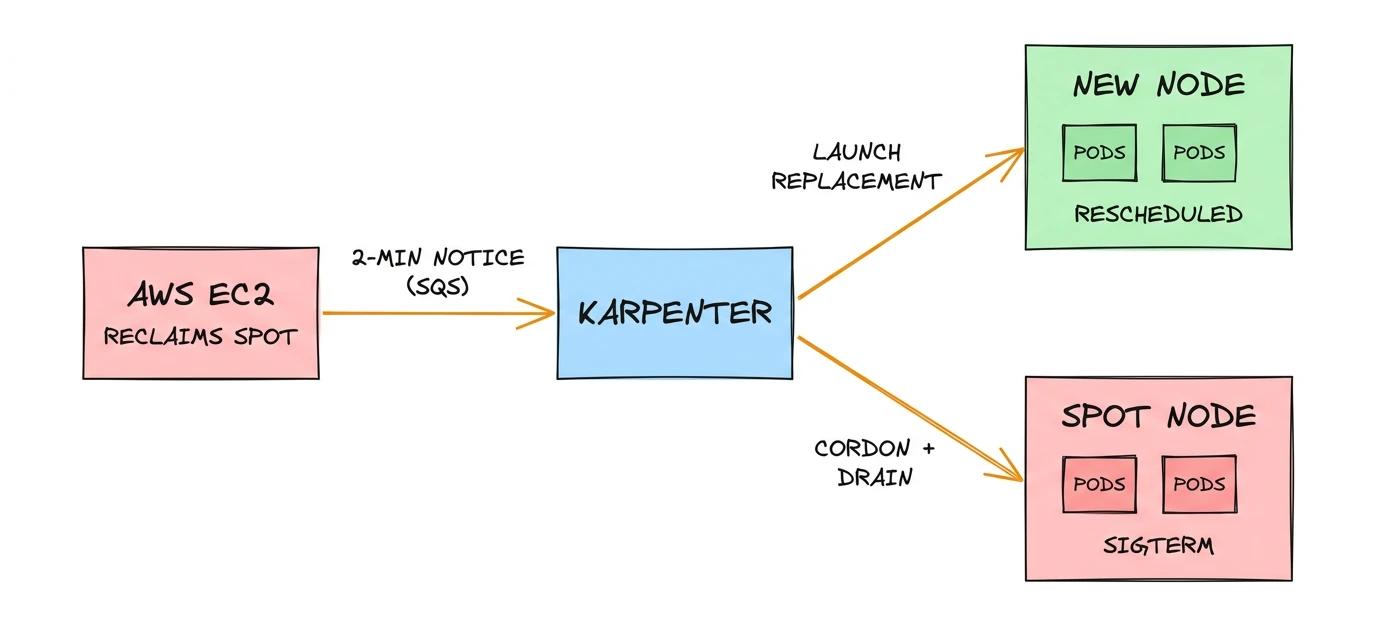
For interruptible workloads, that saving costs you almost nothing in practice. Stateless services behind a load balancer, queue consumers, batch jobs, CI runners, they all tolerate a pod moving to another node, which covers the large majority of what most companies run.
Set a sensible PodDisruptionBudget and terminationGracePeriodSeconds and you barely (or even at all) notice the churn.
Keep the rare workload that genuinely can't be interrupted on On-Demand, and let Karpenter fall back to On-Demand on its own when Spot is scarce.
A couple of lines in a NodePool, and most of your compute bill drops.
I know companies that run 90%+ of their compute on Spot and save A LOT of money.
Secrets Stay Out of Git
One piece sits across both loops: secrets. You can't commit a database password to Git, but Flux only applies what's in Git. External Secrets Operator fixes that.
You commit a harmless reference: "this app needs the secret named prod/db/password."
External Secrets reads that reference, fetches the real value from Vault at runtime, and creates the Kubernetes Secret the pod mounts.
The credential never touches your repo.
Git holds the pointer, Vault holds the secret, the operator bridges the two.
Where This Bites (and How to Fix It)
I've spent this whole post "selling" the blueprint, so let me be straight about the downsides.
For starters, the complexity moved rather than disappeared. You're not babysitting etcd anymore, but you are now running Flux, Helm, Kustomize, Karpenter, External Secrets, and Fargate profiles. The control plane got simpler and your tooling stack got deeper. Every one of those pieces is something a person on your team has to understand when it misbehaves.
Which is the real cost: you need people who actually know Kubernetes. GitOps probably doesn't rescue you when a HelmRelease won't reconcile or a pod sits Pending and Karpenter won't give it a node.
You also can't sit still on versions. Kubernetes ships roughly three releases a year and supports each one for only so long, so you upgrade on its schedule, not yours. Karpenter and Flux ship their own CRD changes on top, and those have bitten me more than the control-plane upgrades themselves.
The blast radius cuts both ways, too. Self-healing GitOps rolls out a good change in a minute, and a bad one just as fast. A broken base layer can reach EVERY environment before you've finished reading the alert, so you pay for that speed with good quality gates!
None of this is a dealbreaker at the scale we're talking about, where a small platform team is serving dozens of others. It's a terrible trade when you're three engineers with five services!
The day-to-day is also lighter than it was even a year ago, and the reason is AI.
When something breaks I paste the events and the manifest into Claude and it walks me through the fix, and it's sharp on the networking corners of EKS that used to eat whole afternoons, the VPC CNI and the security-group puzzle of why one pod can't reach another.
Depending on how much access you're willing to grant, you can go a step further and hand it kubectl, so it connects to the cluster itself and digs into the failing pods on its own, instead of waiting for you to copy-paste. It doesn't replace knowing your system, but it takes most of the stress out of running one.
Should You Do This?
The honest answer for most readers is no, and I'd rather tell you that than sell you a cluster.
Reach for the EKS blueprint when:
- You have many teams shipping many services, and a platform team to own the substrate.
- Your workloads don't fit functions: long-running services, batch jobs, GPUs, vendor software that only ships as Helm charts.
- You run enough steady-state load that bin-packing on EC2 beats the Fargate premium.
- You need one paved road, one place to enforce policy, secrets, and cost, instead of 40 bespoke setups.
Stay on Lambda and Fargate when:
- You're a small or mid-size team without anyone to own a cluster full-time.
- Your load is bursty or event-driven, exactly what serverless bills well for.
- "No nodes, no upgrades, no CRDs" is worth more to you than bin-packing economics.
- You'd be standing up all this machinery for a handful of services.
Don't ask whether Kubernetes is good. Ask whether you have the scale and the people to amortize the overhead. If you have to ask, you probably don't, and that's fine.
Wrapping Up
I still reach for Lambda first. That hasn't changed, and for most teams it shouldn't.
What changed is that I stopped treating Kubernetes as a single yes-or-no. Self-managed Kubernetes is still a second full-time job I don't want. But EKS with a managed control plane, Flux reconciling from Git, and Karpenter sizing nodes to real demand carries almost none of that burden. At the right scale, with a platform team and dozens of others to serve, the cluster stops being the risky choice and becomes the boring one. Boring is exactly what you want from infrastructure.
Serverless first. EKS when the ladder runs out. Know which one you're on before you commit! 💪

