NAT Gateways are easy to forget.
You create one per availability zone, point your private subnets at it, and move on.
Months later, you open Cost Explorer and find NatGateway-Bytes near the top of your EC2 bill.
NAT pricing has two parts.
In us-east-1, you pay $0.045 per hour per gateway, plus $0.045 for every GB the gateway processes.
The hourly part is predictable.
The per-GB part grows with every container image pull, every npm install, every package mirror sync and every third-party API call your workloads make.
Here is how to find that traffic, and how to stop paying for it.
What You Can Do About It
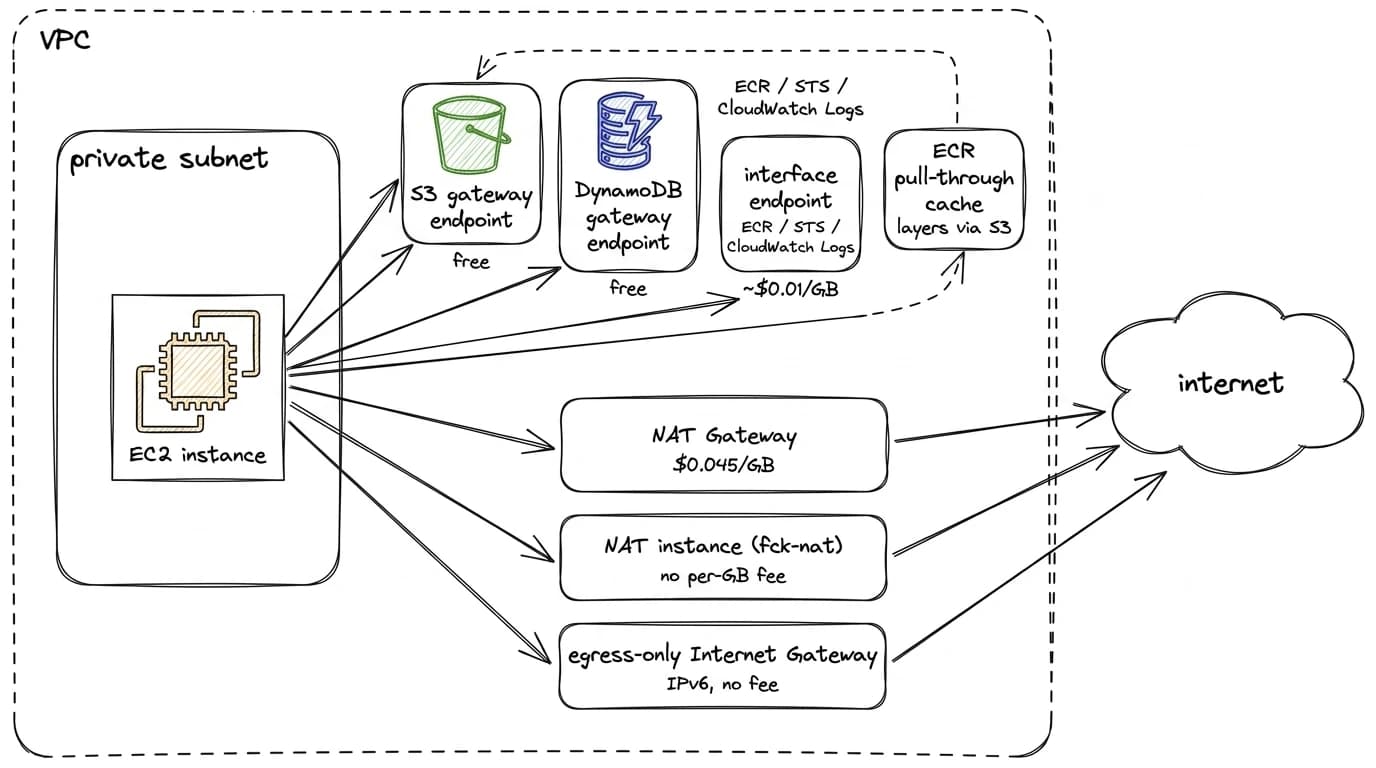
NAT traffic has a few known escape hatches. CI runners can reach GitHub through an Internet Gateway instead of a NAT Gateway. Image pulls can come from an ECR pull-through cache, and S3 and DynamoDB traffic can skip NAT entirely with gateway endpoints. The stronger move is structural: for a new VPC, the cheaper default is not to run the managed NAT Gateway at all. A NAT instance, for example fck-nat, behaves the same for most workloads and costs a fraction of the managed gateway. The sections below go through the options one by one, cheapest first.
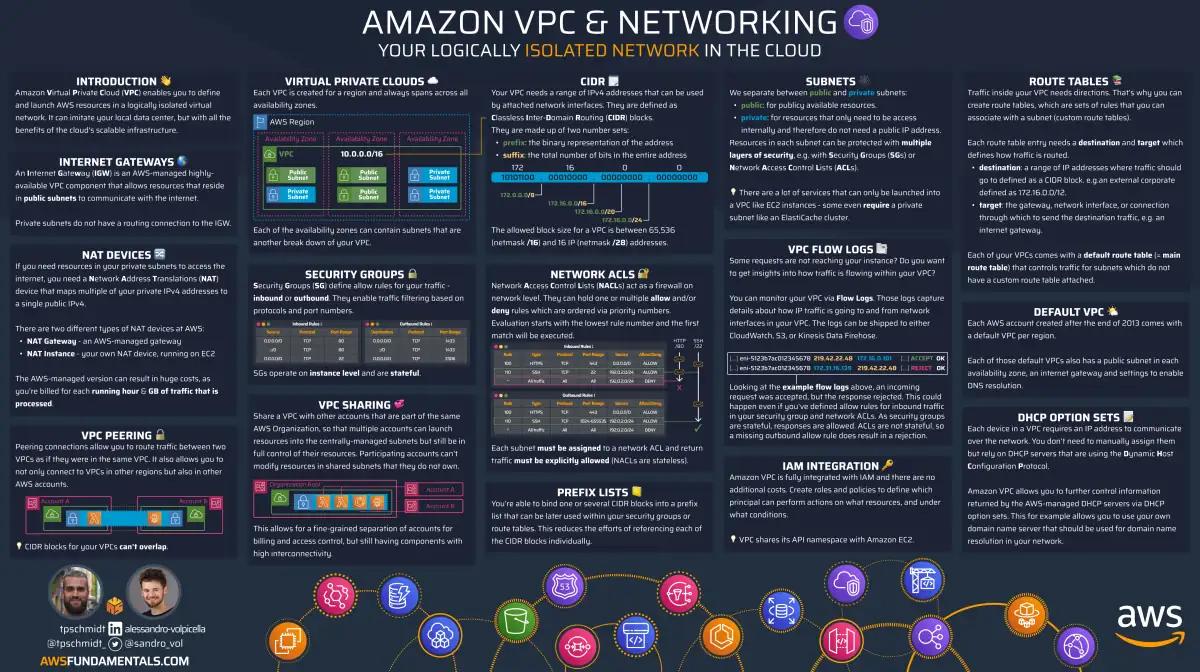
VPC on One Page (No Fluff)
Network with confidence. Our VPC cheat sheet covers subnets, routing, and security groups - the networking essentials.
HD quality, print-friendly. Stick it next to your desk.
Why NAT Costs Grow Without Anyone Noticing
Nobody decides to spend more on NAT. A team adds a new CI pipeline, a node pool scales up, or a service starts pulling a bigger base image. Each change is small, and none of them shows up in a code review as a cost decision.
The processing fee also applies in both directions. Downloading 1 GB through a NAT Gateway costs the same $0.045 as uploading 1 GB. Inbound data transfer from the internet is free on AWS, but not when it passes through a NAT Gateway.
Removing NAT from a path saves the processing fee only. Data transfer out to the internet costs the same whether it leaves through a NAT Gateway or an Internet Gateway. For download-heavy workloads, the processing fee is most of the cost, which is why they are the best place to start.
Find Out Where the Bytes Come From
Measure before you change anything. Three sources give you the full picture.
Cost Explorer
Filter by usage type NatGateway-Bytes and group by resource.
This shows you which gateway is expensive, and so which VPC and availability zone generate the traffic.
NAT costs land under EC2-Other, together with EBS, snapshots and cross-AZ transfer, so they are easy to miss if you only look at service totals.
VPC Flow Logs
Turn on Flow Logs for the network interface of the NAT Gateway and query them with Athena. Group by source address to see which subnets or nodes send the traffic. Group by destination address to see where it goes.
Flow Logs are not free either. You pay per GB delivered, about $0.50 for CloudWatch Logs and roughly half of that for S3, plus storage after that. On a chatty VPC that cost climbs faster than you expect, and you end up paying to investigate the bill you are trying to reduce. Unless a compliance rule requires them permanently, enable them on demand: turn them on, wait a day, look at where the traffic comes from, then turn them off again.
SELECT
    srcaddr,
    SUM(bytes) / 1e9 AS gb
FROM
    vpc_flow_logs
WHERE
    interface_id = 'eni-0123456789abcdef0'
    AND day >= '2026/10/01'
GROUP BY
    srcaddr
ORDER BY
    gb DESC
LIMIT
    20;
AWS IP Ranges
Compare the top destinations with the ranges in ip-ranges.json. If a large share of your NAT traffic goes to S3 or ECR in your own region, you are paying NAT fees to reach AWS itself. That part is the easiest to fix.
The Biggest Lever: Workloads That Never Accept Inbound Traffic
Some workloads only make outbound connections. Nothing on the internet ever needs to reach them. Self-hosted CI runners are the classic example.
CI is download-heavy by design. Every job pulls base images, dependency caches, toolchains and test artifacts, often on fresh nodes with empty caches. All of it goes through the NAT Gateway.
For these workloads, you do not need NAT at all. Give each node a public IPv4 address, route the subnet to the Internet Gateway, and block inbound traffic with a security group.
One thing to know before you count the savings: public IPv4 addresses are not free. Since February 2024 AWS bills every one of them, in use or idle, not just the static Elastic IPs you allocated on purpose. The charge is per address per hour, not per byte. IPv6 addresses have no such charge, which is another reason to look at the egress-only Internet Gateway further down.
The Math
A public IPv4 address costs $0.005 per hour, which is about $3.60 per month. At $0.045 per GB, that is the same as 80 GB of NAT traffic. A busy runner node passes 80 GB in a few days, sometimes in a few hours.
Here is an example fleet of 20 runner nodes, each downloading 50 GB per day:
| Through NAT | Through IGW | |
|---|---|---|
| Monthly traffic | 30 TB | 30 TB |
| Processing fee | $1,350 | $0 |
| Public IPv4 addresses | $0 | $72 |
| Total | $1,350 | $72 |
The NAT Gateway hourly fee stays, because your other private subnets still use it.
Step 1: Give the Nodes Public IPs
If you run your runners on EKS with Karpenter, the change belongs in the EC2NodeClass.
Set associatePublicIPAddress and point the node class at a dedicated security group.
apiVersion: karpenter.k8s.aws/v1
kind: EC2NodeClass
metadata:
    name: ci-runners
spec:
    associatePublicIPAddress: true
    securityGroupSelectorTerms:
        - tags:
              Name: eks-ci-runners
    subnetSelectorTerms:
        - tags:
              Name: ci-runners-*
Without Karpenter, the same setting exists as associate_public_ip_address in launch templates and as map_public_ip_on_launch on the subnet.
Step 2: Lock Down the Security Group
A public IP without a strict security group is an open door.
Do not reuse the cluster security group for these nodes.
Create a dedicated one that allows traffic from the cluster, traffic between runner nodes, and all egress.
It has no inbound rule for 0.0.0.0/0.
resource "aws_security_group" "ci_runners" {
  name   = "eks-ci-runners"
  vpc_id = var.vpc_id
}

resource "aws_vpc_security_group_ingress_rule" "from_cluster" {
  security_group_id            = aws_security_group.ci_runners.id
  referenced_security_group_id = var.cluster_security_group_id
  ip_protocol                  = "-1"
}

resource "aws_vpc_security_group_ingress_rule" "self" {
  security_group_id            = aws_security_group.ci_runners.id
  referenced_security_group_id = aws_security_group.ci_runners.id
  ip_protocol                  = "-1"
}

resource "aws_vpc_security_group_ingress_rule" "cluster_from_runners" {
  security_group_id            = var.cluster_security_group_id
  referenced_security_group_id = aws_security_group.ci_runners.id
  ip_protocol                  = "-1"
}

resource "aws_vpc_security_group_egress_rule" "all" {
  security_group_id = aws_security_group.ci_runners.id
  cidr_ipv4         = "0.0.0.0/0"
  ip_protocol       = "-1"
}
The rule from runners to the cluster security group matters. Without it, runner pods cannot reach the control plane or pods on other nodes.
Step 3: Switch the Route
Point the default route of the runner subnets at the Internet Gateway instead of the NAT Gateway.
resource "aws_route" "ci_runners_default" {
  for_each               = local.azs
  route_table_id         = aws_route_table.ci_runners[each.key].id
  destination_cidr_block = "0.0.0.0/0"
  gateway_id             = var.igw_id
}
The order matters here. Roll out the public IPs first, while egress still goes through NAT. Switch the route after all nodes have a public IP. If you switch the route first, every node without a public IP loses internet access, and your CI stops.
Roll Nodes Slowly
Changing the node class marks every existing node as drifted. Karpenter then replaces them, limited only by your disruption budget. Add a budget that replaces drifted nodes one at a time, so a running job does not lose half the fleet at once.
apiVersion: karpenter.sh/v1
kind: NodePool
metadata:
    name: ci-runners
spec:
    disruption:
        budgets:
            - nodes: '50%'
            - nodes: '1'
              reasons:
                  - Drifted
Other Ways to Stop Paying NAT Fees
Public IPs only make sense for workloads that never accept inbound connections. For everything else, these options reduce NAT traffic without changing your network exposure.
Gateway Endpoints for S3 and DynamoDB
Gateway endpoints are free. There is no hourly fee and no per-GB fee. Attach them to every private route table.
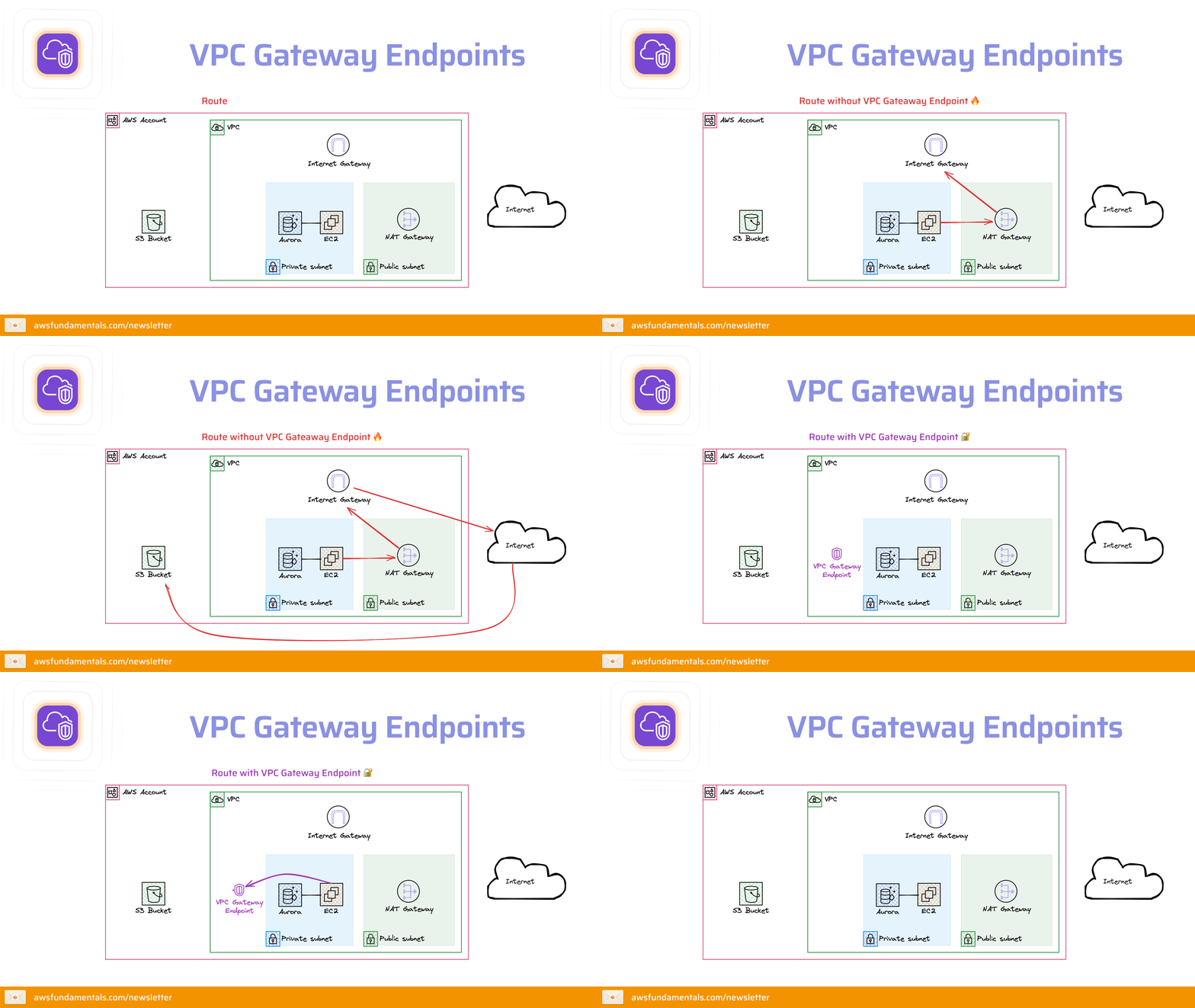
A common mistake is adding a new subnet with its own route table and forgetting the endpoint association. The subnet works fine, and its S3 traffic quietly goes through NAT. Check your associations every time you add a route table.
ECR stores image layers in S3. The S3 gateway endpoint already removes most of the bytes from ECR image pulls, even before you add any ECR endpoints.
Interface Endpoints for High-Volume Services
Interface endpoints for ECR, STS, CloudWatch Logs and similar services cost about $0.01 per hour per availability zone, plus $0.01 per GB. In three availability zones, one endpoint costs about $22 per month before traffic. At a $0.035 saving per GB, it pays for itself after about 630 GB per month.
That makes them a good fit for high-volume services such as CloudWatch Logs from a busy cluster. For a service you call a few times per hour, NAT is cheaper. Check the numbers per service. The VPC Endpoints post covers the setup.
ECR Pull-Through Cache
Pull-through cache rules let you pull images from Docker Hub, GitHub Container Registry or Quay through your own ECR registry. The first pull fetches the image once. Every pull after that comes from ECR, and with the S3 gateway endpoint, the layers never touch your NAT Gateway. You also stop running into Docker Hub rate limits.
IPv6 with an Egress-Only Internet Gateway
An egress-only internet gateway lets IPv6 traffic out and nothing in. It has no processing fee. If your dependencies support IPv6, this is the cleanest long-term option. Many package registries and container registries already do.
One NAT Gateway per Availability Zone
If a subnet in us-east-1a routes to a NAT Gateway in us-east-1b, you pay cross-AZ transfer on top of the processing fee.
Make sure every subnet routes to the NAT Gateway in its own availability zone.
The cross-AZ traffic post shows how this traffic hides in the bill.
NAT Instances
A NAT instance replaces the per-GB fee with the cost of a small EC2 instance. fck-nat is the open-source version of that idea: public Amazon Linux 2023 AMIs for arm64 and x86_64 with the NAT setup already in place.
The numbers for a t4g.nano in us-east-1:
NAT instance (t4g.nano) | NAT Gateway | |
|---|---|---|
| Hourly | $0.0042 | $0.045 per availability zone |
| Public IPv4 address | $0.005 | $0.005 |
| Per GB processed | nothing | $0.045 |
A managed NAT Gateway is $0.045 per hour per availability zone, about $33 per month before it processes a single byte, and then $0.045 for every GB. For a development or staging VPC, the instance pays for itself in the first month.
Deployment does not have to be manual. The official CDK construct wires up the network interface, the route tables and an autoscaling group in high-availability mode. There is also a Terraform module with the same pieces, plus a CloudFormation template if you want a slower cut over from an existing NAT Gateway.
What you take on:
- A
t4g.nanobursts to about 5 Gbps, limited by the instance's network bandwidth. Fine for most workloads, not fine for a busy data pipeline. - The tooling replaces the instance when it dies, but you still run one per availability zone instead of a service with an SLA.
- AMI updates and instance monitoring are on you.
If the environment has to survive an availability zone failure without anyone thinking about it, keep the managed gateway. For everything else, the instance is the cheaper default.
Tips for the Real World
- Set a monthly budget alert on the
NatGateway-Bytesusage type, so growth shows up before the invoice does. - Tag NAT Gateways with the team or environment that owns them, so the cost lands with the people who can change it.
- Review new subnets for missing gateway endpoint associations.
- Check base image sizes in CI. A 2 GB base image pulled 500 times per day is 1 TB of daily traffic.
Summary
NAT Gateways charge for every byte, in both directions. Find your noisiest subnet with Cost Explorer and Flow Logs. Move egress-only workloads such as CI runners to the Internet Gateway with a public IP and a strict security group. Route AWS service traffic through gateway and interface endpoints, and cache container images in ECR.
Start with one subnet.
Check NatGateway-Bytes a week later, and you will see the difference on the next bill.