Advertisement · In partnership with PostHog
How We Run Analytics for awsfundamentals.com with PostHog on AWS

We want to know a handful of things about awsfundamentals.com:
- Where do readers come from?
- Which newsletter form converts?
- Which channel sells the book?
- Which of our short links get clicked?
All of that lands in PostHog. And these days we barely open a dashboard for it. We ask our AI agent in plain English, and it queries PostHog for us.
That only works if the data is good, so this post walks through both halves. First the setup on AWS that collects the events, then the agent that answers questions about them. It stays at the architecture level on purpose: the moving parts, why they're there, and the one or two things that bit us.
This article was created in collaboration with PostHog. We were already using PostHog long before that, and everything here is our own setup and our own opinion.
Why PostHog
The usual alternatives, and why they don't fit our setup:
- Google Analytics wants cookies and consent for everything, and getting raw SQL out of it means setting up a BigQuery export.
- Plausible, Fathom and Umami are lean and privacy-friendly, but they count pageviews. Our signups, purchases and link clicks happen on the server.
- Mixpanel and Amplitude are strong on product events, but we'd still need a second tool for plain web analytics.
PostHog covers web analytics and custom events in one project, hosts in the EU, has a cookieless mode built in, and lets us run SQL against everything through its API. That last point is the one that matters most for us today, because it's what an AI agent needs.
It's not all upside. PostHog is a big product with session replay, feature flags, surveys and a lot more we don't use, and the UI shows it. If all you want is a pageview counter, one of the lean tools is simpler.
Our Setup at a Glance
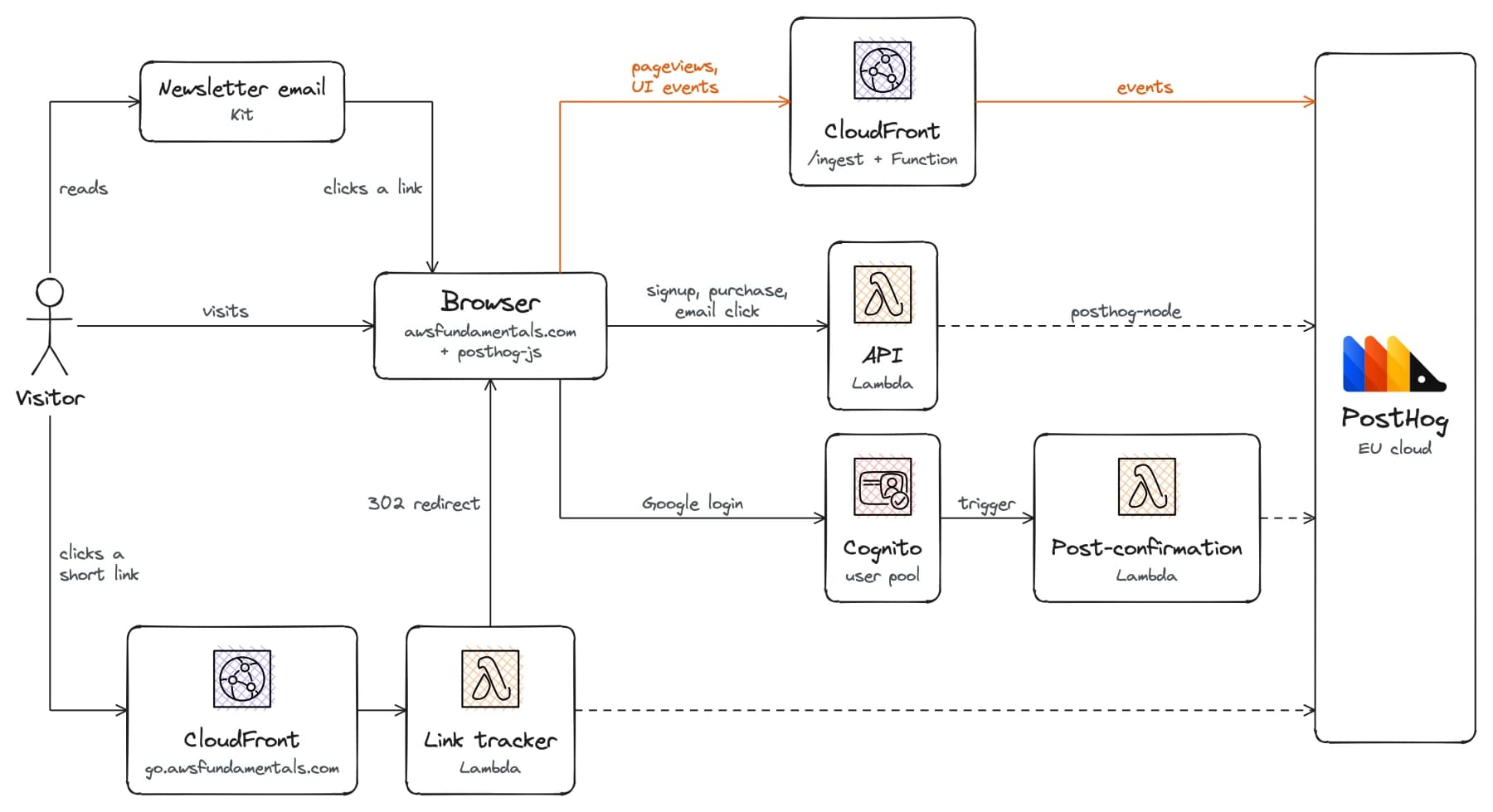
Our site is a Next.js app running on AWS behind CloudFront. posthog-js runs in the browser and sends pageviews and UI events through a reverse proxy on our own domain. Everything the browser can't know about happens in Lambda:
- newsletter signups
- social logins via Cognito
- book purchases
- clicks in our emails
- clicks on our short links
Those functions talk to PostHog directly with posthog-node.
Both sides end up in the same PostHog project in the EU cloud.
Web Analytics That Respects the Cookie Banner
Every cookie banner has the same problem. A big share of visitors click "reject", and with classic analytics your traffic numbers turn into guesswork. And some don't even click themselves. Browser extensions like Consent-O-Matic answer every cookie banner automatically, and by default that answer is "reject". Which we find fair. The whole cookie consent thing the EU enforces so hard is quite annoying for us as well.

PostHog has a setting for this:
posthog.init(POSTHOG_KEY, {
    api_host: '/ingest',
    cookieless_mode: 'on_reject',
});
Visitors who accept get normal cookie-based tracking. Visitors who reject (or haven't decided yet) get nothing stored on their device: no cookie, no local storage. PostHog only counts their pageviews anonymously, with a hash on the server that rotates daily, so nobody is recognized across days and no profile is built.
We still get honest totals, and nobody gets tracked who said no.
What about GDPR?
In the EU, cookies fall under Article 5(3) of the ePrivacy Directive: "the storing of information, or the gaining of access to information already stored, in the terminal equipment of a subscriber or user is only allowed on condition that the subscriber or user concerned has given his or her consent".
Cookieless mode stores and reads nothing on the device, so a visitor who says no stays outside that rule. The server still uses the IP address for the daily hash, so it belongs in your privacy policy.
Regulators do enforce this for analytics. In November 2025 the French CNIL fined the publisher of vanityfair.fr €750,000, partly because a Google Analytics cookie kept running after visitors withdrew consent.
That's our reading, not legal advice.
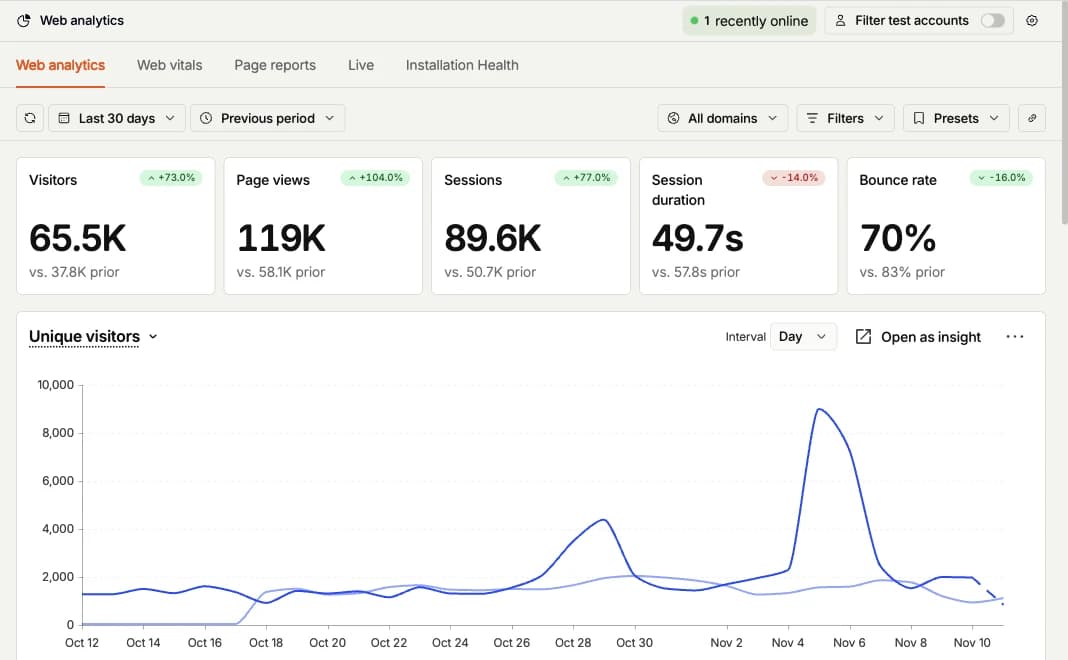
The web analytics view gives us the usual suspects without building anything: top pages, referrers, devices, entry and exit pages.
It's the page we open when a post goes out, to see whether it lands.
Routing PostHog Through CloudFront
Ad blockers drop requests to known analytics domains. For a site whose audience is mostly developers, that's not a rounding error. Blockers like uBlock Origin and browsers like Brave check every request against filter lists such as EasyPrivacy. A request to an analytics domain from another site is exactly what those lists match. A request to the domain the visitor is already on looks like the site itself, so the lists leave it alone.
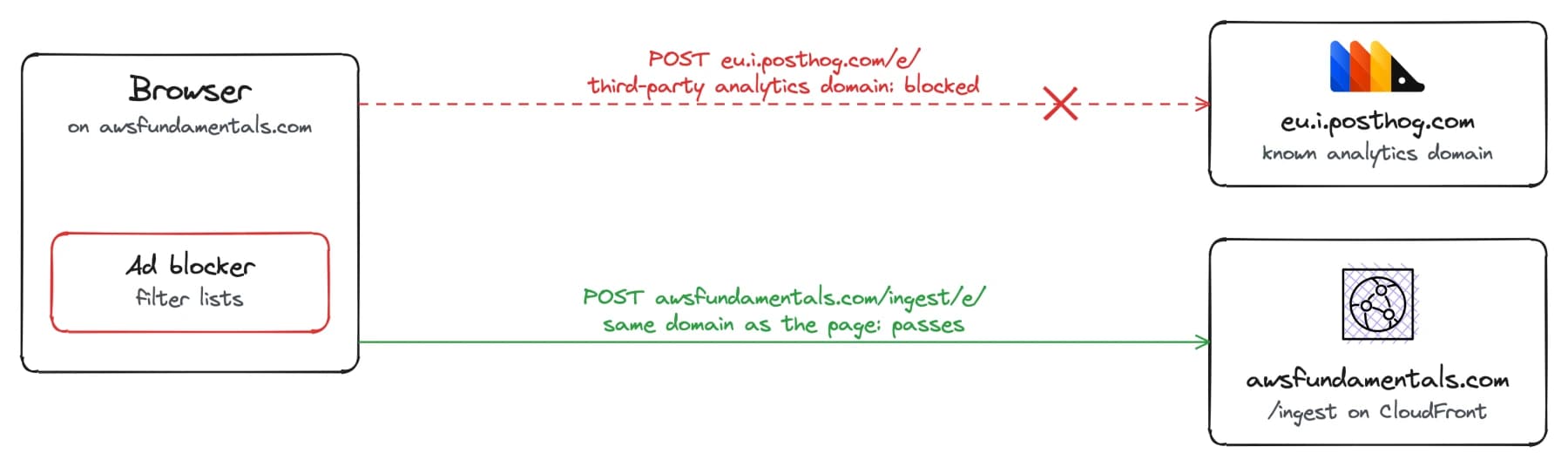
So the browser never talks to posthog.com.
It sends everything to /ingest on our own domain, and CloudFront forwards it.
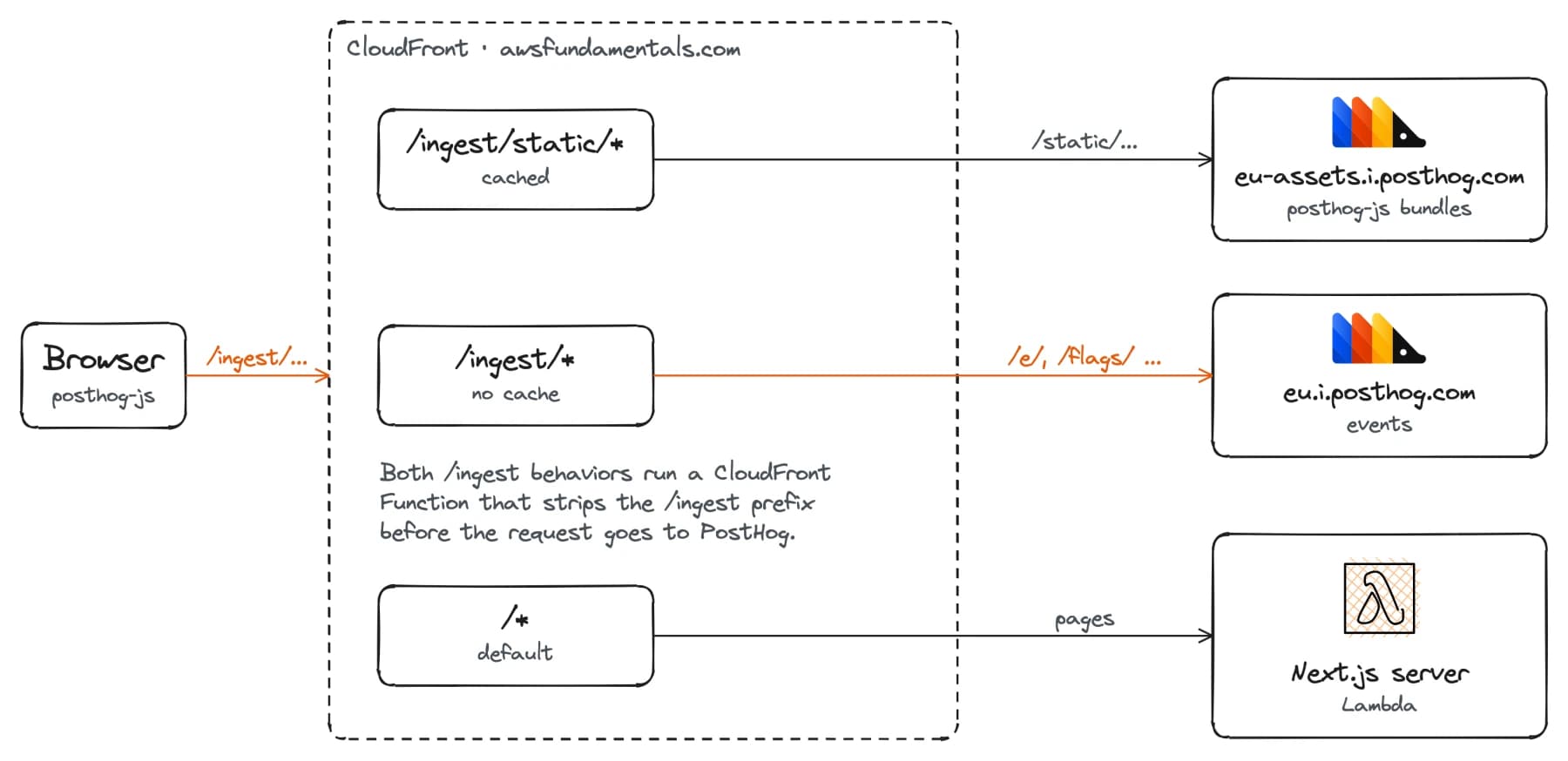
Our CloudFront distribution got two extra origins:
eu.i.posthog.comfor events, with caching disabledeu-assets.i.posthog.comfor the posthog-js bundles, cached
A small CloudFront Function strips the /ingest prefix before the request leaves for PostHog:
function handler(event) {
    var request = event.request;
    if (request.uri.indexOf('/ingest/') === 0) {
        request.uri = request.uri.substring('/ingest'.length);
    }
    return request;
}
posthog-js versions its static bundles with a ?v= query string.
The cache policy for the assets behavior has to include query strings, but must not forward the Host header, otherwise PostHog's asset CDN answers with a redirect back to your own domain.
PostHog's docs have proxy guides for most setups, CloudFront included.
Events We Send From Lambda
The browser only knows what happens in the browser. Did the signup actually go through? Was the order paid? That's only known on the server, so those events come from our Lambda functions:
Newsletter Subscribedfor every signup, with atracking_sourcethat says which form on which page. In the last 90 days that was over 1,000 signups from 13 different sources.- The same event for Google sign-ups through Amazon Cognito. A post-confirmation trigger sends it with the login provider as source, so social logins sit right next to every other form.
Purchase Completedwith the product, the price and the UTM parameters the buyer arrived with. That shows which channel sells the book, next to which one brings traffic.Kit Email Clickwhen someone clicks a link in our newsletter, tagged with the issue.link_clickedfor every redirect on our short links atgo.awsfundamentals.com, with bots and our own end-to-end tests flagged. The link in this post is one of them.
Asking PostHog Questions in Plain English
Everything above is queryable with HogQL, PostHog's SQL dialect over your events. I definitely don't know it by heart.
I don't need to. Claude Code has a small skill for our PostHog project: a script that runs a HogQL query against the PostHog API, our event names, and the traps we already stepped into. Now we ask a question, Claude runs the query and puts the answer in a table.
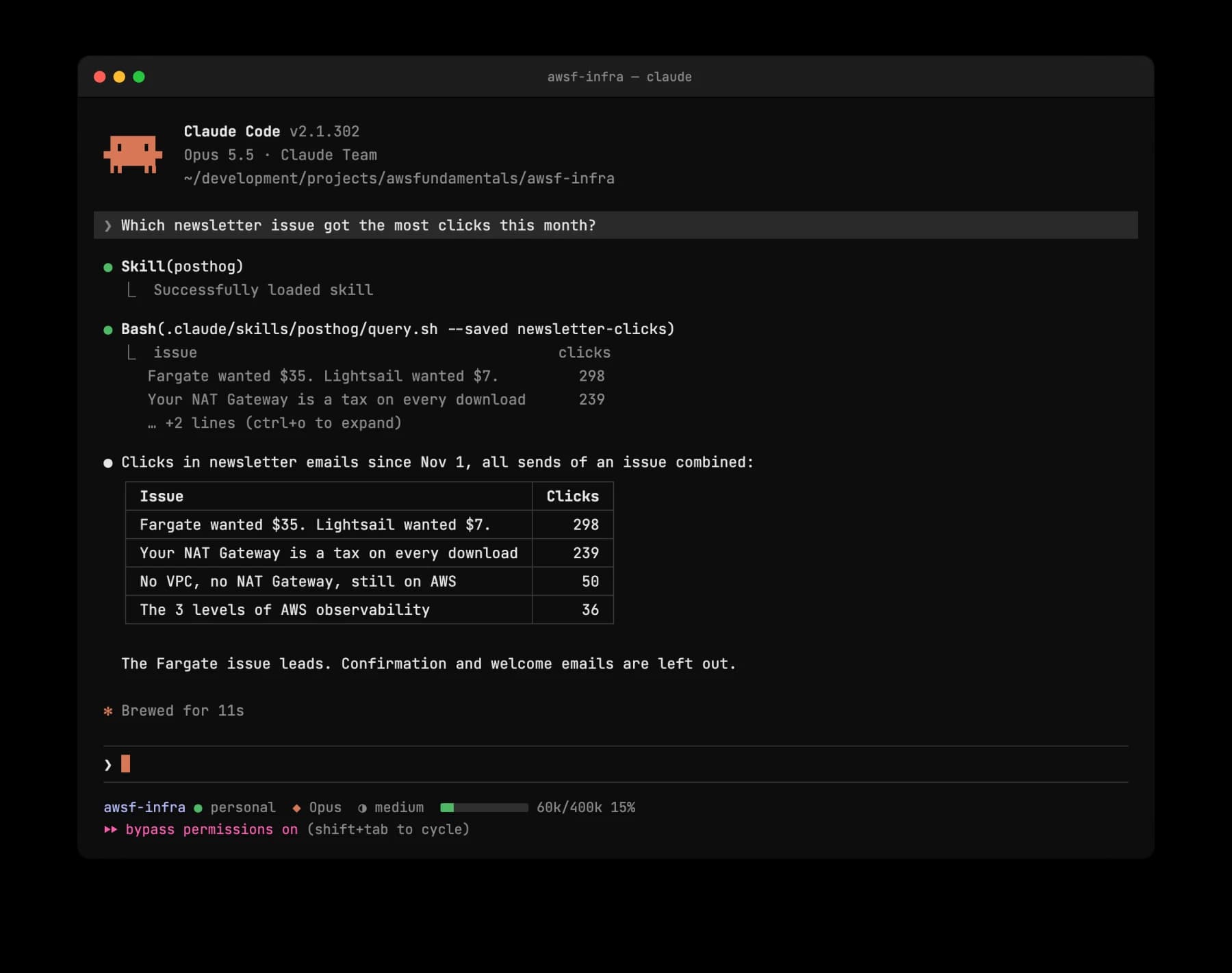
No dashboard to build first, no filters to click through. It works because the events are well named and carry the properties we care about, which is what the sections above are about.
Not tied to Claude Code
The skill is a markdown file and a shell script that calls the PostHog API. Any AI agent that can read a file and run a command can use it, whether that's Cursor, Codex or something else. If you'd rather not write a script at all, PostHog also ships an MCP server that gives agents access to your project.
Three questions we keep asking:
"Which newsletter issue got the most clicks this month?"
SELECT
  replaceRegexpOne(
    properties.utm_campaign, ' - [0-9]+$', ''   -- drop the send ID
  ) AS issue,                                   -- the issue title
  count() AS clicks
FROM events
WHERE event = 'Kit Email Click'                 -- clicks in our newsletter
  AND timestamp >= toStartOfMonth(now())        -- this calendar month
GROUP BY issue                                  -- one row per issue
ORDER BY clicks DESC
"Fargate wanted $35. Lightsail wanted $7." with 298 clicks, ahead of "Your NAT Gateway is a tax on every download" with 239.
"Where did our newsletter signups come from in the last 90 days?"
SELECT
  properties.tracking_source AS source,                -- form and page
  count() AS signups
FROM events
WHERE event = 'Newsletter Subscribed'                  -- sent from Lambda
  AND ifNull(toString(properties.stage), '') != 'dev'  -- skip dev signups
  AND timestamp >= now() - INTERVAL 90 DAY             -- last 90 days
GROUP BY source
ORDER BY signups DESC
The infographics lead magnet page leads with 286, followed by the two homepage heroes with 230 and 165. Google sign-ups via Cognito: 52.
"How many real clicks did our short links get last month?"
SELECT
  count() AS clicks,
  count(DISTINCT properties.slug) AS links                   -- links with a click
FROM events
WHERE event = 'link_clicked'                                 -- every redirect
  AND properties.stage = 'prod'                              -- prod tracker only
  AND toString(properties.is_test) != 'true'                 -- no e2e tests
  AND toString(properties.is_bot) != 'true'                  -- no crawlers
  AND timestamp >= toStartOfMonth(now() - INTERVAL 1 MONTH)  -- from last month's 1st
  AND timestamp < toStartOfMonth(now())                      -- to this month's 1st
26 clicks across 6 links, with bots and tests excluded.
What We Learned Doing This With Claude Code
Left alone, Claude writes fresh SQL for every question. Ask the same thing twice and you can get two different queries. One counts the last 30 days, the other the calendar month. One remembers to drop dev events and bot clicks, the other doesn't. Both answers look plausible, and you won't notice that the numbers drifted.
It happened to us while writing this post.
The first version of the newsletter query grouped by utm_campaign.
Every send of an issue, resends included, gets its own campaign ID in Kit, so the Fargate issue showed up three times with 169, 78 and 51 clicks, and the NAT Gateway issue looked like the winner.
Grouped by title, Fargate wins with 298.
The fix is a single regex, and now it lives in the saved query instead of in whoever asks next:
  SELECT
-   properties.utm_campaign AS issue,
+   replaceRegexpOne(
+     properties.utm_campaign, ' - [0-9]+$', ''
+   ) AS issue,
    count() AS clicks
  FROM events
  WHERE event = 'Kit Email Click'
    AND timestamp >= toStartOfMonth(now())
  GROUP BY issue
  ORDER BY clicks DESC
So the questions we ask more than once live in the skill as saved queries:
.claude/skills/posthog/query.sh --saved newsletter-clicks
.claude/skills/posthog/query.sh --saved signups-by-source
.claude/skills/posthog/query.sh --saved short-link-clicks
We didn't write that skill by hand.
You tell Claude Code to save what you just did as a skill, and it creates a SKILL.md with the instructions and puts the script and the queries next to it.
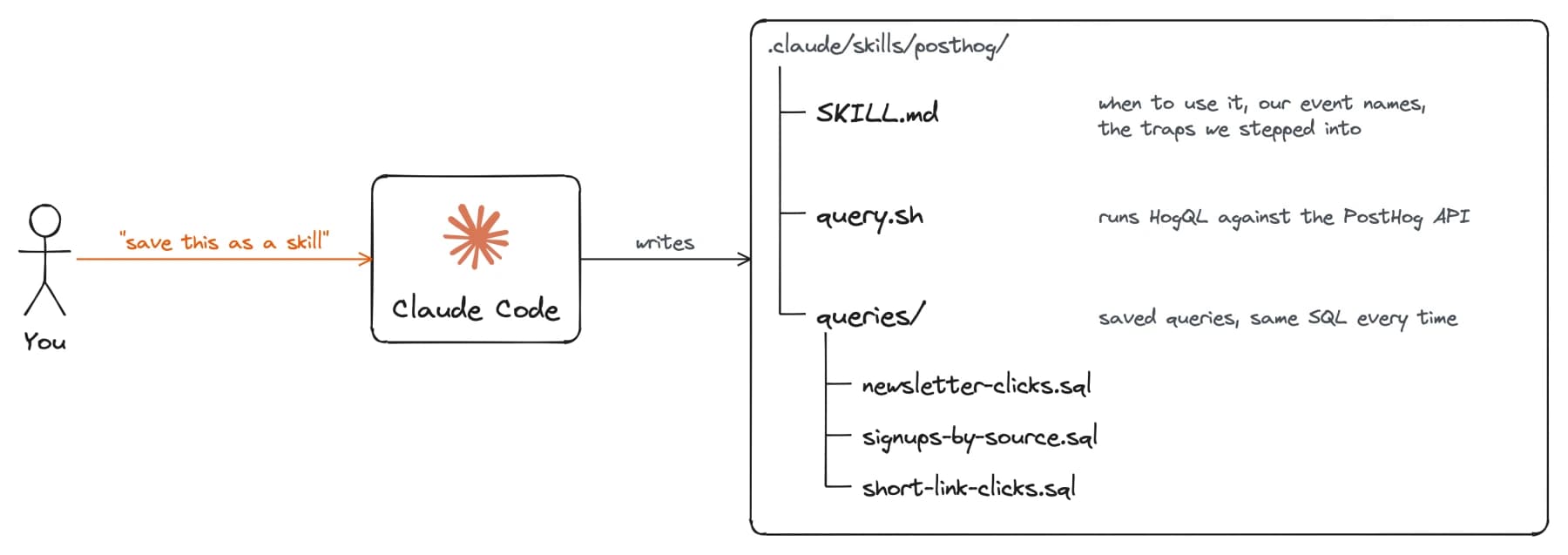
The SQL is fixed, so the same question returns numbers computed the same way every time. Claude's job shrinks to picking the right query and explaining the result. When a one-off question comes up a second time, its query gets saved too.
The other half of the skill is the stuff Claude can't know from the schema:
- Every query needs a
timestampbound, unbounded scans run into PostHog's execution time limit. - Cookieless visitors arrive without an IP, so country comes from our own
viewer_countryproperty, not GeoIP. priceonPurchase Completedis in cents.
None of that is in the schema. Without it written down, Claude guesses, and the guess looks just as confident as a right answer.
Wrap-Up
Our whole analytics setup is posthog-js in the browser, a CloudFront proxy in front of it, and a few capture() calls in Lambda.
Cookieless mode and the proxy keep the visitors we used to lose to "reject" and ad blockers, and the server-side events cover what the browser can't see.
The part we use most today is the last one: asking questions instead of building dashboards. That only works because all the data already sits in one place.
If you want to try it, PostHog has a free tier, and their proxy docs get you through the CloudFront part.