A unit test of your Lambda can pass while the deployed system still fails. The failure sits in AWS: the IAM role, the event rule, or the API authorizer.
On a traditional monolith, most of the system is yours. You control the runtime, and you can reproduce the dependencies in CI with Docker, a test database, and a local stand-in for a service. Integration tests and end-to-end tests then run somewhere that looks a lot like production.
Serverless moves that behavior into managed services. API Gateway, DynamoDB, EventBridge, Cognito, and IAM do not come with you when you start the function on your laptop. IAM is the permission check AWS makes before a call is allowed. EventBridge is the bus that routes events between services. API Gateway is the HTTP front door in front of the function.
A test that only imports the handler covers the function. The order still has to get through the authorizer, the bus, and the role. Those can fail while the function code is fine.
Mocks and LocalStack stop at the account boundary
Mocks are the right tool for a unit test of the function. You can check that you called DynamoDB with the payload you meant, that you handled an error, and that you transformed the data. They are excellent at that.
They stop at the boundary of the account.
Your mock can return success for PutItem while the real call fails, because the Lambda role has no dynamodb:PutItem.
The role is a managed AWS resource.
The mock never consults it.
LocalStack goes a step further. Instead of Lambda calling a fake client, the function calls a local DynamoDB. That is a real service interaction, which a hand-written mock is not.
An emulator is still an approximation of AWS. IAM, service quotas, retries, networking, and other service-specific behavior can differ from the account you deploy to. I wouldn't dismiss LocalStack. It is great for fast local integration testing. I still run the suite against AWS before I trust the result.
Testing the deployed stack is slower. You wait on a deploy before you get an answer, and that wait makes development frustrating. AWS's Lambda testing guide makes the same trade. Cloud tests track the real services, and a cloud deploy takes longer than a local run.
No single technique covers a serverless system. The way I close the gap is to write the scenario once and run it two ways.
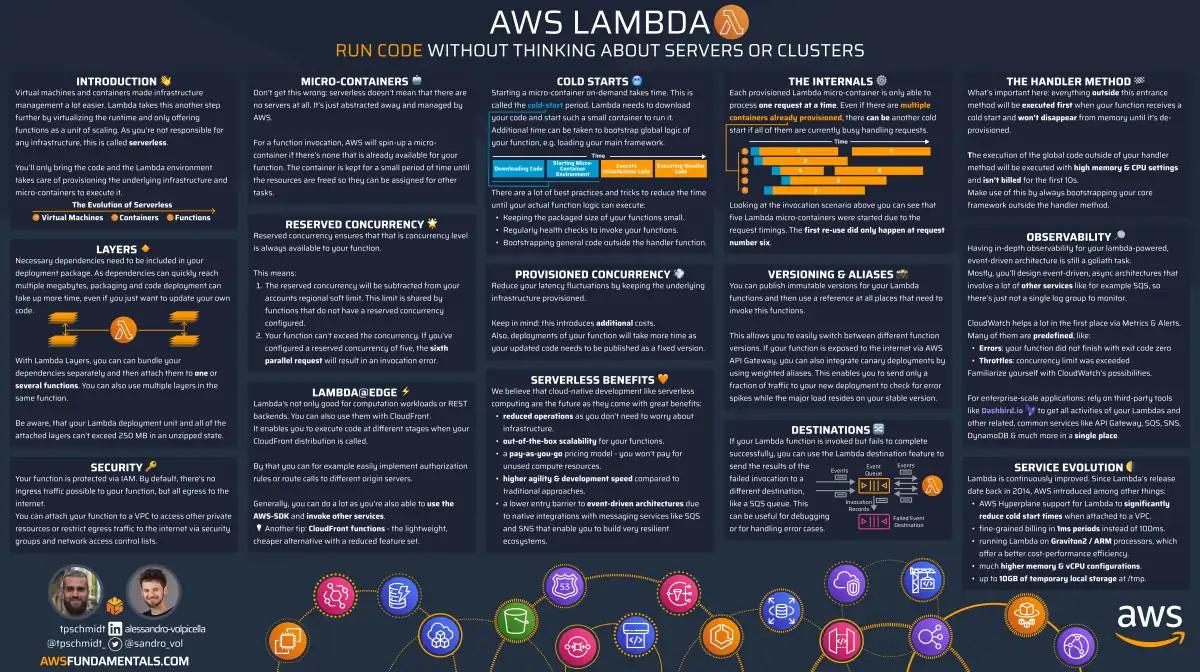
AWS Lambda on One Page (No Fluff)
Skip the 300-page docs. Our Lambda cheat sheet covers everything from cold starts to concurrency limits - the stuff we actually use daily.
HD quality, print-friendly. Stick it next to your desk.
One scenario, two modes
Yan Cui calls the local-code, remote-AWS setup remocal testing. InfoQ's report of his QCon talk is where that name is recorded. Your function runs on your machine. It talks to real AWS resources. I learned the two-mode version of that idea in his Production-Ready Serverless workshop. The ordering API in my repo is where I use it.
You don't want to write that test twice.
You write the scenario once.
TEST_MODE decides how it is invoked.
Handler mode calls the real handler in-process.
The test imports functions/place-order.mjs and calls handler(event, context) inside Vitest.
Nothing in that path goes through API Gateway.
The SDK calls still go to real AWS.
Which service they hit depends on the function.
They use the credentials of whoever is running the test.
On a laptop, that is you.
In this pipeline, that is the GitHub Actions role.
The Lambda role is checked later, when http mode runs the deployed function.
Http mode runs the same scenario through the deployed system.
For the HTTP routes, the test sends a request to the API Gateway URL.
GET /restaurants is signed with Signature Version 4 (SigV4), because that route uses an IAM authorizer.
POST /orders and POST /restaurants/search send a Cognito id token, because those routes use a user-pool authorizer.
notify-restaurant has no HTTP route.
In http mode the test calls PutEvents on the real bus, and the EventBridge rule invokes the deployed function.
| Handler mode | TEST_MODE=http | |
|---|---|---|
| Where the test runs | Your machine | Your machine or CI |
| Where the Lambda runs | In the Vitest process | Deployed |
| API Gateway | Skipped | Used, on the HTTP routes |
| Auth | Skipped | IAM or Cognito, per route |
notify-restaurant | Direct handler call | PutEvents on the real bus |
| Credentials on the function's own SDK calls | Whoever runs the test | The Lambda role |
| Deploy the function first? | The code can stay local | The stack has to be up |
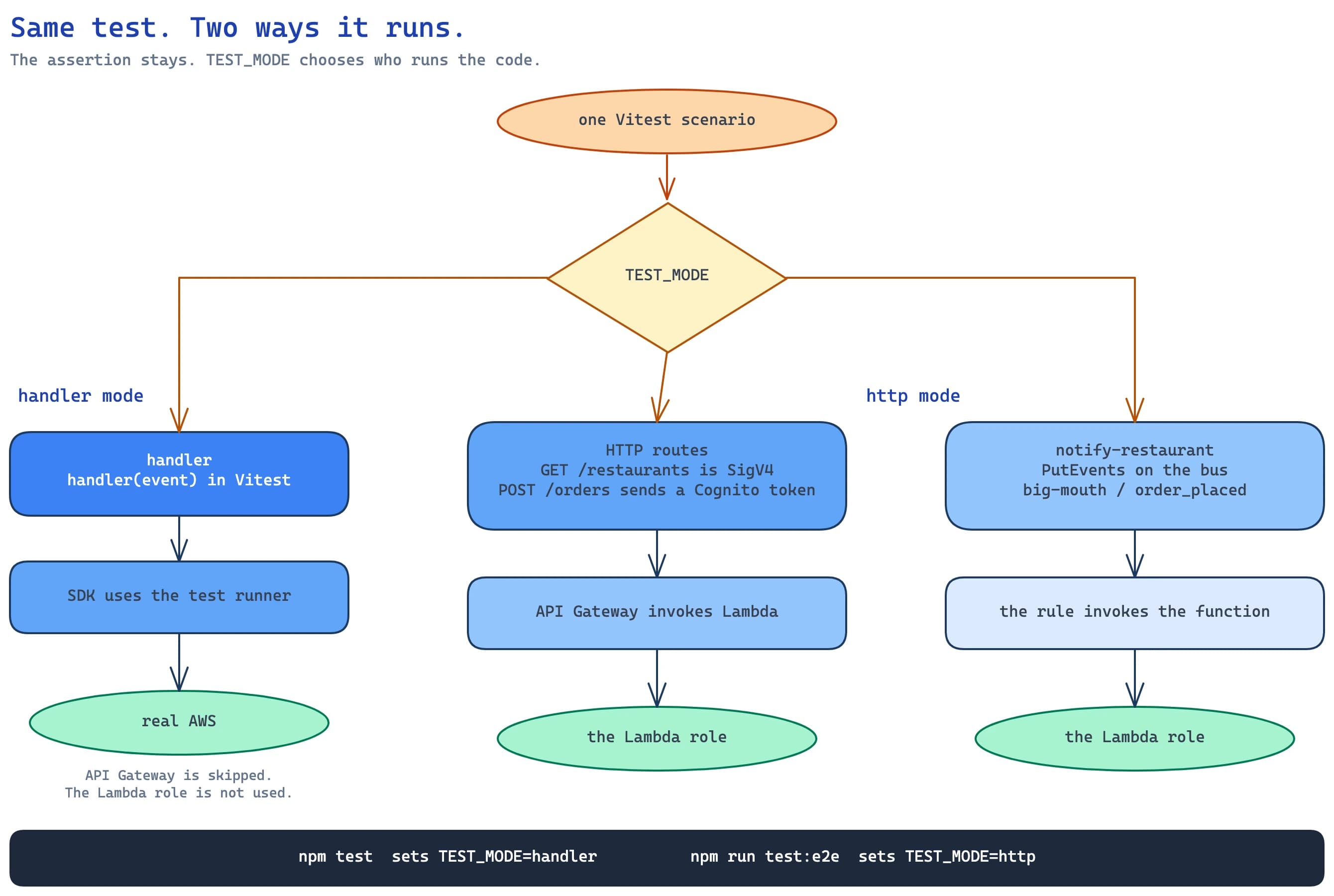
The assertion does not change.
TEST_MODE chooses the path in that picture.
If you only had http mode, every change would look like this.
Change the function
  -> deploy
  -> wait
  -> run the test
Handler mode is the fast loop.
Change the function
  -> run it locally
  -> call real AWS
  -> read the result
You don't need to deploy the Lambda to test its logic and its AWS calls. The table, the bus, and the SSM parameters still have to exist, and the test still needs credentials that can reach them. When you need the deployed architecture, you switch mode.
TEST_MODE switches the call
The scenarios live in one Vitest suite.
Vitest is the test runner.
The scripts in package.json only change the variable.
"scripts": {
  "dotEnv": "sls export-env --all",
  "test": "cross-env TEST_MODE=handler vitest",
  "test:e2e": "cross-env TEST_MODE=http vitest"
}
npm test runs the suite in handler mode.
npm run test:e2e runs the same files in http mode.
cross-env sets the variable the same way on macOS and Windows.
There is no second copy of the assertions.
This test does not know which mode it is in.
It asks when.mjs to invoke GET /restaurants, then checks the answer.
describe(`When we invoke the GET /restaurants endpoint`, () => {
    it(`Should return an array of 8 restaurants`, async () => {
        const res = await when.we_invoke_get_restaurants();

        expect(res.statusCode).toEqual(200);
        expect(res.body).toHaveLength(8);

        for (let restaurant of res.body) {
            expect(restaurant).toHaveProperty('name');
            expect(restaurant).toHaveProperty('image');
        }
    });
});
Eight is default_results on that function in serverless.yml.
The mode switch is the whole trick, and it is small.
const mode = process.env.TEST_MODE;

export const we_invoke_get_restaurants = async () => {
    switch (mode) {
        case 'handler':
            return await viaHandler({}, 'get-restaurants');
        case 'http':
            return await viaHttp('restaurants', 'GET', { iam_auth: true });
        default:
            throw new Error(`unsupported mode: ${mode}`);
    }
};
Handler mode loads the function file and calls it.
const viaHandler = async (event, functionName) => {
    const { handler } = await import(`${APP_ROOT}/functions/${functionName}.mjs`);
    return handler(event, {});
};
The file also parses a JSON body before it returns. That step is the same in both modes.
Http mode builds the URL from process.env.rest_api_url, which sls export-env wrote into .env.
tests/steps/init.mjs loads that file and sets the region to us-east-1.
When the call asks for IAM auth, aws4fetch signs the request with the current credentials.
if (_.get(opts, 'iam_auth', false) === true) {
    const credentialProvider = fromNodeProviderChain();
    const credentials = await credentialProvider();
    const aws = new AwsClient({
        accessKeyId: credentials.accessKeyId,
        secretAccessKey: credentials.secretAccessKey,
        sessionToken: credentials.sessionToken,
    });

    res = await aws.fetch(url, { method, headers, body });
} else {
    res = await fetch(url, { method, headers, body });
}
POST /orders takes the other branch.
The test creates a Cognito user, and http mode sends that user's id token in Authorization.
Handler mode never presents the token.
It passes the body straight to the function.
notify-restaurant is the case that shows why the second mode is not only HTTP.
export const we_invoke_notify_restaurant = async (event) => {
    if (mode === 'handler') {
        await viaHandler(event, 'notify-restaurant');
    } else {
        const busName = process.env.bus_name;
        await viaEventBridge(busName, event.source, event['detail-type'], event.detail);
    }
};
The full switch is in tests/steps/when.mjs.
The second mode sees the wiring
GET /restaurants uses an IAM authorizer.
The deployed function is allowed dynamodb:Scan on the restaurants table, and it is allowed to read its SSM config.
Handler mode skips the authorizer and scans with the test runner's credentials.
Http mode signs the request, then the deployed function scans with its own role.
A caller missing execute-api:Invoke fails the signed call.
A function role missing dynamodb:Scan fails after API Gateway has invoked the deployed function.
POST /orders uses a Cognito authorizer, and the function is allowed events:PutEvents on the bus.
The test places an order for a restaurant named Fangtasia and expects 200.
It then waits up to 10 seconds for this event on the bus.
const expectedMsg = JSON.stringify({
    source: 'big-mouth',
    'detail-type': 'order_placed',
    detail: {
        orderId,
        restaurantName: 'Fangtasia',
    },
});
The test can see that event because the dev stage builds a tap for it.
On any stage whose name starts with dev, serverless.yml adds a rule for source big-mouth and points it at an SQS queue.
The restaurant-notification topic is subscribed to the same queue.
tests/messages.mjs polls the queue.
A role that lacks events:PutEvents can still pass handler mode, because that mode publishes with the test runner's credentials.
notify-restaurant is the event-rule check.
The deployed function listens for big-mouth / order_placed.
It publishes the order to SNS, then publishes restaurant_notified back to the bus.
The test waits up to 10 seconds for both.
In handler mode the test calls that function directly.
A wrong event pattern still passes, because EventBridge never had to match it.
In http mode the test only puts the event on the bus.
The rule has to match, the function has to run, and the role has to be allowed sns:Publish and events:PutEvents.
If the pattern says the wrong detail type, the queue stays empty and the test fails.
These tests tell you the permissions and the wiring held for this request. They do not tell you that you are inside a service quota. A quota miss is still a separate test.
CI deploys, then runs both
Http mode needs a real stack, so the pipeline deploys before it tests.
.github/workflows/dev.yml runs on a push to main that touches the functions, serverless.yml, package.json, the lockfile, the workflow, or the tests.
A README-only push does not deploy.
The job locks on dev-environment, so two pushes cannot deploy that stack at once.
It assumes secrets.AWS_ROLE_ARN in us-east-1 through GitHub's OIDC provider.
OIDC (OpenID Connect) lets the job take on that role without an access key stored in the repo.
The commands run in this order.
npx sls deploy
npm run dotEnv
npm test
npm run test:e2e
dotEnv is sls export-env --all.
That writes rest_api_url, bus_name, and the rest of the function environment into .env, which the suite loads.
Both modes run after that deploy.
On your laptop, handler mode is how you skip redeploying the function between edits.
In CI the function is already deployed before either command runs.
The slow part is the deploy, and it sits on the critical path of every matching push.
That is the trade for knowing the authorizer and the role were tested against the stack this job deployed.
Mocks and LocalStack still belong
I still reach for a mock when the question is inside the function. Did I call DynamoDB correctly? Did I handle an error? Did I transform the data? Those tests stay fast, and they stay off the network.
I still reach for LocalStack when I want several AWS APIs on my laptop and I am willing to accept an approximation. The IAM authorizer, the Cognito authorizer, and the EventBridge rule in this suite stay on the real account.
Which mode to run
Run handler mode while you are changing the function and the AWS resources are already deployed.
Run http mode before you trust a deploy.
That pass is the one that hits API Gateway, the authorizer on that route, the Lambda role, and, for notify-restaurant, the EventBridge rule.
Mock the call when you need a failure the account will not give you on demand.
Use LocalStack for a local look at service interactions, then run the same scenario against AWS.
The switch is in tests/steps/when.mjs.
Deploy the dev stage, run npm run dotEnv, then run node seed-restaurants.mjs so restaurants_table has the eight rows from seed-restaurants.mjs.
Then run npm test and npm run test:e2e.