
Table of Contents
Jump to a section
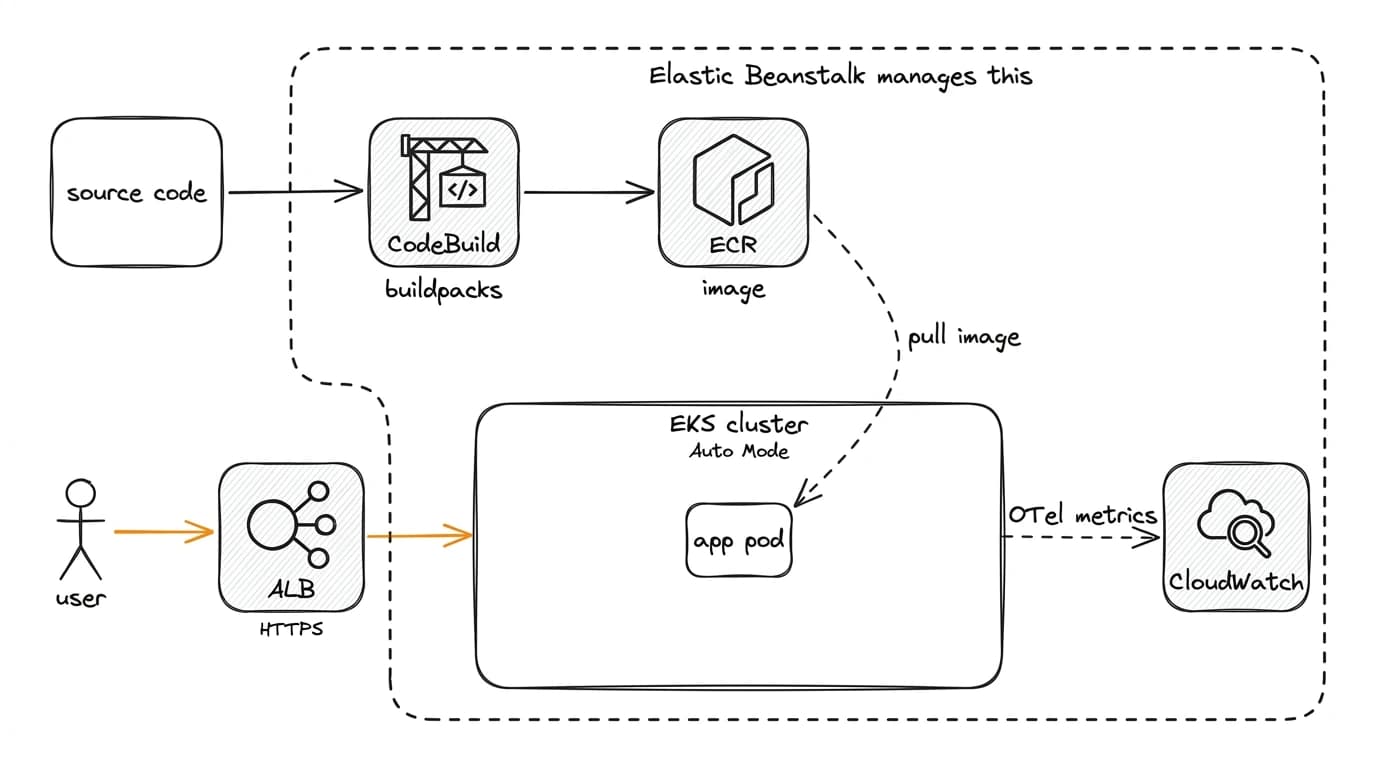
Elastic Beanstalk shipped its biggest change in years on September 17, 2026. Cluster Mode is a second way to run an application on Beanstalk, and it does not look like the Beanstalk you know. Instead of one EC2 environment per application, your app runs as a pod on a shared EKS cluster that Elastic Beanstalk creates and owns.
I have a rule for picking AWS services: build on the primitives, not on the convenience layers wrapped around them. I wrote it down in Build on ECS Primitives, Not Convenience Layers, after watching most of the layers AWS built on top of ECS die. Elastic Beanstalk has always sat on the convenience-layer side of that line.
Which makes this post a plot twist. Cluster Mode is the first AWS abstraction I would build on. It hands you an EKS cluster that Beanstalk maintains, an observability stack that is already wired up, and a container image built from your source with no Dockerfile in sight. The caveats are real, but the abstraction earns its place.
I built a small Node.js app, deployed it both ways, and wrote down everything that broke.
What Cluster Mode is
Elastic Beanstalk now has two ways to run the same application:
- Standard Mode gives every environment its own EC2 instances. Twenty small services means twenty environments to patch and pay for.
- Cluster Mode creates an EKS cluster with Auto Mode enabled and runs your application as a workload on it. One cluster carries many applications.
You hand it source code, a Dockerfile, or a prebuilt container image, and all three end up in the same place:
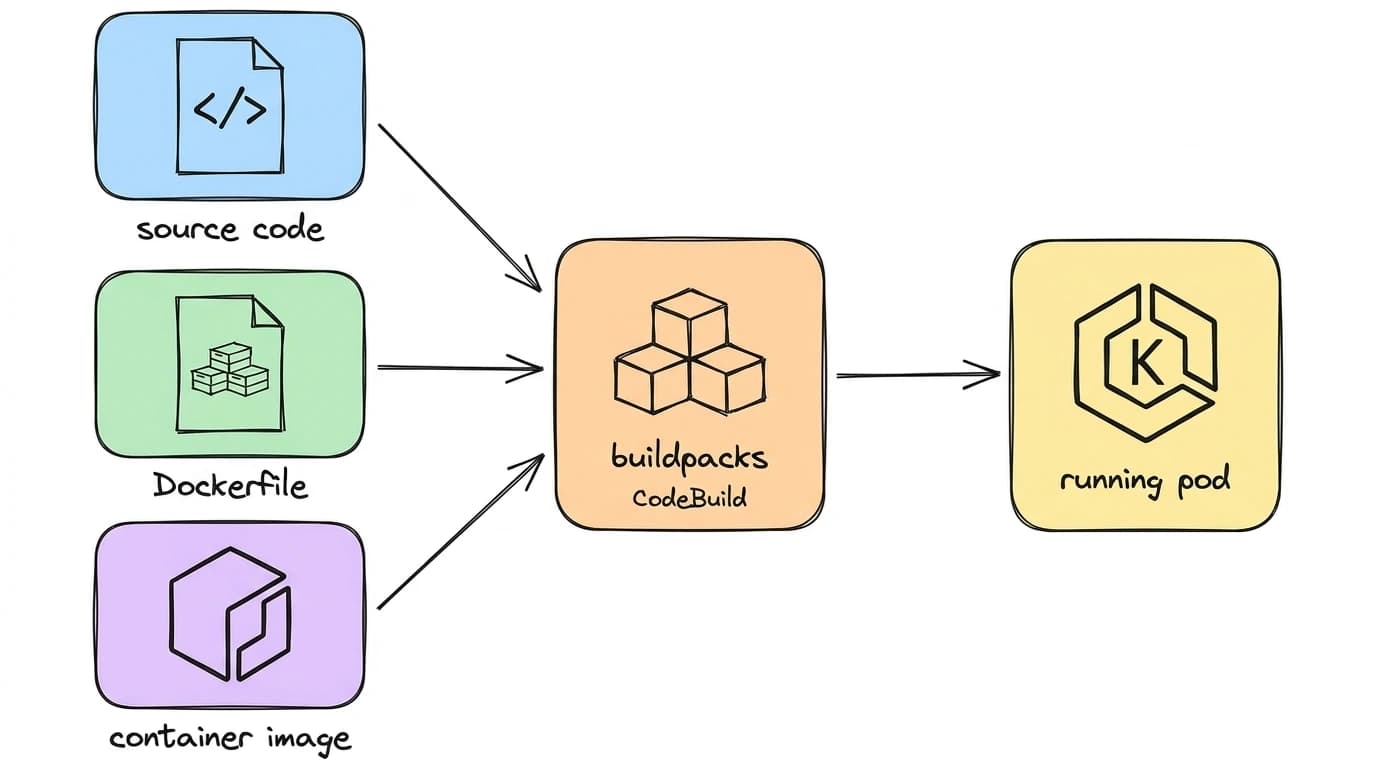
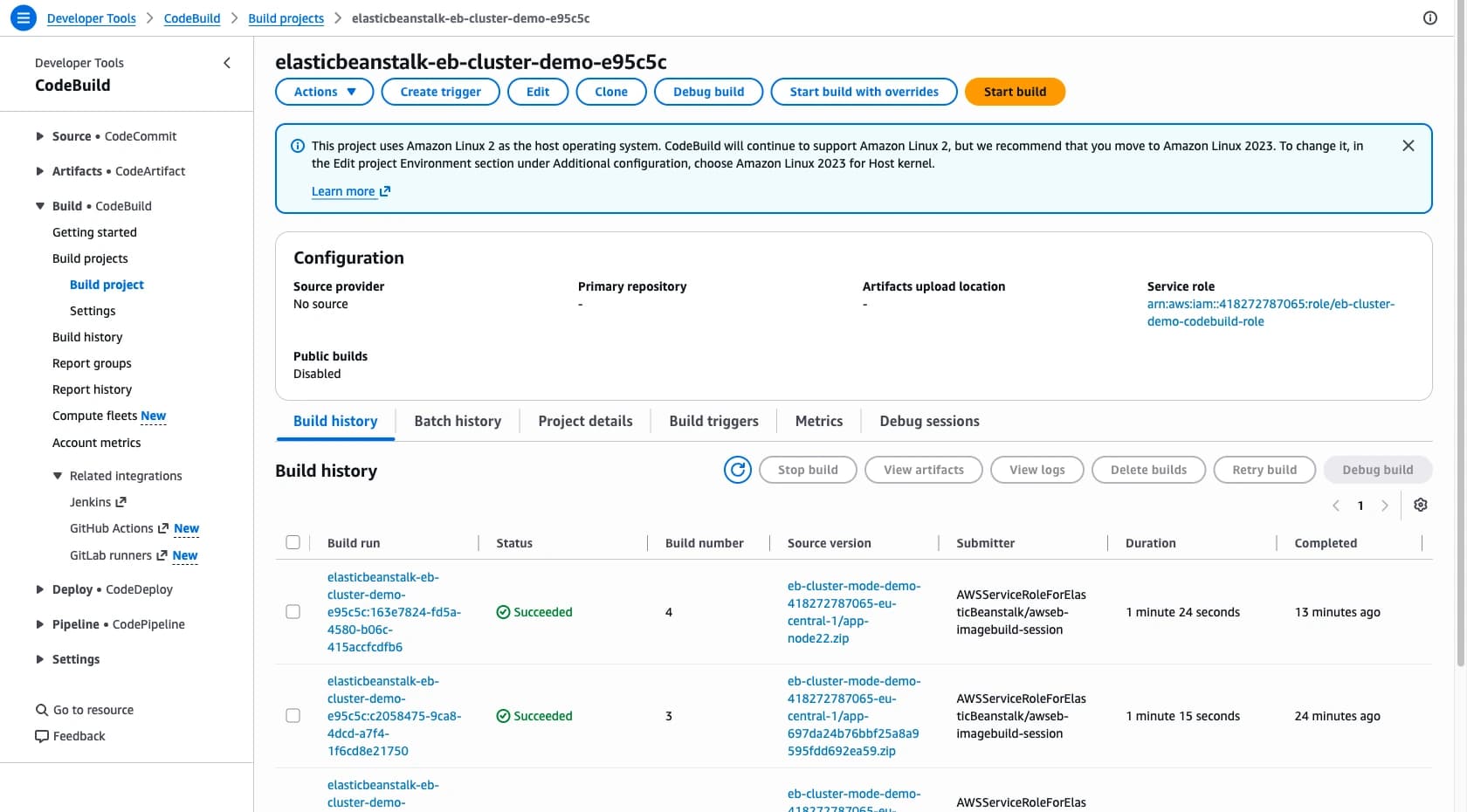
Hand over source and Cloud Native Buildpacks containerize it in CodeBuild, push the image to ECR, and the cluster pulls it. No Dockerfile required.
Every environment gets an ALB with an ACM certificate, pod identity for AWS access, and horizontal autoscaling. Both modes coexist inside one application, so you can migrate environment by environment.
| Standard Mode | Cluster Mode | |
|---|---|---|
| Compute | one EC2 environment per app | pods on a shared EKS cluster |
| Source input | platform bundles per runtime | source, Dockerfile, or image |
| HTTPS | you set it up | ALB and ACM by default |
| Spot | supported | not exposed |
| Deploys | all-at-once to traffic-splitting | rolling update, auto-rollback |
| Observability | you wire it up | OTel and a dashboard, built in |
| Baseline cost | none | EKS control plane, ~$0.10/hr |
AWS Lambda on One Page (No Fluff)
Skip the 300-page docs. Our Lambda cheat sheet covers everything from cold starts to concurrency limits - the stuff we actually use daily.
HD quality, print-friendly. Stick it next to your desk.
What I deployed
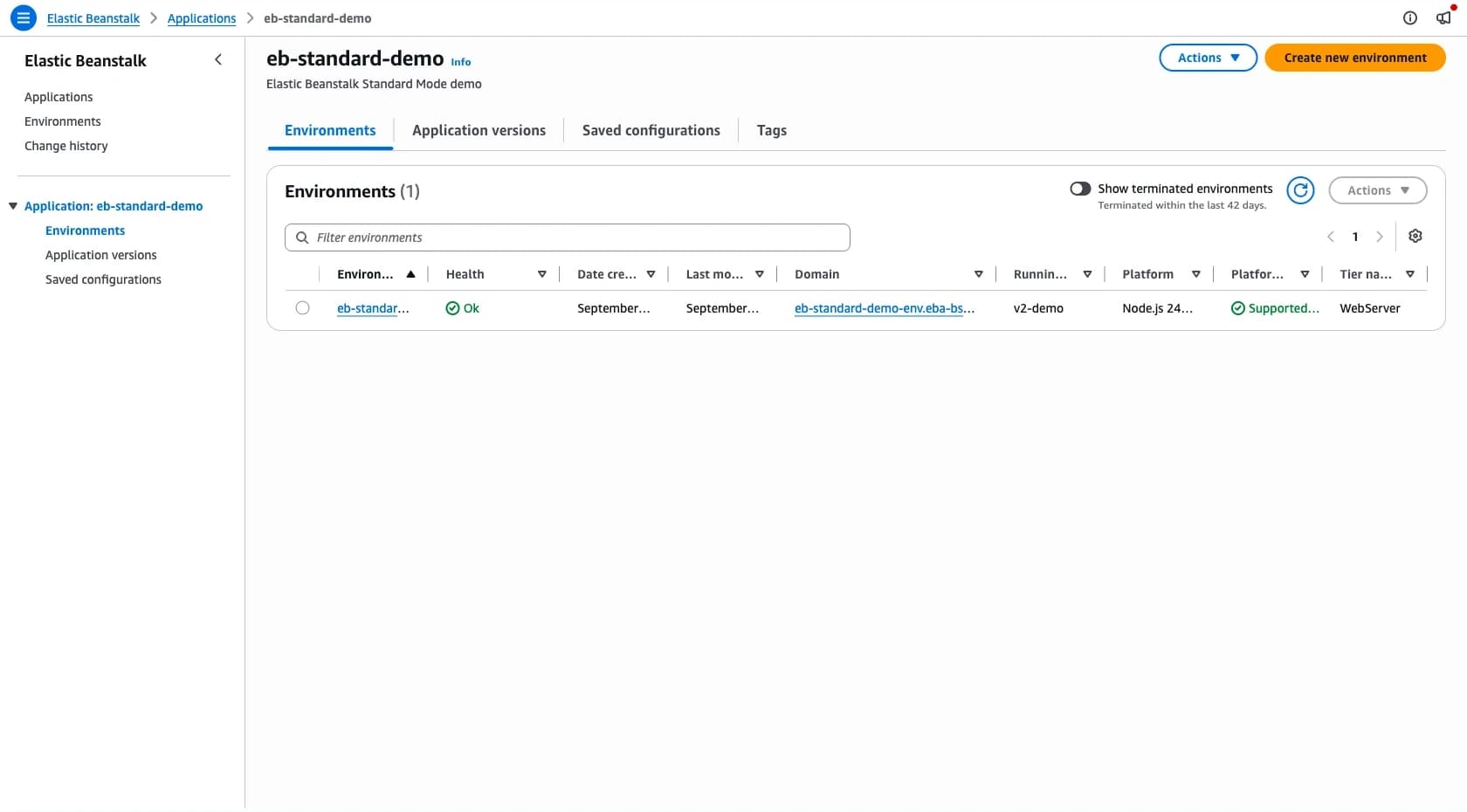
Two environments, same app, both created through CloudFormation (the only IaC that accepted the new tier on day one):
app/         minimal Node.js HTTP server, returns JSON on / and /health
cluster/     Cluster Mode environment (tier Name=Cluster, Type=EKS)
standard/    Standard Mode environment, single instance, 100% spot
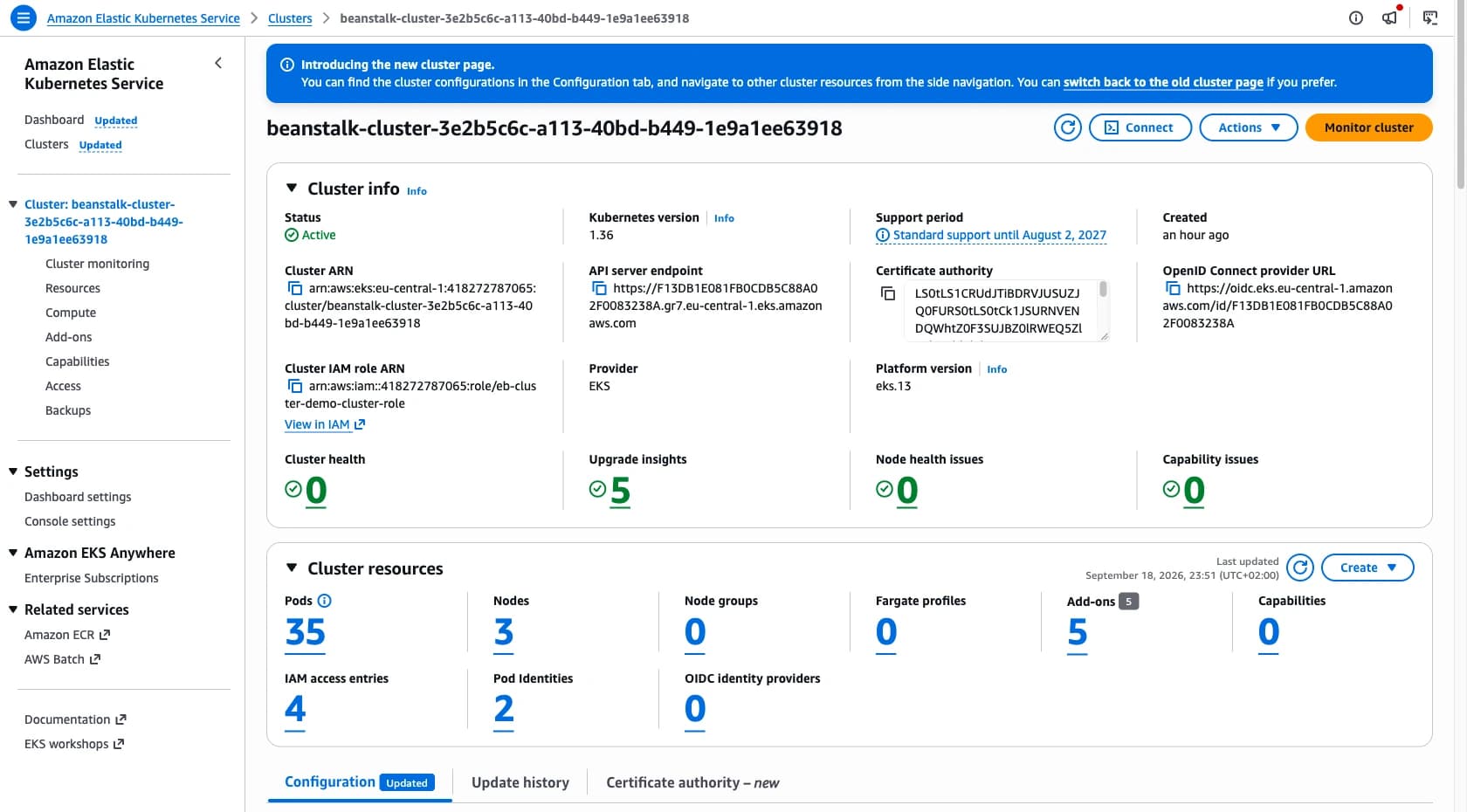
One apply created the Cluster Mode environment, the cluster, the node pool and the add-ons, built the image in CodeBuild, and put a pod behind an ALB.
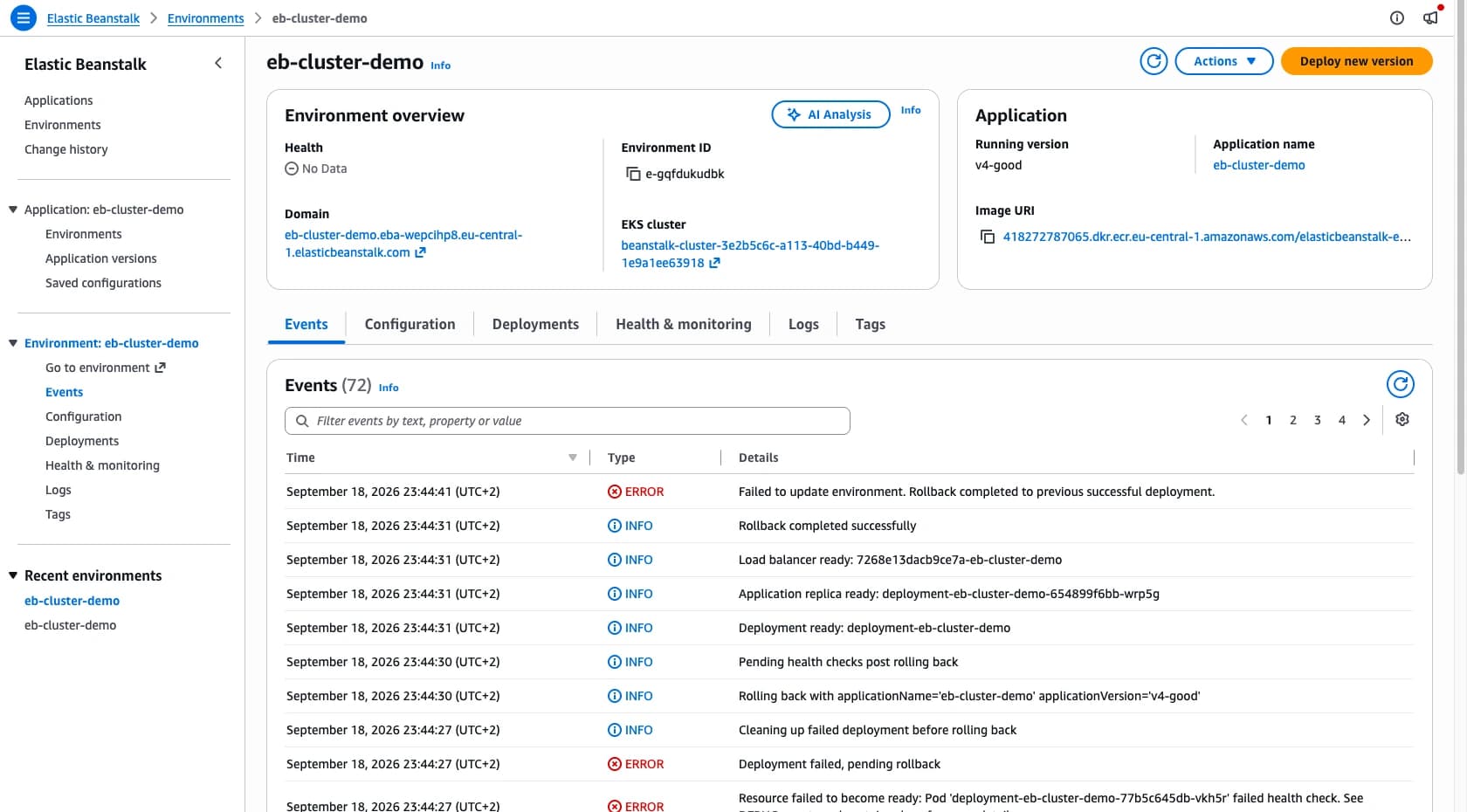
curl https://eb-cluster-demo.eba-wepcihp8.eu-central-1.elasticbeanstalk.com/
{
    "message": "hello from elastic beanstalk",
    "mode": "cluster",
    "hostname": "deployment-eb-cluster-demo-654899f6bb-wrp5g"
}
Standard Mode was the control group: a t4g.nano on spot, one instance, no load balancer, roughly two dollars a month.
It stayed boring, which is a compliment.
The good parts
- One cluster for many apps. No idle capacity per application. Elastic Beanstalk creates the cluster, node pools and add-ons, and keeps the add-on versions current.
- Buildpacks instead of Dockerfiles. Node.js was detected, the image built and pushed to ECR. The build is a normal CodeBuild project, so the logs are where you already look.
- HTTPS out of the box. Certificate, 443 listener and target group are configured without you touching any of it.
- Sizing is option settings, not YAML. CPU, memory, replicas, autoscaling bounds and probes are flat key-value pairs with sane defaults: 250m CPU, 512Mi memory, port 8080.
- The first deploy is slow, later ones are not. Roughly ten minutes to create the cluster, even for a Node app with zero dependencies. Later environments reuse it.
Where it hurts
Undocumented option namespaces
Cluster environments reject every classic namespace, including aws:elasticbeanstalk:environment and aws:ec2:vpc.
On day one, the only way to find the replacements was the validation error:
Invalid option settings: namespace=aws:elasticbeanstalk:environment, option name=ServiceRole:
Unknown namespace 'aws:elasticbeanstalk:environment'. Valid namespaces are:
  aws:elasticbeanstalk:eks
  aws:elasticbeanstalk:eks:alb
  aws:elasticbeanstalk:eks:environment
  aws:elasticbeanstalk:eks:environment:autoscaling
  aws:elasticbeanstalk:eks:environment:deployment
  aws:elasticbeanstalk:eks:environment:liveness-probe
  aws:elasticbeanstalk:eks:environment:readiness-probe
  aws:elasticbeanstalk:eks:environment:startup-probe
  aws:elasticbeanstalk:eks:observability
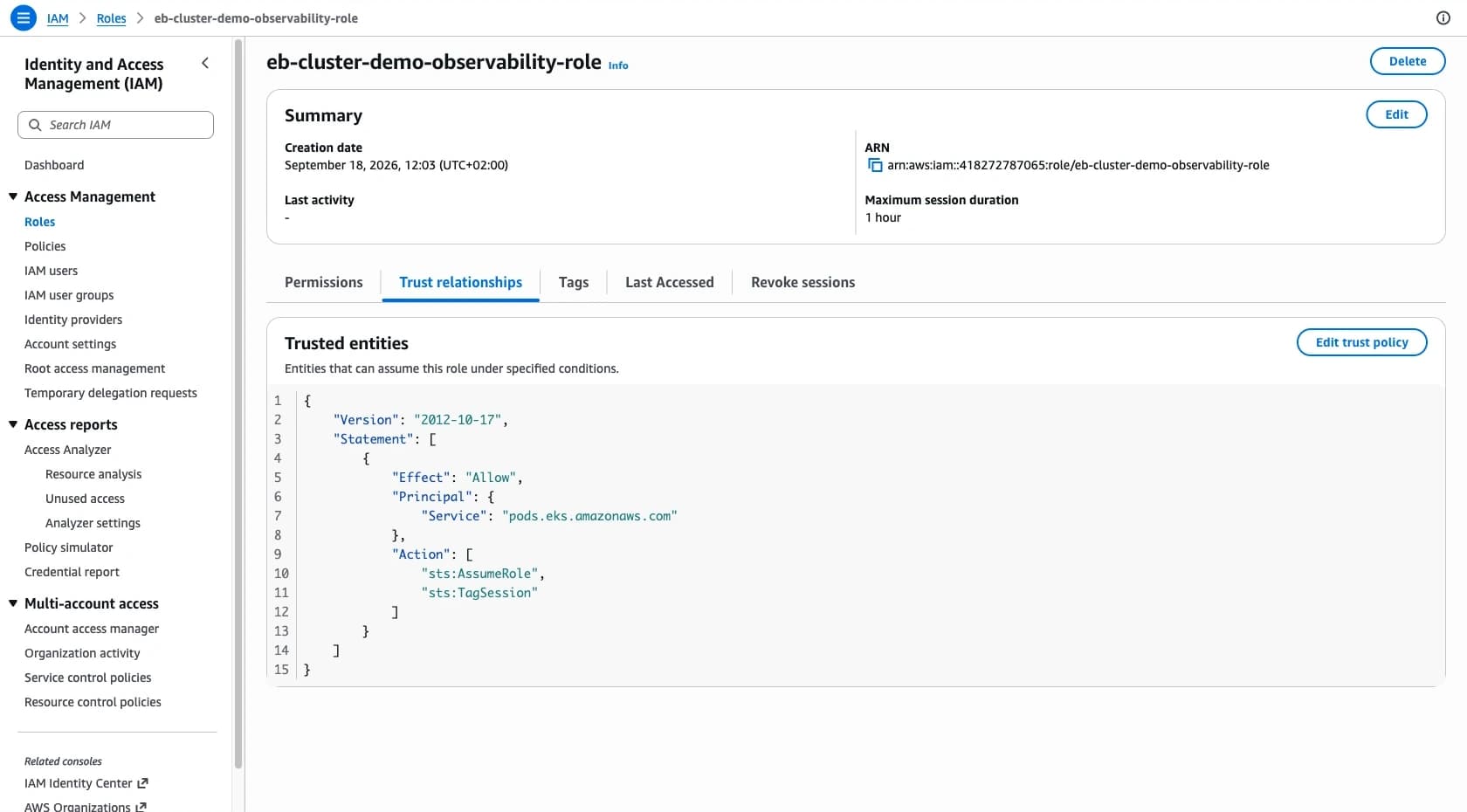
Three IAM roles, three trust policies
| Role | Trusted by | Needs |
|---|---|---|
| cluster-role | eks.amazonaws.com | AssumeRole and TagSession |
| node-role | ec2.amazonaws.com | AssumeRole |
| observability-role | pods.eks.amazonaws.com | AssumeRole and TagSession |
The observability role is the trap.
Beanstalk never assumes it; an EKS Pod Identity association for the metrics and logging agents does.
Give it an elasticbeanstalk.amazonaws.com trust policy, the obvious guess, and the build dies with Trust policy of the role provided is invalid.
No Spot
I dumped the option surface of a running cluster environment: 102 settings, none mentioning Spot or capacity type.
Beanstalk's own node pool, elastic-beanstalk-nodepool, is hard-pinned to on-demand:
karpenter.sh/capacity-type                    In   ['on-demand']
eks.amazonaws.com/instance-category           In   ['c', 'd', 'gr', 'hpc', 'i', 'im', 'is', 'm', 'r', 't', 'x', 'z']
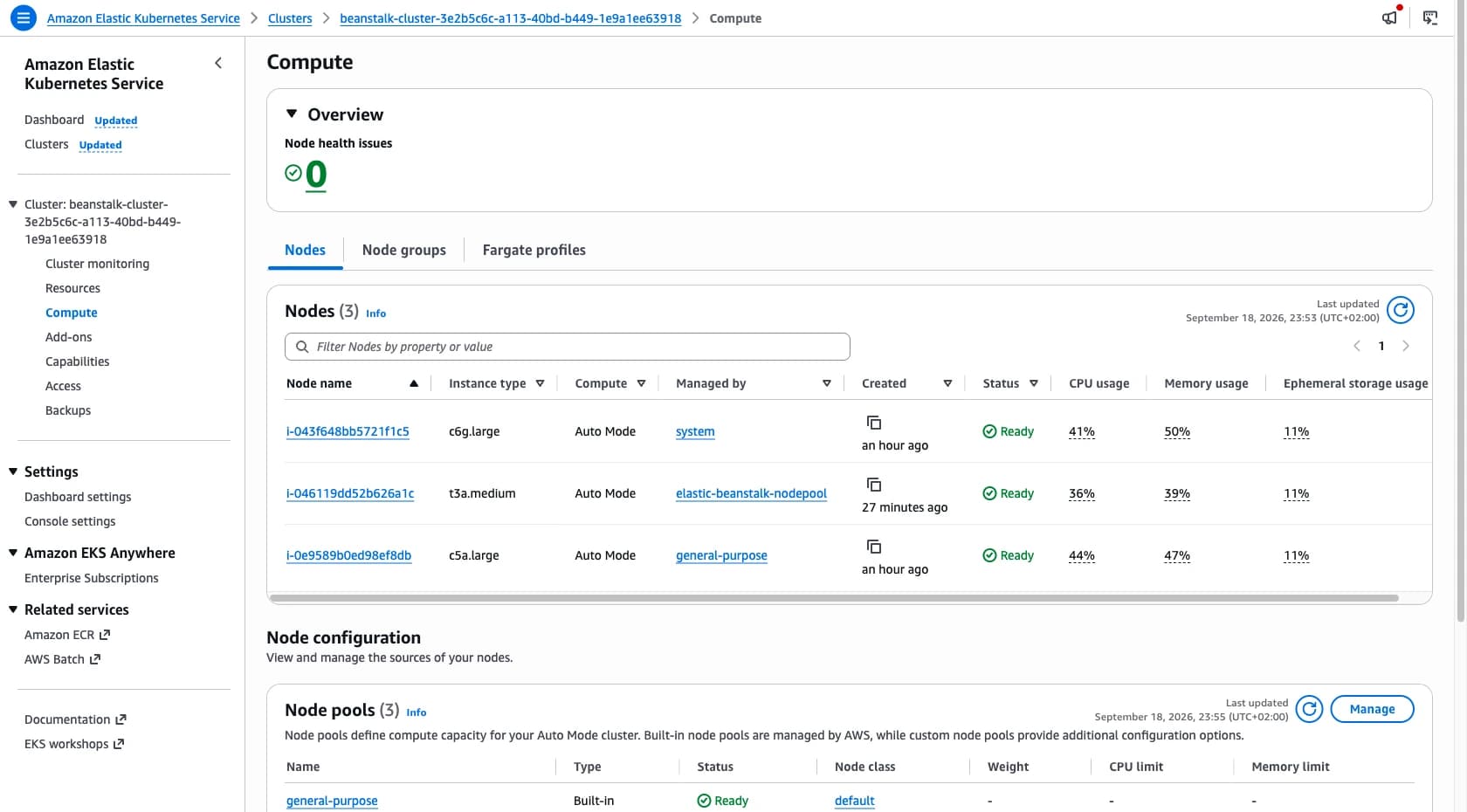
The docs back this up: node capacity is "service-managed" and comes from EKS Auto Mode.
There is a node-pool option in aws:elasticbeanstalk:eks:environment, but it only gives an environment dedicated nodes for isolation, not a different capacity type.
Adding your own Spot NodePool to the cluster is a change Beanstalk treats as drift, which stops it from maintaining the cluster.
Treat Spot as unsupported.
More broadly, the cluster is a normal EKS cluster and kubectl works, but the knobs stop at what Beanstalk exposes.
No add-on selection, no node pool changes, and instance selection is a single instance-category letter.
That is the trade for not running the cluster yourself.
Deploys and rollbacks
Cluster Mode drops the classic deployment policies.
Deploys are Kubernetes rolling updates, by default with a surge of one and zero unavailability.
The only alternative is Recreate, which is all at once.
No immutable deployments, no traffic-splitting canary, no bake time.
I ran the same cycle on both modes: a good version, then a broken one that listens on the wrong port.
aws elasticbeanstalk update-environment \
  --environment-name eb-cluster-demo \
  --version-label v3-broken
On Cluster Mode, the broken pod crashed on startup, the rollout stalled, and the old version kept serving. Every curl through the whole window returned 200. Then Beanstalk rolled back on its own:
INFO  Cleaning up failed deployment before rolling back
INFO  Rolling back with applicationName='eb-cluster-demo' applicationVersion='v4-good'
INFO  Rollback completed successfully
ERROR Failed to update environment. Rollback completed to previous successful deployment.
Standard Mode did the opposite.
Beanstalk reported Environment update completed successfully, health stayed Green, and the endpoint answered:
$ curl -i http://eb-standard-demo-env.eba-bsx5ybfa.eu-central-1.elasticbeanstalk.com/
HTTP/1.1 502 Bad Gateway
A single-instance environment has no second copy to fall back on.
"Completed successfully" described the deployment, not the application.
Health only went Yellow later.
Cluster Mode behaved like a modern rollout here, and I did not expect that going in.
Observability, wired up for you
This is the part I would miss most going back to Standard Mode.
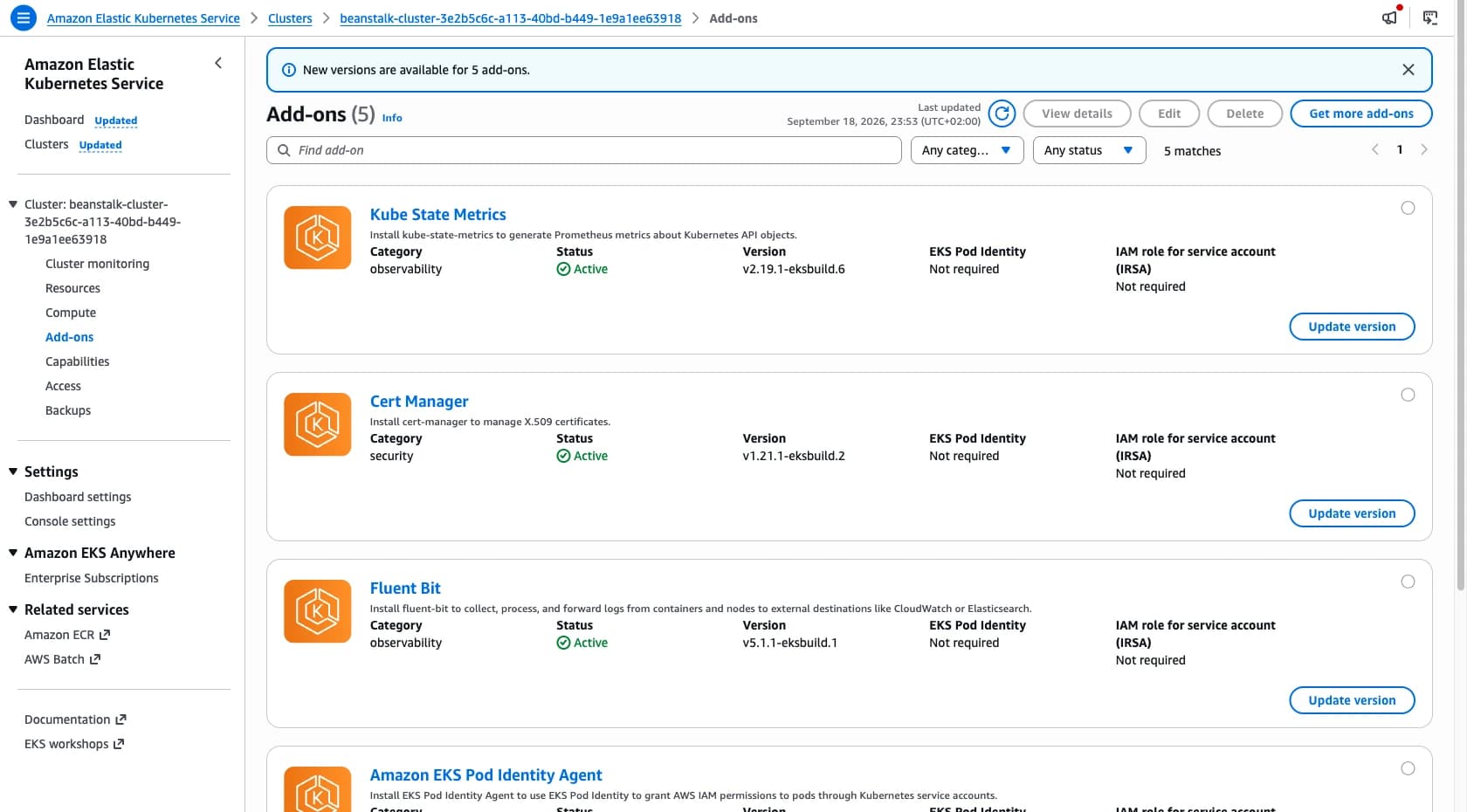
Beanstalk installs metrics-server, kube-state-metrics, fluent-bit, cert-manager and the EKS Pod Identity agent. Metrics go to CloudWatch through OpenTelemetry, and Beanstalk creates a dashboard alongside them. Anyone who has wired OpenTelemetry into ECS by hand knows that normally means a collector, its config, the IAM around it, and a week of figuring out which metrics arrive. Here it is one role ARN.
The catch: the dashboard reads from an ElasticBeanstalk/Application namespace, and in my environment that namespace stayed empty while the app served traffic:
$ aws cloudwatch list-metrics --namespace ElasticBeanstalk/Application
"Metrics": []
The panels sat at No data available.
Whether that is timing on a young environment or a setup gap, I could not tell after a few hours.
Verify it on your own cluster before relying on it.
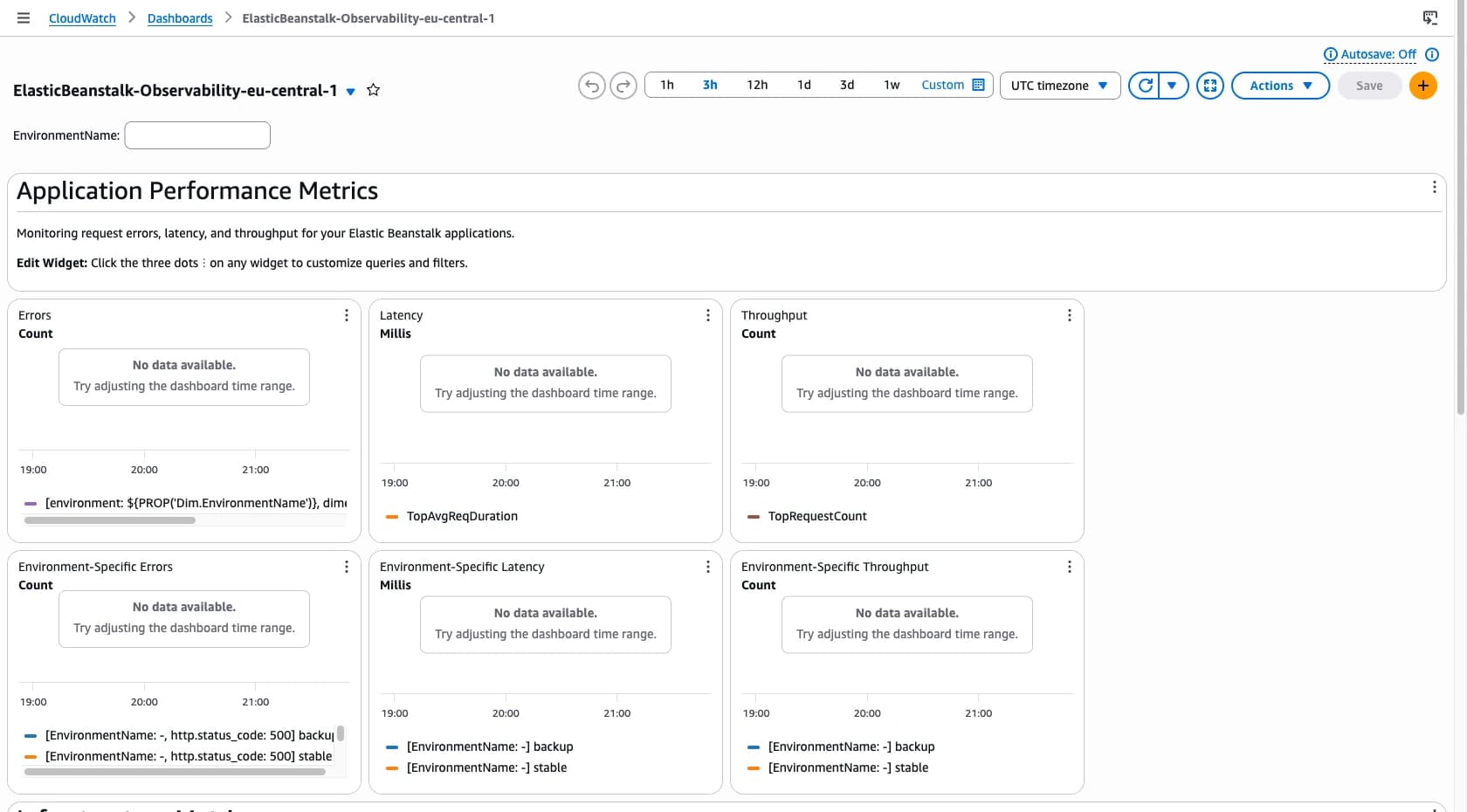
You can route each signal separately in aws:elasticbeanstalk:eks:observability.
Metrics go to CloudWatch or Amazon Managed Prometheus, logs to CloudWatch or S3, traces to X-Ray, and custom takes your own OpenTelemetry collector pipeline for a third-party backend.
What it costs
| Standard Mode, single instance | Cluster Mode | |
|---|---|---|
| Baseline | $0 | EKS control plane, ~$0.10/hr, ~$73/mo |
| Compute | t4g.nano on spot, ~$0.003/hr, ~$2/mo | EKS Auto Mode, on-demand only |
| Load balancer | none | ALB |
| Break-even | — | roughly 20+ small apps per cluster |
The control plane bills whether anything runs on it or not, about $2.40 a day for an idle environment. For a single small app, Standard Mode on spot came out roughly 35 times cheaper. The crossover depends on how many applications share the cluster, not on containers.
Terraform support on day one
hashicorp/aws cannot create a cluster environment, because tier is enum-locked:
Error: expected tier to be one of ["WebServer" "Worker"], got Cluster
hashicorp/awscc, the Cloud Control provider generated from the CloudFormation schemas, can:
resource "awscc_elasticbeanstalk_environment" "cluster" {
  application_name = "eb-cluster-demo"
  environment_name = "eb-cluster-demo-env"
  version_label    = "v1-697da24b"

  tier = {
    name = "Cluster"
    type = "EKS"
  }

  option_settings = [
    # cluster-role, node-role, observability-role, instance-category
  ]
}
The application version is the gap.
Cluster environments reject the classic S3 source bundle and need an ImageConfiguration, which neither provider exposes.
So the version comes from one CLI call, driven by a terraform_data resource:
aws elasticbeanstalk create-application-version \
  --application-name eb-cluster-demo \
  --version-label v1-697da24b \
  --source-bundle S3Bucket=eb-cluster-mode-demo-418272787065-eu-central-1,S3Key=app-697da24b.zip \
  --image-configuration '{"Build":{"Type":"buildpack",
      "Buildpack":"paketobuildpacks/builder-jammy-base",
      "CodeBuildServiceRole":"arn:aws:iam::418272787065:role/eb-cluster-demo-codebuild-role"}}'
Also worth knowing: Beanstalk creates its own CloudFormation stacks for the environment, the EKS cluster and the dashboard. They are not in your Terraform state and they stay behind when the environment goes away.
AWS noticed the failure before I did
Hours after a failed run, an email arrived: Proactive Reach Out regarding your Beanstalk Cluster environment.
I had not opened a case.
AWS opened it for me.
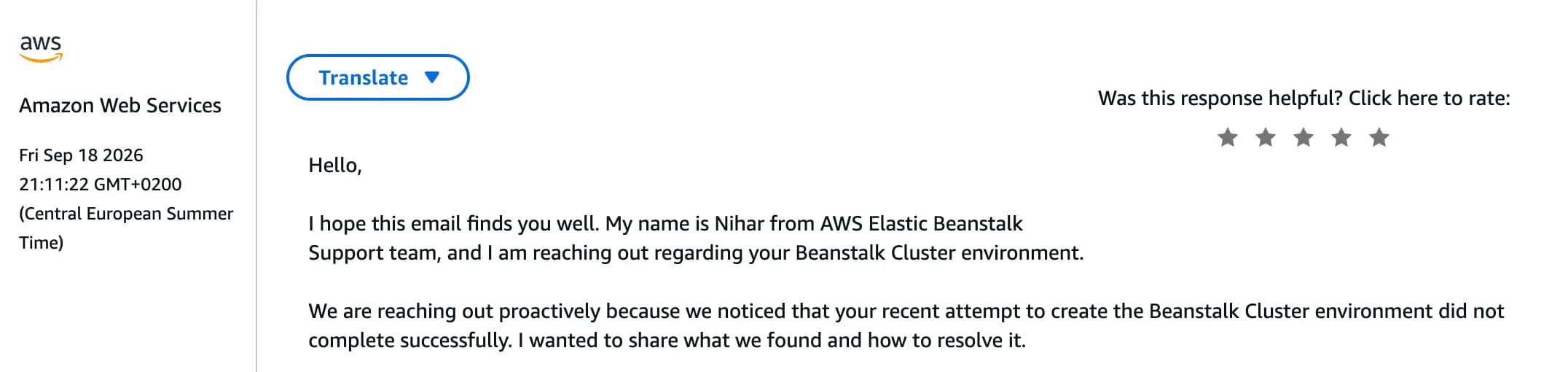
The diagnosis was spot on: the observability role had no trust policy for pods.eks.amazonaws.com, which rolled back the EKS stack.
That is the exact trap from the IAM table above, found by a human reading a rolled-back stack in a sandbox account on Basic Support.
I read that as a signal about the launch, not a support policy. The service team is watching rollbacks on new cluster environments. This is day-one software with people still standing behind it.
So, should you use it?
If you run a fleet of small services and are tired of paying for an environment each, a shared EKS cluster maintained by Beanstalk is a reasonable trade. The observability setup beats what I would wire up myself, and buildpacks lower the migration cost.
Skip it if you have one or two apps, need Spot, or depend on the deployment strategies Cluster Mode dropped. Either way, budget a debugging session for your first environment.
Fifteen years in, this is the most interesting thing Elastic Beanstalk has shipped in a long time. The rule still holds for the ECS-era wrappers. Cluster Mode is the exception I did not expect to find.

