
Table of Contents
Jump to a section
On April 22, 2026 AWS announced a wave of new AgentCore features to "build agents faster". The headline item: the AgentCore harness in public preview! The pitch: "production-ready agents on AWS infrastructure", without the parts everyone hates.
That is a BIG CLAIM if you have ever built an agent on AWS before 😅 If you did, you know that it requires gluing Bedrock, Lambda, DynamoDB, and a framework like LangGraph or Strands together. Also, we need to take care of (most parts of) our own tracing and memory layer.
This post looks at what the AgentCore harness actually gives you and what does it mean not owning the runtime yourself anymore.
Disclaimer: the harness is in public preview at the time of writing. APIs, the console layout, and supported regions may still shift before GA.
Nevertheless, AWS is pretty steady with their announcements and APIs, so I think it's safe to say that not much will change before GA!
What is Bedrock, AgentCore, Strands? A quick map
If you followed the news, you know that AWS has shipped A LOT of agent-shaped things in the last 18 months 😅 They overlap heavily, they sound similar, and the marketing makes it much worse.
Here is the cheat sheet to make sure the rest of this article makes sense before we go deeper:
- Amazon Bedrock: The foundation-models-as-a-service layer. Calls Claude, Nova, Llama, Mistral, Titan, Cohere and OpenAI models (since April 2026). Pay per token. No agent logic, just model endpoints. Some people hate it through and through, some people love it. Have a single interface to access all of the frontier models from one place is nice though!
- Bedrock Agents (legacy): The original agent service. You define an agent with a foundation model, instructions and action groups (tools). AWS runs the loop. Around since 2023, still works but feels a little bit dated (= dead).
- Bedrock AgentCore: A platform of managed primitives, so: Runtime, Memory, Gateway, Identity, Observability, Policy. Framework-agnostic. You can bring your own agent code (LangGraph, Strands, custom) and deploy that code on top of these primitives, or use the higher-level harness on top. GA since October 2025.
- AgentCore harness: A fully-managed agent runtime on top of AgentCore, in public preview since April 22, 2026. AWS provides the orchestration loop. You do not deploy agent code — you call
InvokeHarnessCommandwith a model, instructions and tools, and AWS runs the loop for you. Multi-provider: Bedrock, OpenAI, Google Gemini, with mid-session provider switching. Powered by Strands Agents under the hood. The subject of this post! - Strands Agents: An AWS-open-sourced agent SDK (Python and TypeScript). Lets you build agents in code and deploy them to AgentCore. Model-agnostic. Also the framework that powers the AgentCore harness.
- Claude Platform on AWS: Anthropic's native platform, GA since May 2026, accessed through your AWS account. Anthropic operates it and your data leaves the AWS boundary (this is critical if you have data privacy requirements!). A separate path from Bedrock model calls.
There is also a separate Bedrock Managed Agents product announced six days later on April 28, 2026, which is OpenAI-specific and runs on top of the same AgentCore plumbing. That is not what we cover here. Thanks for the confusion AWS 💛 🫠
A simple diagram to help you remember:
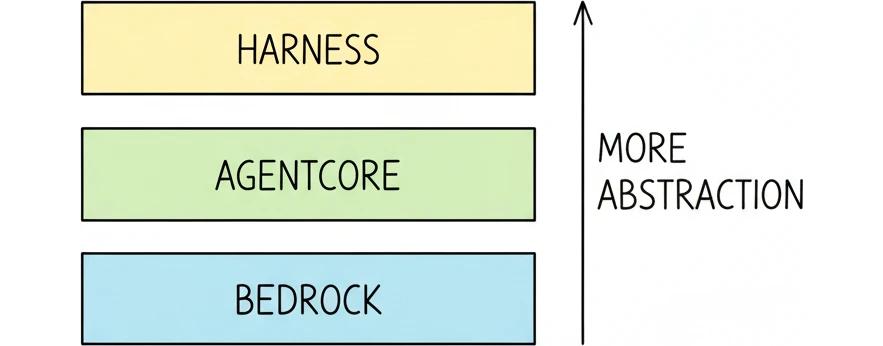
Most important: Bedrock is the model layer, AgentCore is the runtime layer, the harness is a higher-level abstraction sitting on top of both.
AWS Lambda on One Page (No Fluff)
Skip the 300-page docs. Our Lambda cheat sheet covers everything from cold starts to concurrency limits - the stuff we actually use daily.
HD quality, print-friendly. Stick it next to your desk.
Building agents on AWS today still sucks
So what is the "before" and what is the "after" of building agents on AWS today?
Assumption: you are a developer who wants to build an agent on AWS.
You have two options to build an agent on AWS today, with very different amounts of work.
Option 1: start from a raw Bedrock model endpoint
This is the world before AgentCore (so pre-October 2025, but still very much alive if you only adopted Bedrock for model calls):
- You open the AWS console
- You pick Bedrock
- You get a model endpoint
That's it. You have a model endpoint. Now what? Everything else is on you 😅 And that is a lot of work.
Including but not limited to:
- State management: You build it yourself, maybe featuring a DynamoDB table, schema, TTL, retry logic.
- Memory: You build it yourself too. Conversation history goes where? S3? DynamoDB? Both? Pick one - up to you.
- Tools: You need to wire them up too. Schema validation, error handling, timeouts, ... the whole everything.
- Observability: You need to instrument every step or you fly blind when an agent loops for 40 minutes and burns $80 in tokens (which will definitely happen at some point).
Most developers give up and grab LangGraph or Strands. You get state machines, tool definitions, tracing, all out of the box.
But now you run a Python framework inside Lambda or Fargate. That means you need to:
- Patch dependencies
- Match runtime versions
- Own your infrastructure
The result: even a "simple" agent ends up as three Lambda functions, two DynamoDB tables, a Step Function, and some glue code that glues messages together before each call.
Option 2: use AgentCore (since October 2025)
This is where most of that pain already gets solved. AgentCore gives you Runtime (managed compute), Memory (server-side conversation history), Gateway (tools), Identity (per-agent IAM), Observability (traces and CloudWatch metrics) and Policy as managed primitives.
What was still on you: writing the agent code yourself. Pick a framework (Strands, LangGraph, something custom), implement the orchestration loop, package the agent as a Docker image or a code bundle, upload it to AgentCore Runtime. AWS hosts the container as a serverless endpoint. The loop logic is still yours to maintain, update and debug!
A lot less work than option 1. But still real work and still a non-trivial amount of glue code.
What AWS just shipped
The AgentCore harness announcement landed on April 22, 2026. The harness was part of a broader "AgentCore new features to build agents faster" wave that also shipped an AgentCore CLI (IaC support for agents) and AgentCore Skills (pre-built skills for coding assistants like Kiro Power, Claude Code, Codex and Cursor).
This article focuses on the harness itself.
A quick terminology note before we continue: The word "harness" is the term for everything that wraps a foundation model and turns it into an agent: the orchestration loop, the tool dispatcher, the memory layer, the secure compute, the identity, the observability. Until now, every team built that harness themselves. With the new preview, AWS gives you a managed one.
In the AgentCore console it lives in a new sidebar tab called Harness (you will see the "Preview" label next to it). Under the hood the harness is powered by Strands Agents, the AWS-open-sourced agent framework, but you do not need to know any of that to use it, which is a huge benefit.
It also helps to compare it to the existing Runtime tab in the same console, which is the less abstracted way to run agents on AgentCore.
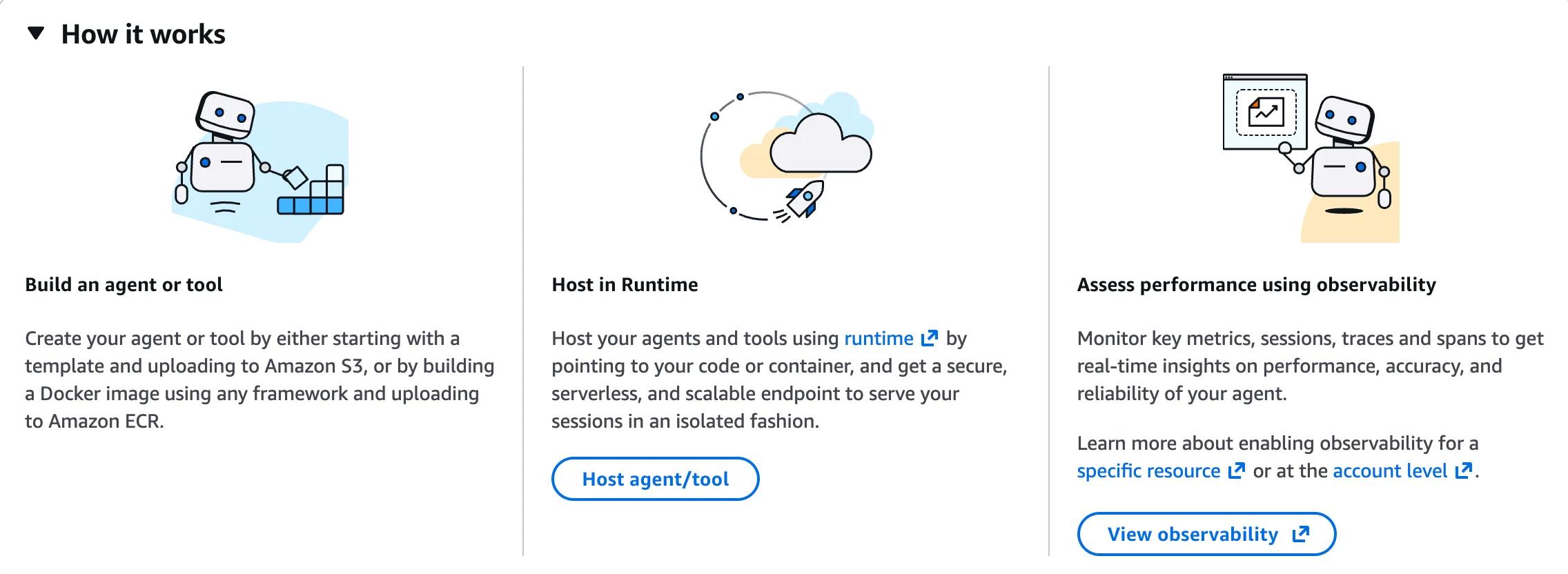
With Runtime you still bring your own agent code. You write the orchestration loop, you upload a zip to S3 or a Docker image to ECR, and Runtime hosts it for you as a serverless endpoint. No EC2 or autoscaling config, but you are still on the hook for the agent logic.
Harness sits one layer higher. You do not write the loop and there's no container to push. You just describe the agent (model, system prompt, tools) and AWS provides the entire runtime and the orchestration on top!
What you get out of the box:
- Per-session microVM: Each harness session runs in a secure, isolated microVM with its own filesystem and shell. Sessions are stateful by default and can suspend/resume.
- Multi-provider models: The harness is model-agnostic. You can pick any Bedrock model, an OpenAI model, a Google Gemini model. You can even switch providers mid-session without losing context.
- Managed memory: Short-term and long-term memory are server-side. Same
runtimeSessionIdacross calls = the harness threads conversation history for you. - Built-in tools: Browser, code interpreter, MCP servers, AgentCore Gateway, or your own inline functions. Wire them up in the console or pass them at invocation time.
- AgentCore Identity: Each harness has an IAM execution role; every action it takes is logged.
- One AWS bill: Tokens, compute, memory, tools all land on the same invoice. No third-party vendor in the data path (not a harness benefit, but a good thing nevertheless - can't mention that enough!).
The runtime piece is the biggest one; everything else you almost already got with AgentCore before.
Before, you owned the runtime and the orchestration code.
Now, you describe what the agent should do, you register your tools, and the loop lives behind a single API call: InvokeHarnessCommand.
Let's see how that works in practice! 🕵️♂️
Configuring a Harness
The fastest way to feel how the harness differs from anything you have built before is to open the AgentCore console. You do not need to write any code.
You configure the harness in the UI, attach tools, attach skills, then chat with it in the playground tab. Surely, you can also configure the harness via the API, but the UI is the fastest way to get started.

Each block below corresponds to a section in the harness configuration sidebar.
Model and system prompt
You pick a foundation model (any Bedrock model your account has access to: Claude, Nova, OpenAI's OSS family, etc.) and write a system prompt that defines what the agent is and how it should behave. This is the same idea as the instruction parameter on legacy Bedrock Agents, just rendered as a textarea.
Memory
There are two memory layers here that are easy to mix up.
Same-session memory is automatic. As long as you call InvokeHarnessCommand with the same runtimeSessionId, the harness threads the conversation server-side for you. No toggle / separate primitive / DynamoDB table on your side. This is what we cover in the runtimeSessionId discussion later.
AgentCore Memory is for persistence across sessions. This is the optional sidebar block. From the console hint: "Connect an AgentCore Memory instance to persist and retrieve conversation history across sessions. When attached, the harness automatically saves and loads context between invocations. Without memory, each invocation starts with no prior context." In other words: with no AgentCore Memory attached, the agent forgets everything once the session ends. With it attached, a returning user picks up where they left off last week. Billed separately under AgentCore Memory (this can get expensive QUICKLY!).
Tools
AWS ships a small library of tools you can attach to your harness with a click. The most useful one out of the gate is the AgentCore Browser Tool (aws.browser.v1), which lets your agent navigate web pages, fill forms and scrape content.
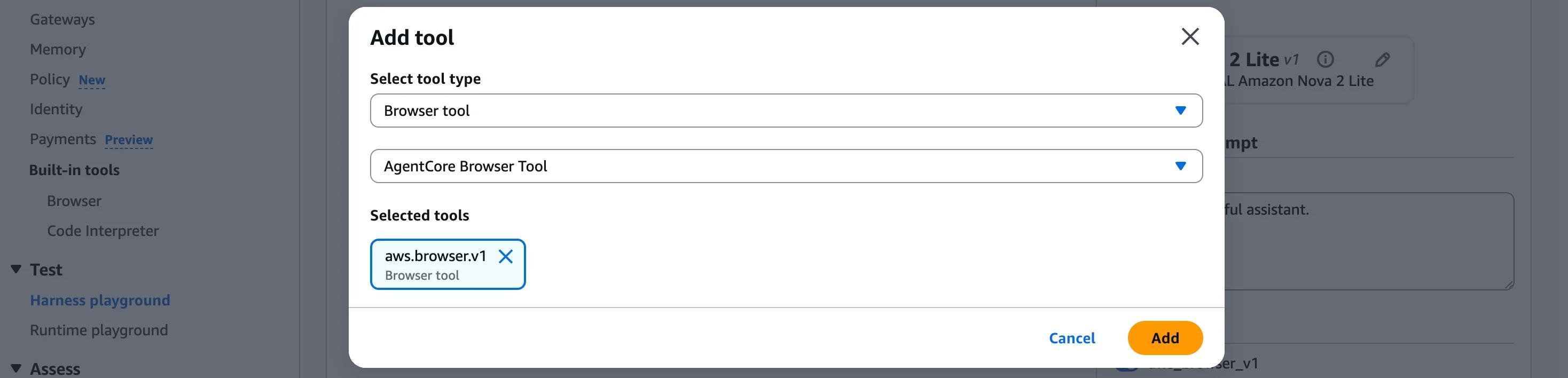
There is also a Code Interpreter for letting the agent run Python on the fly. You can also point at a remote MCP server, an AgentCore Gateway, or set up an inline function with a JSON schema.
Skills
Skills are bundles of files and scripts mounted to the harness filesystem. The agent can reference and execute them during a session.
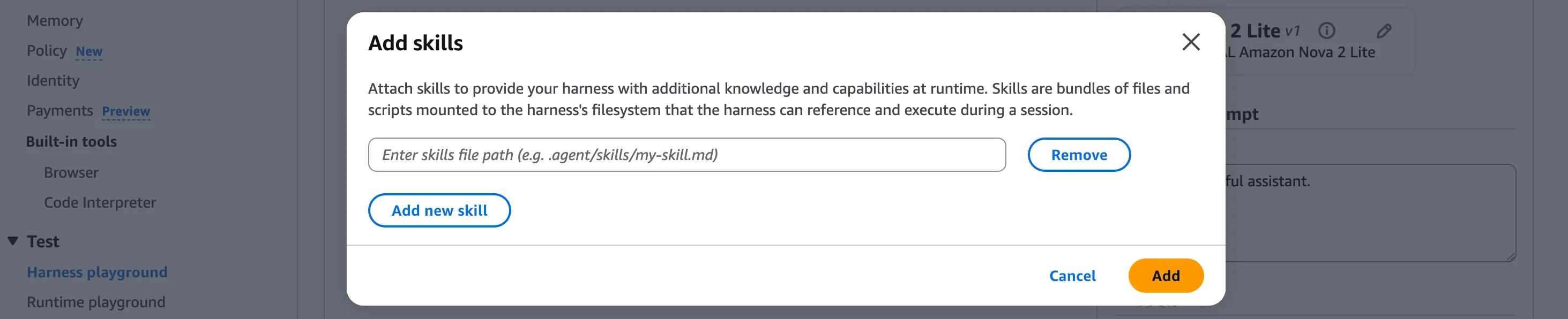
If you have used Claude skills before, the concept is similar: drop a markdown file at a known path and the harness can pick it up at runtime.
Inbound Auth
This is the gatekeeper that controls who can invoke this harness. Two options:
- Use IAM permissions: the IAM principal calling
InvokeHarnessCommand(your AWS user, an EC2 role, a Lambda's execution role) is what AWS checks. Default for backend-to-harness traffic. - Use JSON Web Tokens (JWT): configure your IdP (Cognito, Auth0, Okta, ...) to issue JWTs. The harness validates the token signature and scopes on each call. Useful when you want end-user identity to flow all the way through to the agent! Super cool imho!

Inbound Auth is part of the broader AgentCore Identity product (also not new to AgentCore harness 😉).
Permissions
A separate block from Inbound Auth. This is the IAM execution role the harness assumes when it calls the model, invokes tools, accesses memory, talks to the gateway.
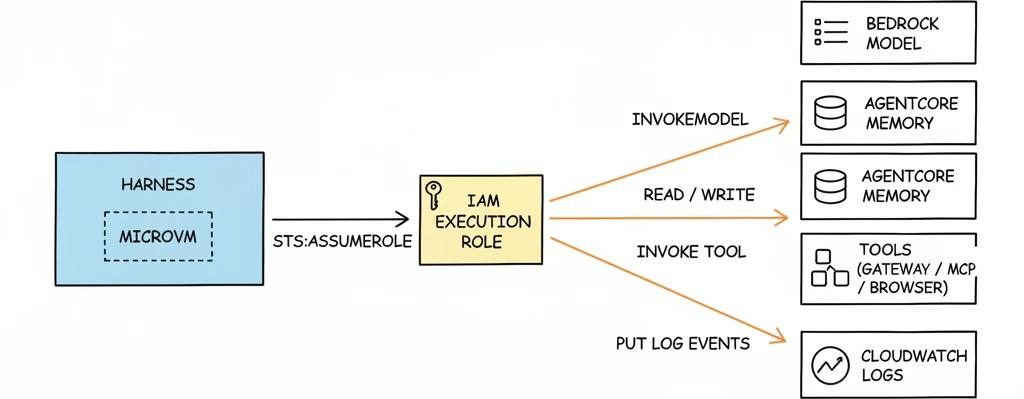
The harness needs permission to do its job; this is where you scope it.
Advanced configurations
Under "Advanced configurations" you set execution limits and defaults that apply across every invocation (you can override most of them at invoke time):
- Filesystem configuration: which paths the harness can read or write, where skills live.
- Network: VPC, subnet, security groups if the harness needs to reach private resources.
- Custom environment: container-level environment settings.
- Environment variables: key-value pairs available to the harness at runtime.
- Lifecycle configs: hooks for session start, session end, and similar lifecycle events.
- Truncation: how the harness trims long conversations when context starts filling up.
- Allowed tools: a whitelist of tools the harness is allowed to call, even if more tools are attached.
- Invocation limits: caps on tokens per invocation, max steps in the loop, timeouts.
This is the part that hopefully prevents the "agent looped for 40 minutes and burned $80 in tokens".
Observability
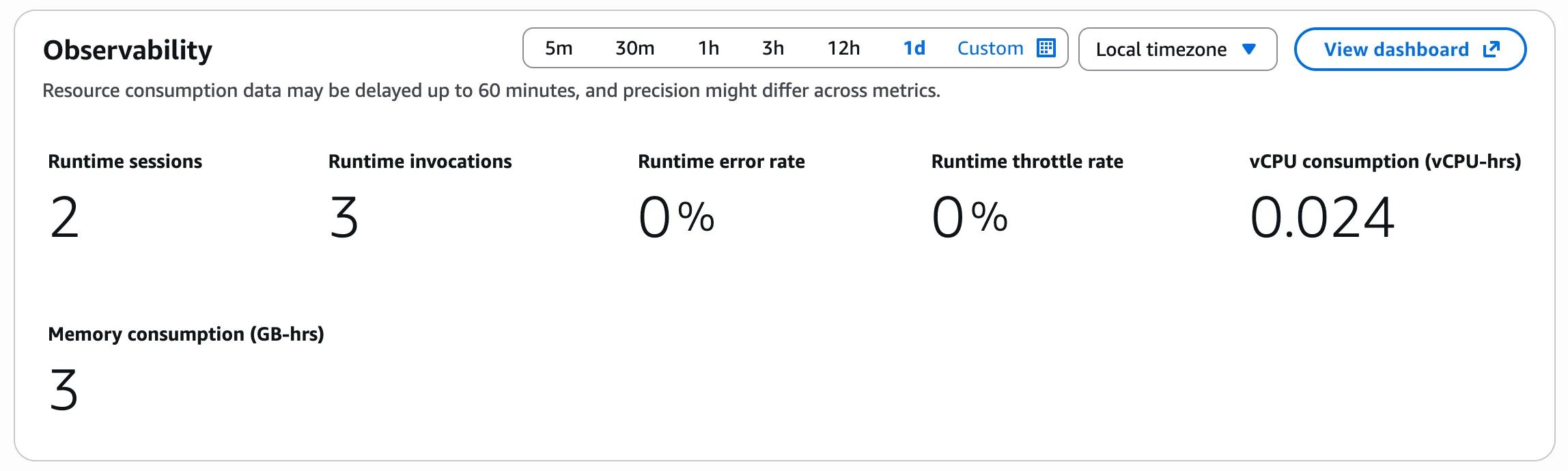
Each harness gets a built-in observability panel with runtime sessions, invocations, error rate, throttle rate, plus vCPU and memory consumption (the things you actually get billed for under AgentCore Runtime).
You can also configure log deliveries for the harness directly from the same panel.
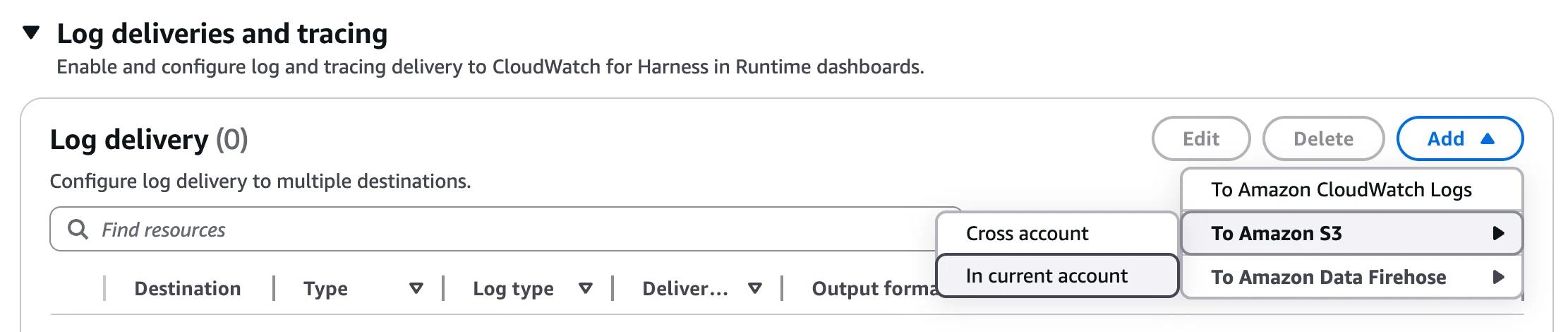
Destinations to select from: Amazon CloudWatch Logs, Amazon S3 (in current account or cross-account), and Amazon Data Firehose for streaming traces into your existing analytics pipelines. No Lambda subscription filters to set up! Weeee 🎉
The Playground
Once everything is set up, we can switch to the Harness Playground tab! This allows us to easily test our harness without having to write any code.

Once you are in a session, the chat layout is straightforward.
On the right side, we have the Configs panel, which exposes the same building blocks we just walked through (model provider, system prompt, tools, skills, invocation limits) so you can tweak them per session without going back to the harness definition.
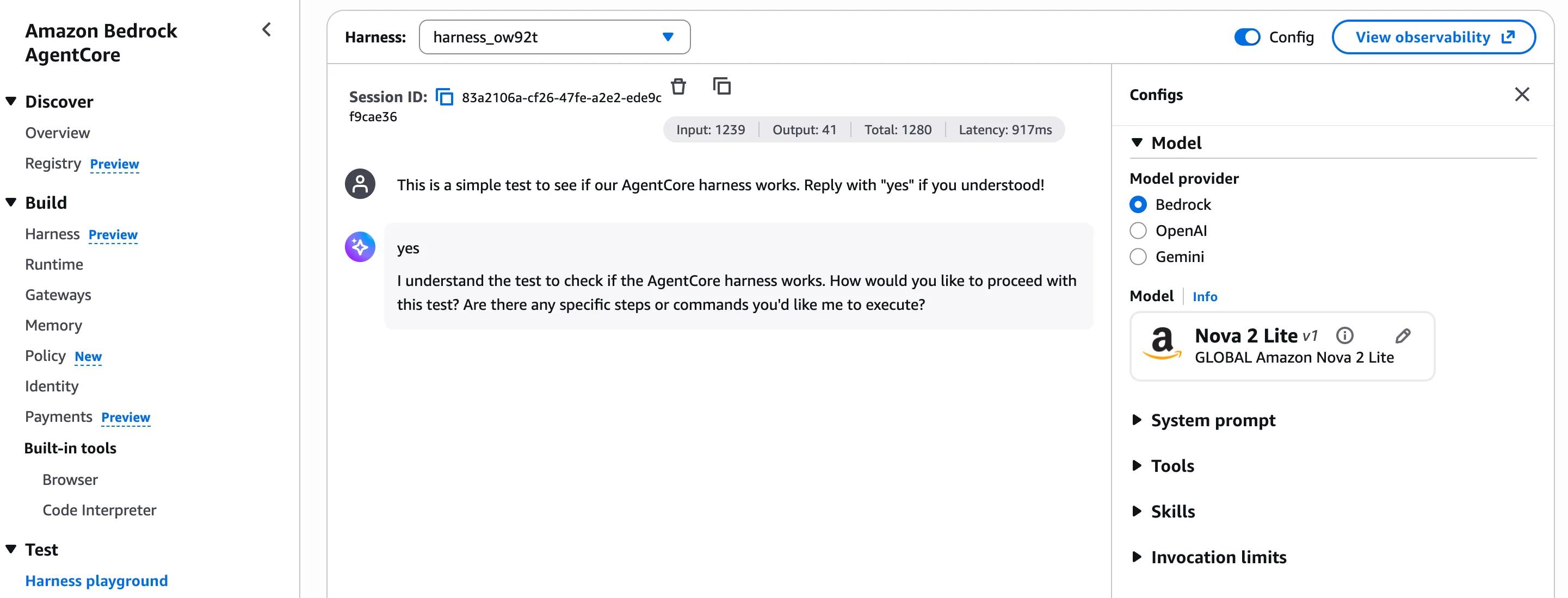
The model picks the tools, the harness runs them, the trace shows up alongside the response. Same orchestration loop we wire up via API in the next section, just driven from the UI!
The 20-line agent
Once your harness is configured in the console (model, system prompt, tools, skills, all set up under the Harness tab), invoking it from code is genuinely tiny. Here is what a minimal call looks like with the AWS SDK v3 for JavaScript using the @aws-sdk/client-bedrock-agentcore package.
import { randomUUID } from 'node:crypto';
import { BedrockAgentCoreClient, InvokeHarnessCommand } from '@aws-sdk/client-bedrock-agentcore';

const client = new BedrockAgentCoreClient({ region: 'us-east-1' });

const response = await client.send(
    new InvokeHarnessCommand({
        // ARN of the harness you created in the AgentCore console
        harnessArn: 'arn:aws:bedrock-agentcore:us-east-1:123456789012:harness/harness_xxxxx',
        // Same value across calls = the harness threads conversation history for you
        runtimeSessionId: `chat-${randomUUID()}`,
        messages: [
            {
                role: 'user',
                content: [{ text: 'Customer cust_0007 cannot log in after password reset.' }],
            },
        ],
    }),
);

if (response.stream) {
    for await (const event of response.stream) {
        if (event.contentBlockDelta?.delta?.text) {
            process.stdout.write(event.contentBlockDelta.delta.text);
        }
    }
}
That is the whole working thing!
What we didn't need: packaging a Lambda or building a Docker image, writing the orchestration loop, persisting conversation history. All of that lives in the harness configuration on AWS side.
No infrastructure to manage - we're just calling our harness API!
Quick look at the code:
BedrockAgentCoreClient: New SDK client for AgentCore. The harness API lives here, not underbedrock-agent(that is the legacy Bedrock Agents service, separate product).harnessArn: Points at a specific harness you created in the console. The model, system prompt, tools and skills baked into that harness are what the call uses by default. You can override any of them per-call via themodel,systemPrompt,toolsandskillsfields onInvokeHarnessCommand.runtimeSessionId: Server-side memory key. Same ID across calls = the harness remembers the conversation. Note that the API requires it to be at least 33 characters long, so a UUID works perfectly.messages: The current user turn. You do not send the conversation history yourself — the harness threads it server-side, keyed byruntimeSessionId.response.stream: An async iterable of stream events.contentBlockDeltaevents carry the text chunks. Other event types in the same stream cover tool calls, reasoning content, message boundaries, and errors.
What the harness handles for you
Walking through that 20-line example against the bullet list from section 1:
- State management: gone.
runtimeSessionIdis the only state you keep on your side, and even that is just a string mapped to a user or thread. - Memory: gone. Same
runtimeSessionIdacross calls = the harness threads conversation history server-side. No DynamoDB schema, no TTL handling. - Tools: gone. You attach the AgentCore Browser, Code Interpreter, an MCP server, an AgentCore Gateway, or your own inline function in the console (or as
toolsoverride at invoke time). The harness handles wire format, validation and error propagation. - Observability: gone, as in built in. The response stream itself emits structured events for reasoning, tool calls, errors and metadata. CloudWatch and CloudTrail get populated automatically.
What you get out of the box
The harness response stream is itself structured observability:
messageStart/messageStop: Boundary markers for each model turn.contentBlockStart/contentBlockDelta/contentBlockStop: Per-block events. A block can be a chunk of text, atoolUsedecision, atoolResult, orreasoningContent. You see why the agent chose to call a tool, the parameters it sent, and what came back, all without bolting on a tracing SDK.metadata: Token usage and other per-invocation metrics.validationException/internalServerException/runtimeClientError: Structured error events on the same stream. No silent failures.
On top of the stream:
- CloudTrail: every harness API call (
InvokeHarnessCommand, configuration changes) is written to CloudTrail. - CloudWatch metrics: the harness emits runtime sessions, invocations, error rate, throttle rate, vCPU consumption and memory consumption!
What does this cost?
Important question that always comes up.
The announcement was explicit: there is no separate harness charge! 🎉
You pay only for the underlying AgentCore capabilities you use, plus the Bedrock model tokens. More line items than calling a model endpoint directly, but each one is metered on actual use, so it stays very predictable.
Full picture at a glance (rates as of May 2026, verified against the AgentCore pricing page — preview pricing may shift before GA!):
| Component | What you pay for | Rate |
|---|---|---|
| Bedrock model | Input + output tokens | Per-model, see Bedrock pricing |
| AgentCore Runtime (CPU) | Active vCPU-hours | $0.0895 / vCPU-hour |
| AgentCore Runtime (RAM) | Active GB-hours | $0.00945 / GB-hour |
| AgentCore Memory (events) | New events written | $0.25 / 1,000 events |
| AgentCore Memory (storage) | Long-term memory records | $0.75 / 1,000 records / month |
| AgentCore Memory (retrieve) | Memory record retrievals | $0.50 / 1,000 retrievals |
| Gateway | Managed tool invocations | $0.005 / 1,000 invocations |
| Policy | Authorization requests | $0.000025 / request |
| Code storage | Agent code artifacts at rest | S3 Standard rates (ECR for containers) |
A few things that surprised me while reading the AgentCore pricing page:
- Idle time is free: While the model is thinking or a tool call is in flight, the CPU is idle and you do not pay for it. Agents spend 30 to 70 percent of their time waiting, so this matters.
InvokeHarnessCommandhas no flat fee: Unlike many AWS managed services, there is no per-call API charge on top of the underlying components.- Session history is not free: Yes, AgentCore Memory has its own meter. Per event stored and per retrieval. So the stored conversation history is its own line item.
- Token usage is probably 5 to 10x what you estimate: Internal reasoning traces, tool call payloads, and tool results all flow through the model. Budget accordingly 😅 Don't use the craziest frontier models unless you have a lot of budget to spare and you REALLY need the intelligence.
Per-session compute is small as far as AWS is concerned. A typical multi-turn session lands below $0.01 in runtime cost. The model tokens for the same session will usually be 10 to 100x that!
Here's also a nice in-depth read about the pricing: AgentCore pricing breakdowns by CloudBurn
So the headline number is still the model bill - no surprise there. 🤷♂️
Where it falls short
The pitch is superb and I think there's not much to complain about here.
As it's preview, everything of these are expected and not a deal breaker:
- Public preview, four regions: The harness is only available in us-east-1, us-west-2, ap-southeast-2 and eu-central-1 at the time of writing. Anything you build today is subject to API shape or behaviour changes before GA.
- Runtime lock-in to AgentCore: Your agent definition lives inside AWS. Tools, memory config, identity, the loop, everything points at AgentCore APIs. Moving the same agent to another cloud or to a self-hosted setup is not a few-line change. If portability is a hard requirement, this is the trade-off you accept. The fact that the harness is powered by Strands at least means you can drop down to vanilla Strands code if you ever need to.
- Observability is still being shaped: AgentCore ships tracing and logging out of the box, but the dashboards and OpenTelemetry surface are still in active development. If you rely on Langfuse, Datadog APM, or your own tracing stack today, expect to wire it in manually for the moment.
- IaC support is patchy/missing: The April 22 announcement introduced an AgentCore CLI and CDK support, with Terraform "coming soon". Pulumi and full Terraform resources are not there yet for the harness specifically.
Conclusion
The AgentCore harness is a big step forward for building agents on AWS! It closes a lot of gaps that were present before and makes it much easier to build and operate agents on AWS.
Nothing more to say here. Go out and try it! 🚀

