
Table of Contents
Jump to a section
Introduction
AI coding assistants are amazing if you give them the right context. Your data is one crucial part of that. But there is often a pure technical issue that comes up if you want to connect your privately deployed database with Claude Code or Cursor. They are in a private subnet.
This can be fixed by introducing a few more components. In this blog post, we will see how to fix that and how to connect to your DB in a secure way.
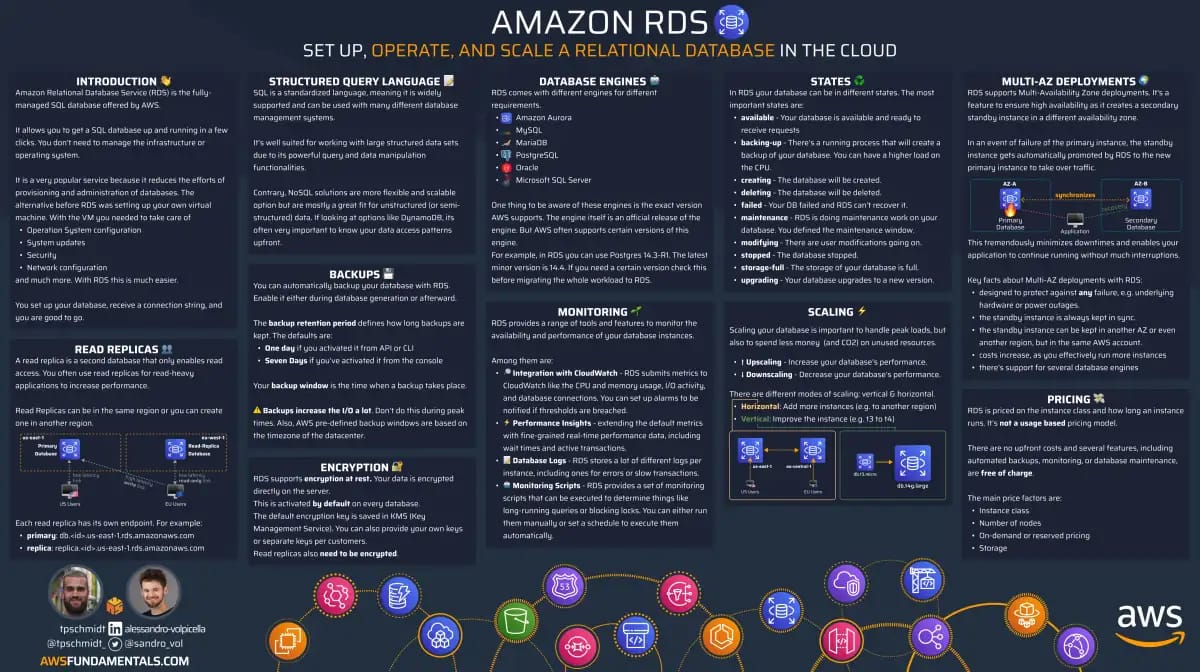
RDS on One Page (No Fluff)
Manage databases efficiently. Our RDS cheat sheet covers instance types, backups, and scaling - the key aspects of database management.
HD quality, print-friendly. Stick it next to your desk.
Why Focused Context Beats More Context
Before we get into the setup, I want to look at this from an AI angle. Because I think it's interesting to see how AI coding assistants perform with different amounts of context.
People always say you want to give your AI assistant more information, more context. They think more context means better performance.
I think it's the inverse. The more context it gets, the worse it performs. This is why you clear your context after every feature.
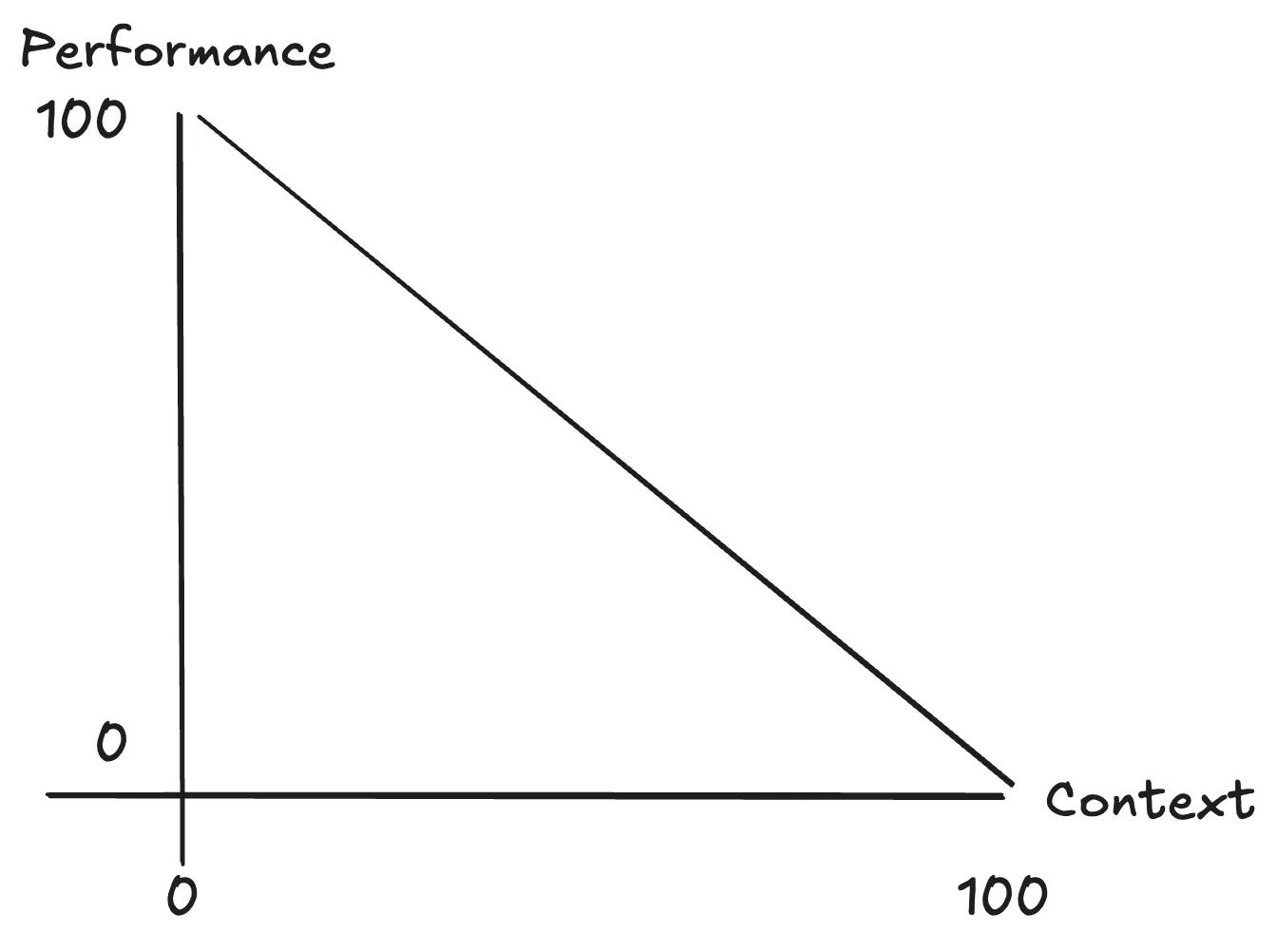
Here's how I think it actually works day-to-day.
You don't start at 100% performance. You start at maybe 50%. Then you give it some information. You write a spec, you tell it which files to look at, and it gets better.
Tools like Claude Code are really good in using tools like:
- reading files
- searching the web
- using MCPs/skills
It starts filling up the context with relevant information. Now, the performance gets better the more context it gets. But after the feature is complete, if you don't clear the context and start a second feature, it goes downhill.
The main point: we want to give it the right context at the right time.
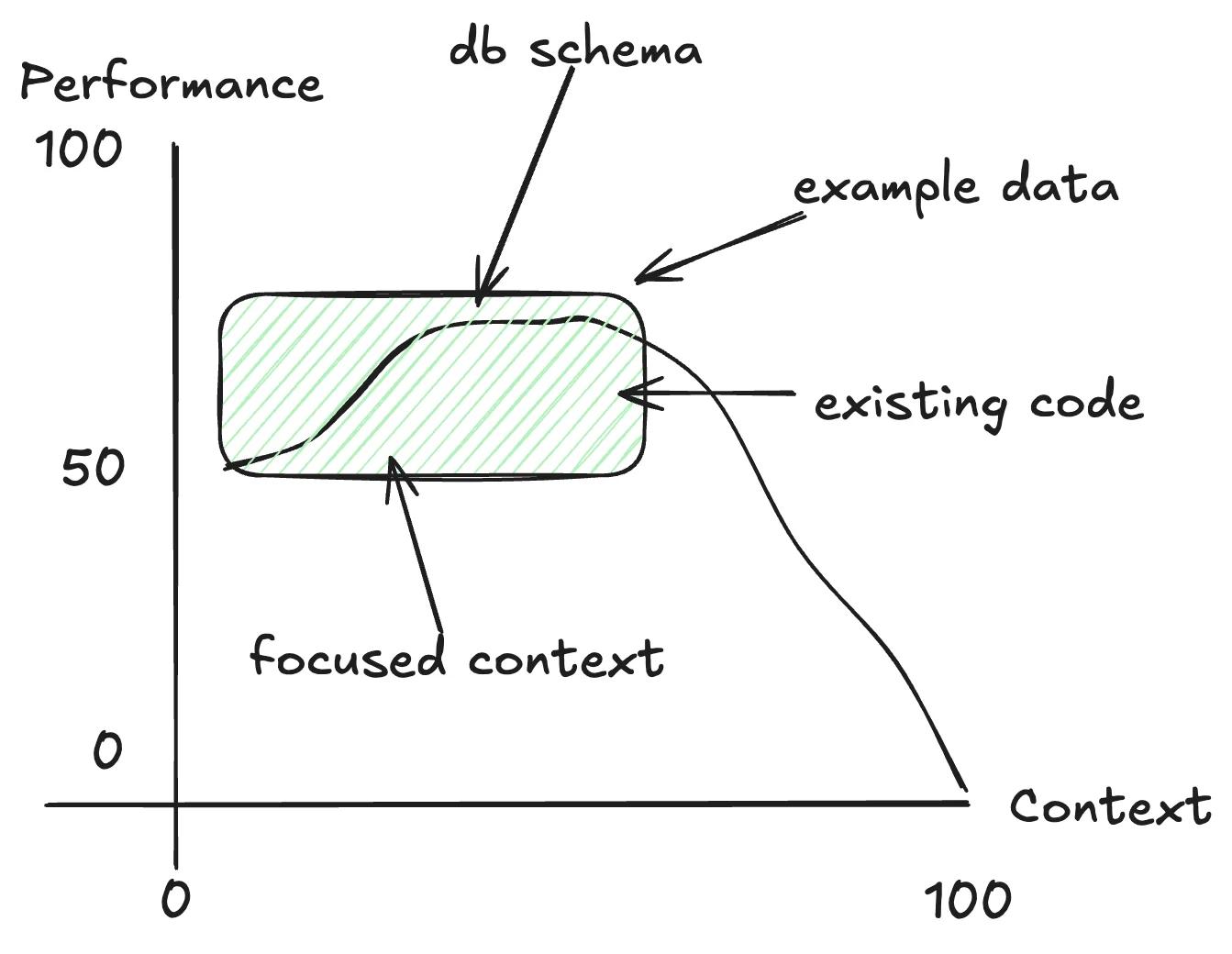
Right context for the application means:
- database schema
- example data
- relevant source code
Giving your AI assistant access to your database is one of the most impactful things you can do. Not just the actual data, but the schema. What tables exist, how they relate, what the data looks like.
The Networking Problem: RDS Lives in a Private Subnet
The second "problem" is that your database probably is in a private subnet. It shouldn't be deployed in the open internet. You should have it in a VPC not accessible from the internet. You cannot connect via IP from anywhere. And it's supposed to be that way.
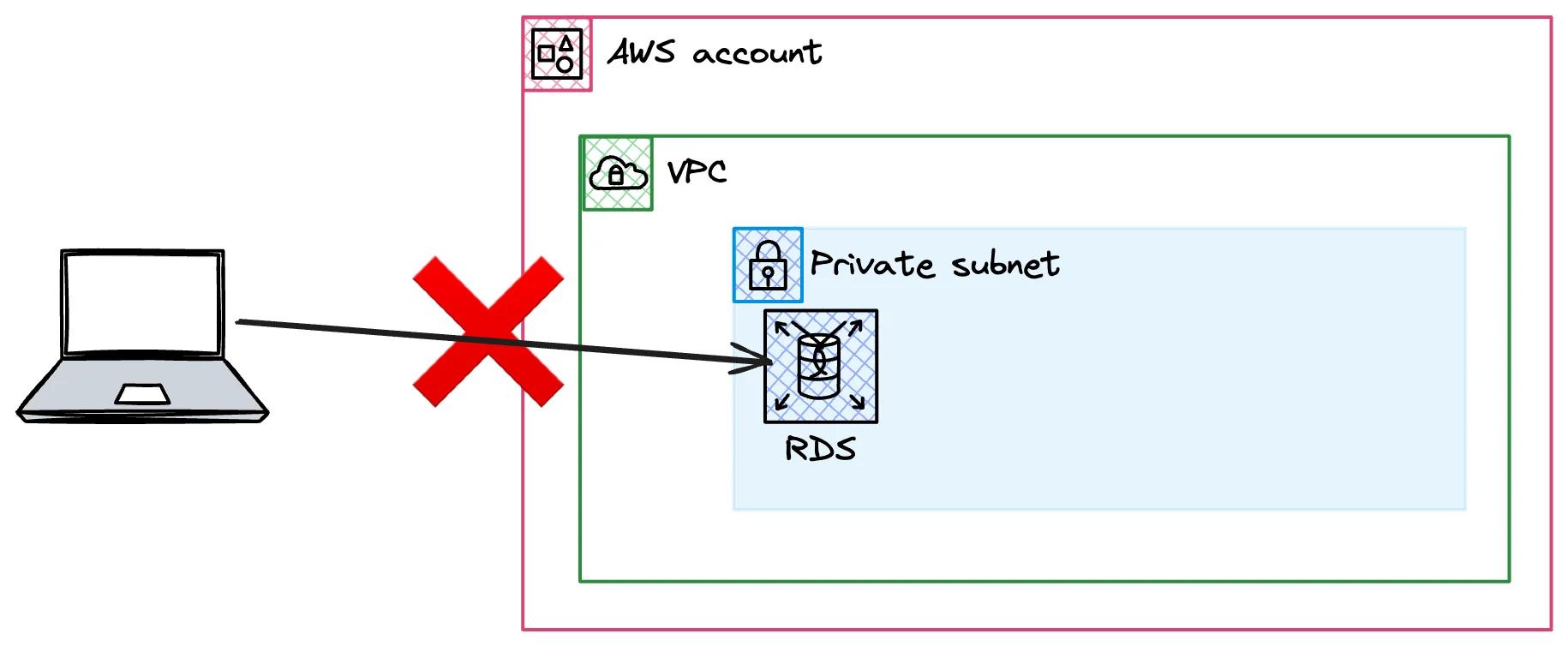
Don't put your database on the internet if you can avoid it.
But how do you actually connect to it from your local machine?
The Architecture: SSM Tunnel + VPC Endpoints + jumphost
Let's introduce a few more components to fix that:
- Your local machine runs Claude Code with the MCP config
- AWS Session Manager (SSM) is a CLI tool that uses your local AWS credentials
- VPC Endpoints (three of them) allow SSM to reach into your VPC without internet access
- A jumphost (EC2 instance) sits in the same subnet as RDS
- The jumphost connects to RDS on your behalf
So the full path: local machine → SSM session → VPC endpoints → jumphost → RDS.
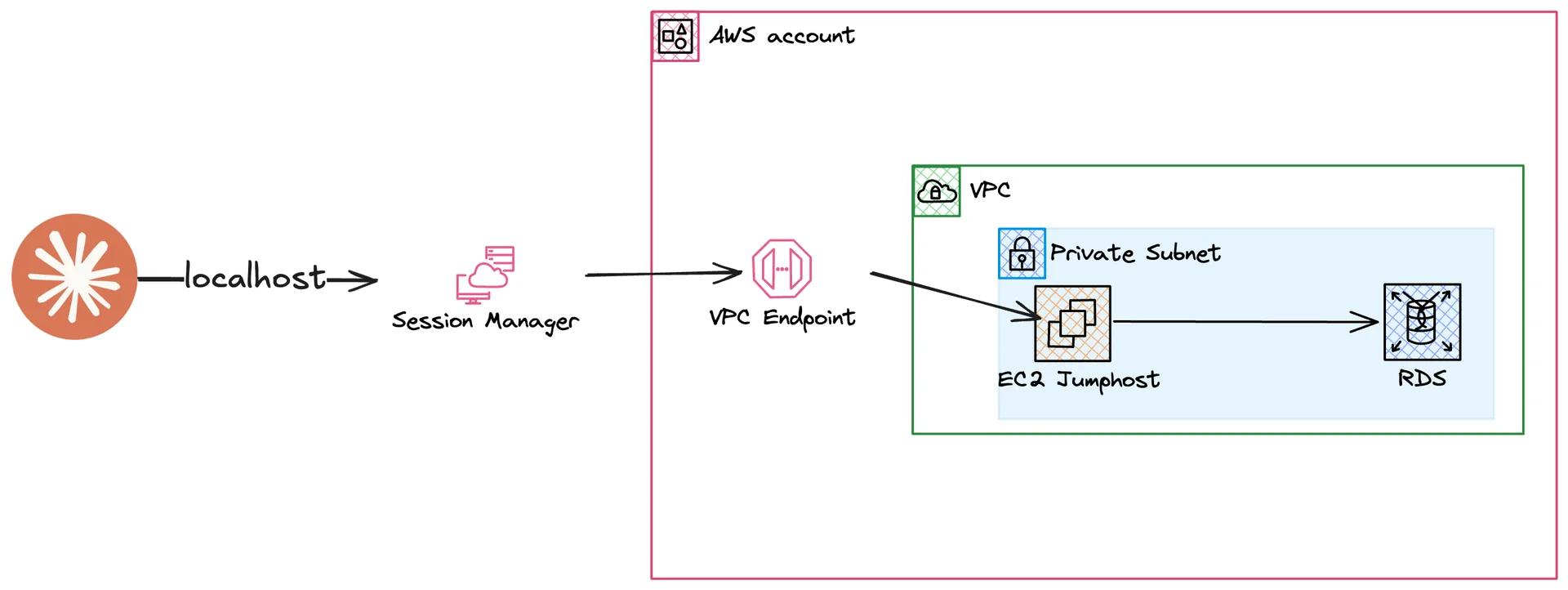
This creates a local tunnel. All requests to localhost on a specific port get forwarded to your RDS instance. And this is what we reuse.
Deploy the CDK Stack and Start the Tunnel
Deploying is straightforward.
Run pnpm cdk deploy, approve the IAM changes, wait for CloudFormation to finish.
The stack creates the VPC endpoints, the jumphost, and the RDS instance.
After deployment, start the tunnel manually to verify everything works: ./scripts/tunnel.sh.
The tunnel script fetches the CloudFormation outputs (instance ID, RDS endpoint) and starts the SSM session.
You should see "Waiting for Connections…" in your terminal.
That means the tunnel is up.
Seed and Verify the Database
We need some data in the database, so I've created a seed script.
You can execute it with ./scripts/seed.sh.
This will add some authors and blog posts into the table.
You'll see the connection accepted on the tunnel side and the seed output showing what got created.
To verify manually, use pgcli.
Get the password first from secrets manager.
PGPASSWORD=$YOUR_PASSWORD pgcli -h localhost -p 5432 -U postgres -d demo
Run a quick query to see the data. I really like pgcli for this.
Hook It Up to Claude Code via MCP
This is the part that's just seven lines of config.
The MCP config in your Claude Code settings points to the MCP Postgres script. Behind those seven lines, the script does a few things:
- Checks requirements (SSM plugin installed, AWS credentials valid)
- Fetches stack outputs from CloudFormation
- Gets database credentials
- Starts its own SSM tunnel
- Starts the MCP Postgres server
After adding the config, restart Claude Code.
Run /mcp and you'll see "RDS Postgres" connecting.
It creates its own tunnel in the background.
Once connected, you can just say "show me some data" and it uses the MCP to query your database. It gets the tables, fetches authors, shows you summaries. You don't always need to say "in the database" either. That depends on how you structure your CLAUDE.md and your skills.
Real Workflow Wins
Think about what this means for your daily work.
Debugging incidents. You're investigating a production issue (on your staging environment). Instead of switching between your SQL client and your editor, Claude Code looks at the data directly. It sees the same thing you see.
Feature development with feedback loops. This is what Matt Pocock also says: AI performs much better if you give it proper feedback.
Yes, this works with unit tests and integration tests. But now you can build a full-stack feature end to end. Let the AI click the UI, for example with a headless browser. And then check the database if the data is as expected.
The database is the feedback loop you're missing. Giving your AI assistant access to it is a big step.
Context without copy-pasting. No more exporting schemas manually. No more pasting table definitions into every new conversation. The MCP gives Claude Code live access to the schema and the data, every time.
Security Checklist
The main question you will ask yourself now: is this actually secure? There are a few things to consider!
Only dev and staging. Don't connect this to a production database. If you need to troubleshoot incidents, you have a staging environment that behaves the same as production. Use that.
Read-only access. The MCP we use here only allows read queries. But I wouldn't trust that 100%. MCPs can be changed, and weird ones exist out there. Create a dedicated read-only database user for this. Since this is staging and a demo, I didn't do that here. But you should.
Then we have some really cool security benefits by using the session manager:
- No long-term credentials: Session manager uses your local CLI credentials
- Audit trail: Session manager logs everything to CloudTrail. Which API calls were done at what time
- Private Subnet: And the main point, you can keep your database in your private subnet!
Wrapping Up
Giving your AI coding assistant access to your database changed how I build features. It's one of those things that seems obvious in hindsight.
The full CDK stack and all scripts are open source. Grab the code from the GitHub repository, deploy it on your own, and don't forget to destroy the stack when you're done with the demo.
You can also watch the full walkthrough on YouTube.
If you want to understand VPC networking better, grab the free VPC infographic. It covers subnets, VPC private links, and how to set up VPCs efficiently.
If this helps you build real-world AWS skills, not just pass exams, let me know.

