 AWS
AWS
Every re:Invent, every AWS blog, every newsletter is dominated by one topic right now. You know which one.
But while everyone's been writing about agents and foundation models, the core infrastructure layer has also been moving fast. Quiet releases that actually affect your architecture, your costs, and your day-to-day work.
This is a roundup of the best AWS releases from the past 12 months that have nothing to do with AI. Ordered by impact.
1. Lambda Durable Functions: Orchestration Without Leaving Lambda
Lambda can now run multi-step workflows with checkpointing and long pauses, without Step Functions.
This was the biggest Lambda announcement in years.
Lambda has always been stateless and short-lived. If you needed multi-step workflows — waiting for an external API, pausing for human approval, chaining long-running tasks — you'd reach for Step Functions.
Lambda Durable Functions changes that. You can now build multi-step workflows directly inside Lambda, with checkpointing, suspension, and automatic recovery built in.
A function can pause for up to a year waiting for an external event without incurring compute charges during the wait. If the function fails mid-workflow, it resumes from the last checkpoint rather than starting over.
It's available for Python (3.13, 3.14) and Node.js (22, 24), currently in US East (Ohio). Deployable via Lambda console, CLI, CloudFormation, SAM, and CDK.
This doesn't replace Step Functions for complex visual workflows with branching and parallel states. But for linear multi-step processes — order processing, async pipelines, approval flows — Durable Functions removes a lot of the reason to leave Lambda in the first place.
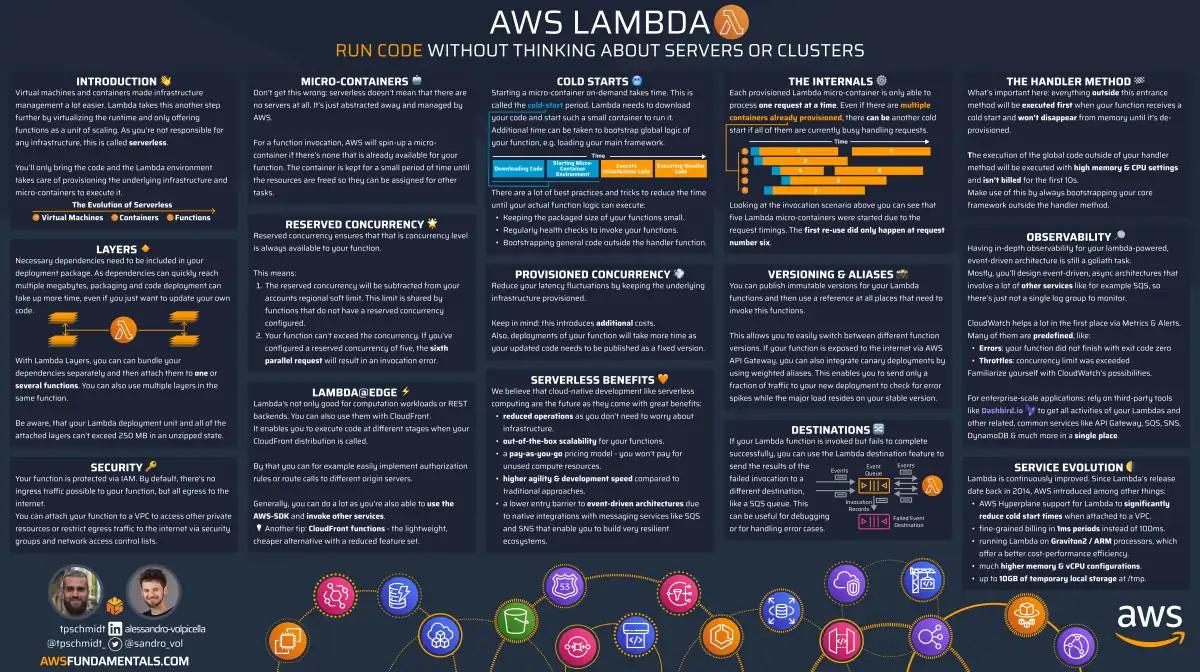
AWS Lambda on One Page (No Fluff)
Skip the 300-page docs. Our Lambda cheat sheet covers everything from cold starts to concurrency limits - the stuff we actually use daily.
HD quality, print-friendly. Stick it next to your desk.
2. ECS Express Mode: From Container Image to HTTPS in Seconds
Give ECS a container image, get a production-ready HTTPS endpoint with auto scaling and canary deploys — no infrastructure config required.
AWS has a history of launching "easy container" services that don't quite stick. App Runner gives you a URL from an image, but it's opaque, limited, and hard to migrate away from when you outgrow it. Adoption has been low, and it's not clear how long it'll be around. AWS Proton was supposed to solve infrastructure templates for platform teams — it was deprecated in 2025.
ECS Express Mode is the answer AWS should have built years ago.
You provide a container image. Express Mode provisions the full stack: ECS service with Fargate tasks, Application Load Balancer, auto scaling policies, security groups, networking, and a public HTTPS URL. No IAM roles to wire up, no load balancer listeners to configure, no target groups to manage.
It also ships with canary deployments by default. If your new version starts returning 4xx or 5xx responses above a threshold, it automatically rolls back.
Under the hood it's just ECS and Fargate — battle-tested infrastructure that's been running production workloads for years. You're not locked into a proprietary abstraction. You can migrate to a full ECS service configuration at any point without rewriting anything. Up to 25 Express Mode services share a single ALB, which keeps costs down.
No additional charge beyond standard ECS and Fargate pricing.
3. Database Savings Plans: One Commitment, Seven Services
One flexible savings commitment covers RDS, Aurora, DynamoDB, ElastiCache, DocumentDB, Neptune, and Timestream — up to 35% off.
Reserved Instances for databases used to require per-service commitments. You'd buy RDS Reserved Instances, then separate ElastiCache reservations, then DynamoDB reservations. Each one locked to a specific instance family.
Database Savings Plans, announced at re:Invent 2025, replace that with a single flexible commitment.
One commitment covers RDS, Aurora, DynamoDB, ElastiCache, DocumentDB, Neptune, and Timestream. Up to 35% savings over on-demand pricing with a 1-year term, no upfront payment required.
The commitment isn't tied to a specific instance type or engine. If you switch from RDS MySQL to Aurora PostgreSQL, your Savings Plan applies. If you scale DynamoDB more than RDS one month, the discount still applies across the board.
If you're running any combination of these services in production and haven't committed to anything yet, this is the easiest cost optimization available right now.
4. CloudFront Flat-Rate Plans: No More Bill Shock
Fixed monthly price for CloudFront with no overages, even during DDoS attacks or viral traffic spikes.
If you've ever had a side project get unexpectedly popular — or get DDoS'd — you know the anxiety of watching CloudFront costs climb.
In November 2025, AWS introduced flat-rate pricing plans for CloudFront. Fixed monthly price, no overages, even during traffic spikes or attacks. Blocked DDoS requests and WAF-blocked requests don't count against your allowance.
The plans:
- Free — $0/month, 1M requests, 100GB transfer (up to 3 per account)
- Pro — $15/month, 10M requests, 50TB transfer
- Business — $200/month, 125M requests, 50TB transfer
- Premium — $1,000/month, 500M requests, 50TB transfer
Each plan bundles CloudFront, WAF, Route 53, CloudWatch Logs ingestion, and Lambda@Edge compute. Data transfer from AWS origins to CloudFront stays free.
For anyone running public-facing workloads where traffic is unpredictable, this is a straightforward switch from pay-per-use that makes cost forecasting much easier.
5. CloudWatch Cross-Account Log Centralization Is Now Free (First Copy)
Aggregate logs from all your AWS accounts and regions into one place, natively, with no custom pipelines — and the first copy is free.
Running a multi-account AWS setup meant one of two things for logs: either you built a custom log aggregation pipeline (Kinesis, Lambda, S3, and a lot of glue), or you searched each account's CloudWatch individually.
In September 2025, AWS launched native cross-account, cross-region log centralization — and the first copy of logs is free.
You define centralization rules scoped to your entire AWS Organization, specific OUs, or individual accounts.
Logs flow into a single destination account automatically.
Log events get enriched with @aws.account and @aws.region fields so you always know the source.
Same-named log groups from different accounts merge automatically in the destination.
No custom Lambda forwarders. No Kinesis Data Streams to manage. No cross-region data transfer charges for the first copy.
You still pay standard CloudWatch storage costs in the destination account. Additional copies (like a backup region) cost $0.05/GB.
If you've been putting off centralized logging because of the setup complexity, that excuse is gone.
6. CloudFormation Stack Refactoring: Finally Move Resources Between Stacks
Move resources between CloudFormation stacks without deleting or recreating them — no downtime, no data loss.
This one has been a long time coming.
CloudFormation stacks tend to grow over time. What starts as a single stack becomes a monolith. You want to split it up, but moving resources between stacks meant deleting and recreating them — which means downtime, new resource IDs, and potential data loss.
Stack Refactoring, released in February 2025, lets you move resources between stacks without touching the underlying infrastructure.
You update your templates to reflect the new layout, CloudFormation validates dependencies and conflicts, and then executes the refactor. Resources keep their physical IDs, their data, their configuration. You can move resources across up to 5 stacks in a single refactor operation.
The console supports up to 2 stacks; the CLI supports up to 5.
There are some limitations: stacks with stack policies attached aren't supported, and you can't move resources that reference pseudo parameters like AWS::StackName whose values differ between stacks.
But for breaking apart monolithic stacks — something almost every team with a mature CloudFormation setup needs to do — this is the feature that was missing.
7. EventBridge Direct Cross-Account Delivery
EventBridge can now deliver events directly to SQS, Lambda, SNS, and more in other AWS accounts — no intermediate event bus needed.
Before January 2025, sending events from one AWS account to a target in another account required an intermediate event bus in the target account. Source account → target event bus → target resource. Two hops, two sets of resource policies, more to manage.
EventBridge now supports direct cross-account delivery. Events go from your source event bus straight to SQS, Lambda, SNS, Kinesis, or API Gateway in another account. One hop.
This is particularly useful in multi-account architectures where you're following the AWS Organizations best practice of separating workloads by account. Your platform account can route events to workload accounts without intermediary infrastructure.
Less latency, lower cost, fewer moving parts.
8. S3 Vectors: Native Vector Storage at a Fraction of the Cost
Store and query vector embeddings natively in S3 at up to 90% lower cost than dedicated vector databases.
Vector databases are expensive. Pinecone, Weaviate, OpenSearch with k-NN enabled — they work, but running them at scale isn't cheap.
S3 Vectors, which reached general availability at re:Invent 2025, is purpose-built vector storage inside S3. New "vector bucket" type, up to 2 billion vectors per index, up to 20 trillion vectors per bucket. Query latency under 100ms for frequent queries.
The cost angle is the headline: up to 90% cheaper than dedicated vector database solutions for upload, storage, and queries combined.
It's not a full vector database replacement for every use case. Write throughput is 1,000 vectors/second, which is fine for most workloads but not for real-time high-volume ingestion. It doesn't have some of the filtering and metadata capabilities of dedicated vector DBs.
But for semantic search, RAG pipelines, and content recommendations where you're not hammering it with writes, S3 Vectors gives you production-grade scale at S3 prices. Supports SSE-S3 and KMS encryption, up to 50 metadata keys per vector.
Available in 14 regions.
9. The Free Tier Got a Complete Overhaul
The 12-month free trial is gone for new accounts; replaced with $200 in credits and a 6-month free plan.
In July 2025, AWS quietly replaced the 12-month free trial model for new accounts.
The old model gave you 12 months of limited service usage before charges kicked in. The new model gives new accounts $100 in credits at signup, plus up to $100 more by completing five onboarding tasks (EC2, RDS, Lambda, Bedrock, and AWS Budgets - $20 each). That's $200 total, valid for 12 months if you upgrade, or a 6-month free window if you stay on the Free Plan.
New accounts also choose between two plans at signup:
- Free Plan - no charges until you upgrade, some expensive services restricted, great for learning
- Paid Plan - full access immediately, credits apply automatically
The 30+ Always Free services (Lambda 1M invocations/month, DynamoDB 25GB, S3 5GB) are still there for everyone.
This is the biggest change to the AWS onboarding experience since the free tier launched. If you're teaching AWS, running workshops, or building demo environments, the credit model is far more flexible than the old per-service trial limits.
One important gotcha: the Free Tier automatically ends when an account joins an AWS Organization. If you're spinning up accounts for learners inside your org, they won't have free tier access.
Accounts created before July 15, 2025 keep the old model.
10. SQS Fair Queues: The Noisy Neighbor Problem, Solved
SQS now distributes processing time fairly across message groups, so one noisy tenant can't starve everyone else.
SQS Fair Queues launched in July 2025 and addresses one of the most common headaches in multi-tenant architectures.
The problem: you have a single SQS queue shared across multiple tenants or message types. One tenant sends a burst of messages, or their messages take longer to process. Everyone else's messages sit in queue and wait. The noisy neighbor wins.
With Fair Queues, you include a MessageGroupId when sending messages.
SQS uses that group ID to reorder messages and maintain roughly equal dwell time across all groups, even when one group is generating a backlog.
No changes needed on the consumer side. It works on standard queues (not just FIFO). SNS and EventBridge both integrated support for SQS Fair Queues shortly after launch.
If you're building any kind of multi-tenant system on top of SQS, this removes the need for per-tenant queues just to prevent starvation.
11. Lambda SnapStart Now Covers Python and .NET
SnapStart's cold start elimination, previously Java-only, now works for Python and .NET too.
Cold starts are the most complained-about part of Lambda. Until recently, SnapStart — AWS's solution for eliminating them — only worked for Java.
In June 2025, SnapStart expanded to Python 3.12+ and .NET 8+. Then it rolled out to 23 additional regions.
SnapStart works by taking a snapshot of your initialized function environment and restoring from that snapshot on subsequent cold starts. Instead of waiting for the runtime to boot and your init code to run, Lambda restores from a pre-warmed image. Cold starts drop to near zero.
Java teams have been using this for a while. Python and .NET teams finally get the same treatment.
If you're running Python Lambdas in a latency-sensitive context and you haven't enabled SnapStart yet, it's a one-line config change.
Quick Hits
A few more changes worth knowing about, without needing a section each:
-
🚀 Lambda response streaming: 20MB → 200MB (July 2025) — The streaming payload limit increased 10x. You can now stream large files, processed PDFs, or audio directly from Lambda without offloading to S3 first.
-
📦 SQS message size: 256KB → 1MB (August 2025) — The maximum message payload quadrupled. Lambda's SQS event source mapping was updated to match. Fewer workarounds needed for larger payloads.
-
🔐 ALB native JWT verification (November 2025) — Application Load Balancer can now validate OAuth 2.0 JWTs at the load balancer layer — checking signatures, expiration, and claims — before requests reach your application. No code changes required in your services.
-
📋 API Gateway Developer Portal (November 2025) — API Gateway now ships with a built-in developer portal: API catalog, auto-updating documentation, "Try It" button, access controls, and CloudWatch RUM analytics. No more third-party tooling to stand up a basic API portal.
-
🏷️ S3 ABAC (November 2025) — S3 buckets now support Attribute-Based Access Control. Tag your buckets (
env:prod,team:payments) and write IAM policies that reference tags instead of explicit bucket ARNs. As your bucket count grows, your policies don't. -
💸 Lambda IPv6 outbound (November 2025) — Lambda functions in a VPC can make outbound internet calls over IPv6 using an egress-only internet gateway instead of a NAT Gateway. Egress-only internet gateways are free. NAT Gateways cost ~$32/month per AZ plus data transfer charges. If your Lambda functions only need outbound internet access and your endpoints support IPv6, this is a straightforward cost cut.
AWS shipped a lot in the past 12 months. Most of the press went to the AI features. But the infrastructure layer — the part your production systems run on — moved further than it usually does in a single year.
The items in this list aren't previews or betas. They're available now, in most regions, ready to use.